Better Search Replace plugin
- Better Search Replace will assist with changing URLs or slugs etc in your database.
- It is also very helpful when changing your site from HTTP to HTTPS.
Changing slugs that have -1 appended
- Sometimes when you add a new location or category etc, the slug [part URL] might get a “-1” appended. For example mysite.com/location/east-sussex-1/
- This happens because WP does not allow duplicate slugs, and there already is something else using the slug east-sussex.
- This can be a tag, or a post name etc.
- It can also still be in the database from an old plugin you deleted.
- The solution is to search the database for the slug east-sussex and change it to east-sussex-2
- Then search for east-sussex-1 and replace all results (except the one you just changed) with east-sussex.
First replace the “correct” slug in the database
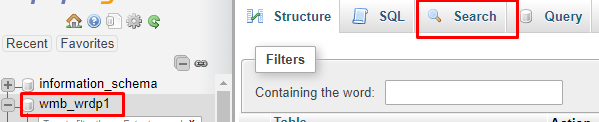
- Go to your database using phpMyAdmin.
- Search for the “correct” slug and replace it if required.
- Go to the Search:

- Search for east-sussex:

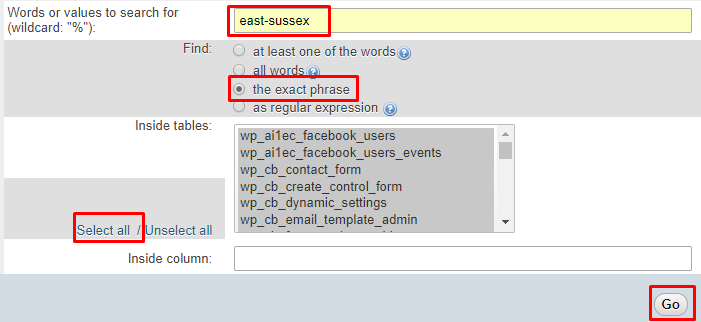
- Review the results:


- Adjust if you like by double clicking the field and changing the slug:


Using Better Search Replace
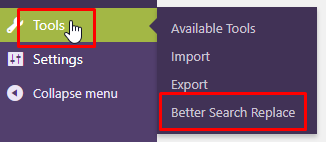
- After installing the Better Search Replace plugin, go to Tools > Better Search Replace:

- Let’s now search for the slug that we want to replace:

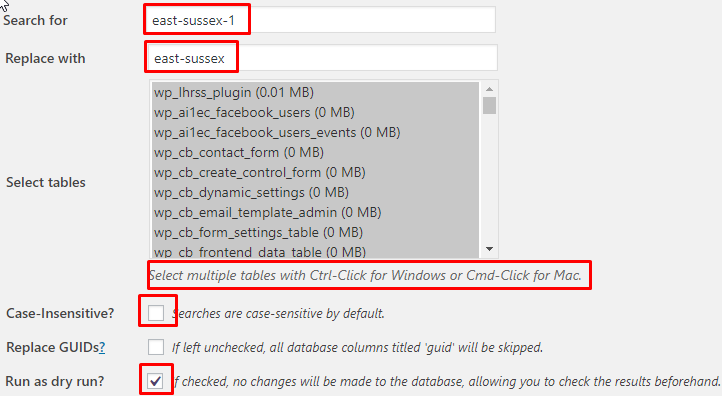
- You can now review where the slugs will be replaced:


- If all is OK, run the process, but un-tick the “Run as dry run” box.
- Once that is done, re-save WP Settings > Permalinks.