



Most directory operators who add paid memberships to their site reach for a generic WordPress membership plugin.
MemberPress, Restrict Content Pro, Paid Memberships Pro, Ultimate Member, ProfilePress.
All competent for the job they were built for: protecting whole pages or sections of content behind a paywall.
None of them were built for the specific job a directory site actually needs.
Directories rarely want to hide an entire listing.
They want to show a preview (photo, name, category, neighborhood) publicly, hide the high-value fields (contact details, pricing, full address, case studies) behind login, and reveal even more (premium attachments, internal notes, lead-routing forms) to members on a specific paid tier.
That is granular per-field visibility, not page-level content protection.
Bolting a generic membership plugin onto a GeoDirectory site forces you to either hide whole listings (which kills your SEO and your conversion funnel) or write custom code to expose partial content (which kills your maintenance budget).
There is a cleaner path.
This post is the architectural case for using our own free BlockStrap themes and the free BlockStrap page builder plugin, alongside the UsersWP Membership add-on, to build directory sites with block-level visibility rules that competitors cannot replicate.
The Visibility Problem in Directory Sites
Every serious directory site faces the same core question.
What does the public see, what does a free member see, and what does a paid member see?
The right answers vary by vertical, but the structure is consistent:
- Public visitors see enough to understand the value and motivate signup (photos, names, neighborhoods, categories)
- Free registered members see slightly more (location maps, partial contact, full descriptions)
- Paid members see everything (direct contact, pricing, premium attachments, lead-routing forms)
- Premium listing owners themselves get a separate tier (analytics dashboards, edit access, featured placement)
Most membership plugins handle the boundary between “logged out” and “logged in” reasonably well at the page level.
Almost none of them handle visibility at the block level inside a listing page.
The workaround in those plugins is either to wrap content in shortcodes (which break in Gutenberg, break in page builders, and require maintenance every time you change a listing template) or to write conditional PHP in your theme files (which works until you need to give a non-developer client the ability to change the rules).
Both approaches scale badly.
How BlockStrap Solves This
BlockStrap is our free WordPress page builder plugin, paired with our free BlockStrap themes (including the Real Estate Listings theme and several others).
It works directly with native Gutenberg blocks, which means no third-party page builder dependency, no JavaScript-heavy frontend, and no premium subscription required.
The capability that matters for directory sites: most BlockStrap blocks (and critically the container block) support UWP Membership Controls that you set per block, directly in the block sidebar.
You can tie those visibility rules to:
- Whether the visitor is logged in or logged out
- The specific UsersWP membership level the visitor belongs to (free tier, paid tier, premium tier, custom tiers you define)
- The WordPress user role (Subscriber, Editor, Author, custom roles)
- Combinations of the above for complex multi-tier directories
The integration is tight because we built both products.
UsersWP Membership defines the tiers.
BlockStrap reads those tiers natively and shows or hides blocks based on the visitor’s tier.
No shortcodes.
No custom PHP.
No third-party plugin to maintain.
The container block is the workhorse here because containers wrap other content. Set a visibility rule on the container, and everything inside it (paragraphs, fields, contact buttons, images, embedded forms) inherits the rule.
How It Looks in the Editor
Walking through a real example: you have a real estate directory and want to hide the phone number from logged-out visitors and free members. Only paid members should see it.
Open the GD Single Template (the template that controls how each listing page renders) in the WordPress Site Editor.
Select the BlockStrap container that wraps the Phone Number field (in our demo this is the BS > list-group-item that holds the phone field).
In the right-hand sidebar, find the UWP Membership Controls panel and toggle Enable Controls.

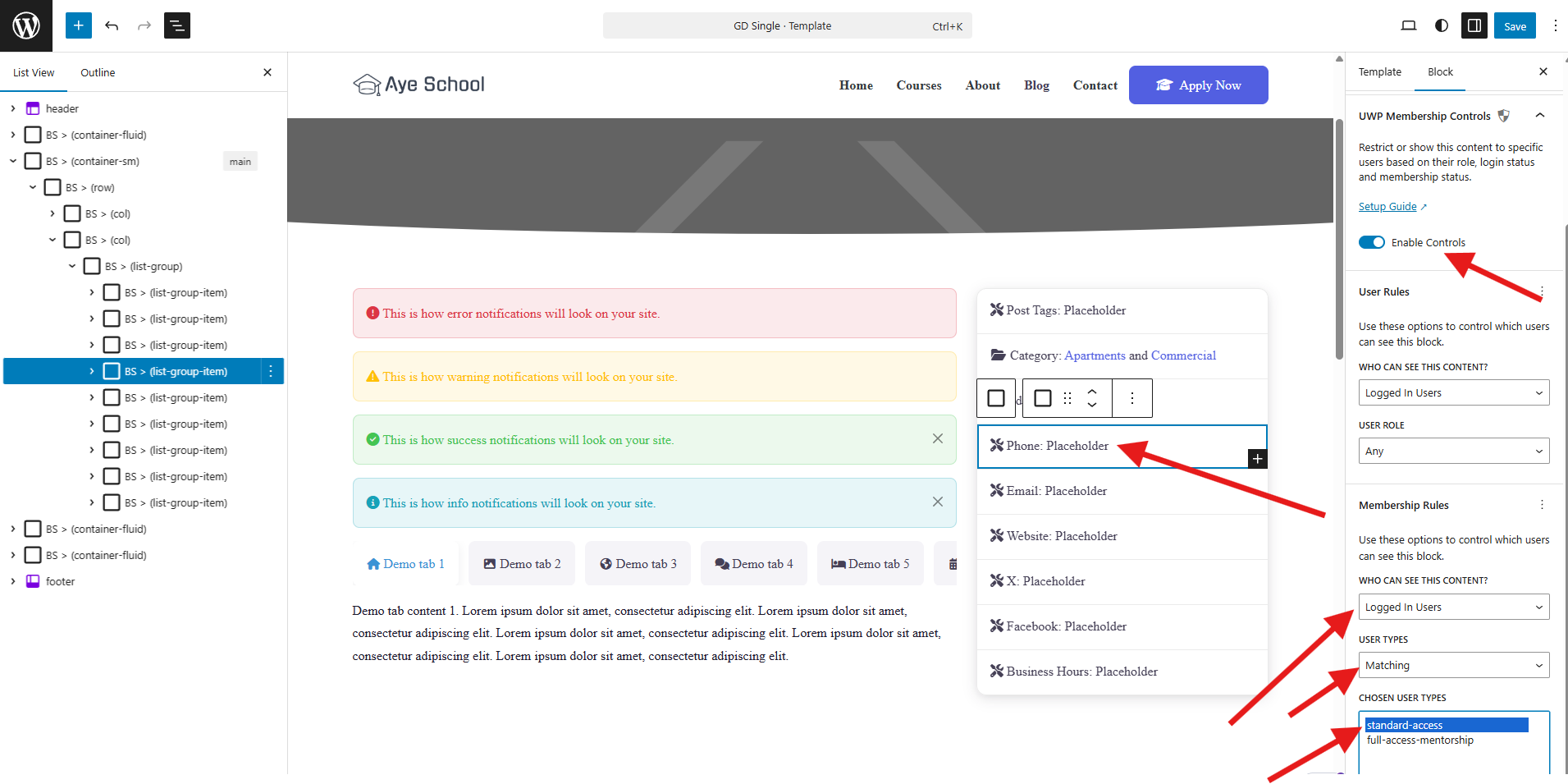
The configuration is straightforward:
- Who can see this content: Logged In Users
- User Types: Matching
- Chosen User Types: Standard Access (the paid membership level you defined in UsersWP)
Save the template.
The phone number field is now invisible to anyone who is not logged in as a paid member.

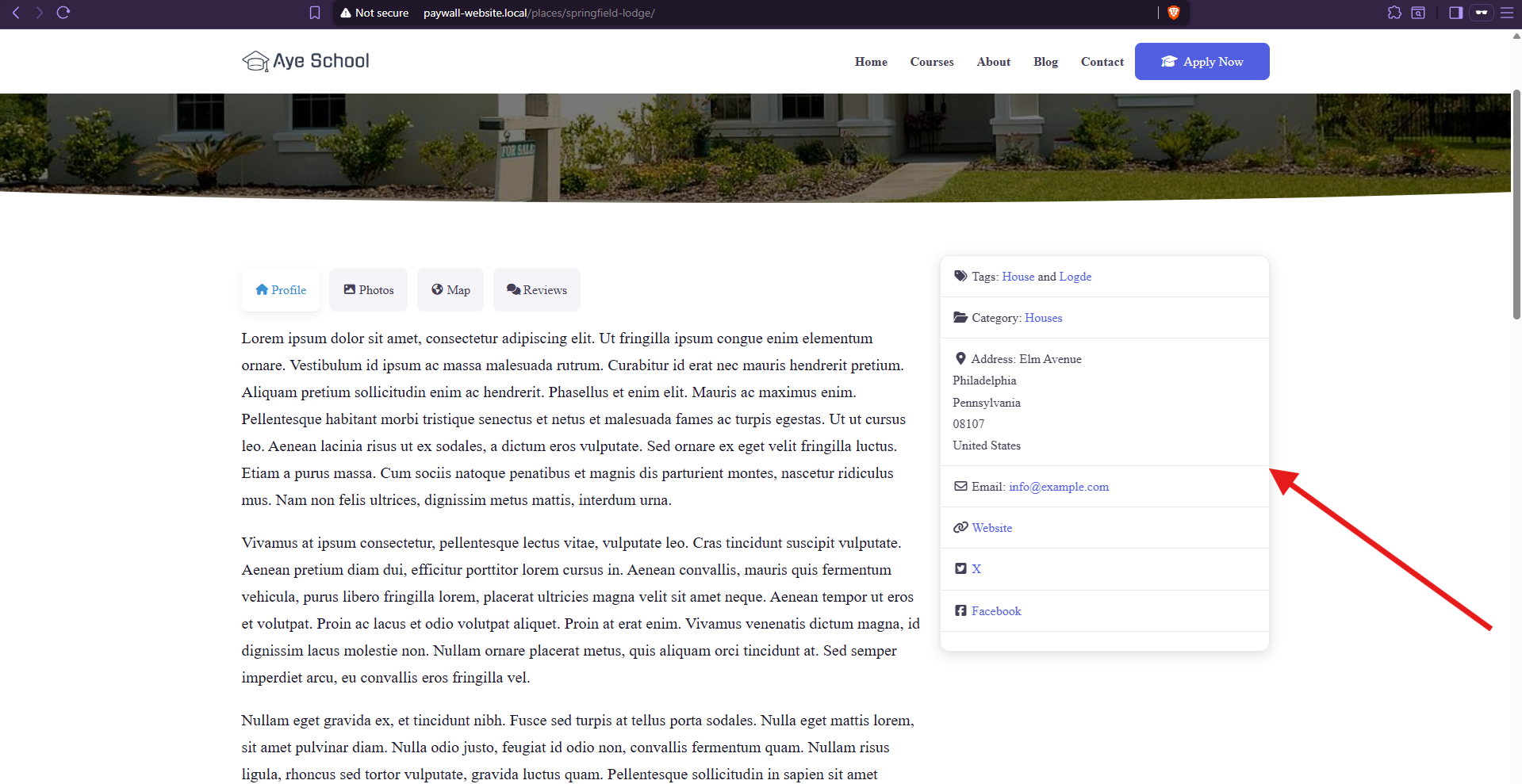
That is the entire workflow.
One container, one toggle, three dropdown selections.
No code, no shortcodes, no third-party membership plugin to configure.
The Conversion-Driving Pattern
Hiding the phone number is half the job.
The other half is showing the logged-out visitor something compelling enough to motivate signup, in the exact spot where the hidden content sits.
The pattern: duplicate the container, invert the visibility rule on the copy, and replace the hidden content with a conversion prompt.
Concretely:
- Right-click the container holding the hidden phone number and duplicate it
- On the duplicate, open UWP Membership Controls and invert the rule (Logged Out Users, or Logged In Users + Not Matching for visitors on a lower tier)
- Delete the dynamic Phone field block inside the duplicate (it cannot be edited as static text since it pulls live data per listing) and replace it with a regular paragraph block
- Inside the paragraph block, write the teaser copy (e.g., “Phone hidden. Register or upgrade to see the full number for this listing.”) and add a link to your registration or upgrade page
Logged-out visitors now see a teaser version with a clear call to action.
Paid members see the real phone number.
The same approach works for email addresses, full street addresses, pricing, downloadable attachments, contact forms, and any other premium field you want to gate.
Worked Examples by Vertical
Legal Services Directory
Public listing shows: lawyer name, photo, specialty area, city, bar admission year.
Free member adds: full biography, languages spoken, professional associations, education.
Paid member adds: direct phone number, direct email, online booking calendar, case results summary.
Each tier sits inside its own BlockStrap container, with the visibility rule set to the appropriate membership level.
Public visitors see the lawyer exists and what they do, enough to motivate signup. The “create free account to see more” prompt sits exactly where the gated content would otherwise appear.
B2B Vendor Directory
Public listing shows: company name, industry, headquarters city, employee count band.
Free member adds: full company description, products and services categories, customer logos.
Verified buyer member adds: pricing tier, account manager direct contact, RFQ submission form, downloadable spec sheets.
The verification angle works because B2B vendors only want to share pricing and reps with serious buyers, and the membership tier itself functions as a qualifier.
Premium Real Estate Directory
Public listing shows: property photos, neighborhood, bedrooms, bathrooms, price band (“$2M-$3M”).
Free member adds: exact price, full square footage, year built, complete photo gallery.
Paid member adds: listing agent direct contact, showing schedule, full address, school district, recent sale history.
This tier structure is particularly effective for luxury markets where the listing agent wants to qualify buyers before exposing detailed property information.
For the broader real estate site setup, see our guide to how to build a real estate website and our comparison of the best real estate listing plugins for WordPress.
Wholesale Supplier Directory
Public listing shows: supplier name, country of origin, product category.
Free member adds: minimum order quantity, lead times, certifications.
Paid (verified buyer) member adds: wholesale pricing, sales rep contact, sample request form, full product catalog download.
Wholesale directories are one of the strongest fits for block-level visibility because suppliers actively want to gate pricing information behind a qualification layer.
Why Generic Membership Plugins Fall Short Here
The major WordPress membership plugins (MemberPress at ~$199/year, Restrict Content Pro at $99/year, Paid Memberships Pro free with paid tiers up to $347/year, Ultimate Member with premium add-ons from $99/year, ProfilePress at $129/year) were all built for the same underlying use case: a course site, a paid newsletter, a coaching program, or a content library.
Their core model is “this URL is protected, this URL is open.”
Some offer shortcode wrappers for partial content protection, which work if you are protecting one or two paragraphs of static text but break down quickly when you are protecting dynamic listing fields rendered through a directory plugin’s template engine.
The cost of fighting these plugins to do block-level visibility on a directory site shows up in three places: shortcode debugging time, broken listings when the directory plugin updates its templates, and the recurring license fees you pay every year for software that was never designed for your use case.
For the deeper comparison of WordPress membership plugins more broadly, see our best WordPress membership plugin guide on the UsersWP blog.
The Practical Stack
The full stack for a directory site with block-level visibility rules:
- GeoDirectory (free) for the directory engine itself
- A free BlockStrap theme that matches your vertical (Real Estate Listings, or one of the other BlockStrap themes)
- The free BlockStrap page builder plugin for the block-level visibility controls
- The free UsersWP plugin for user registration, profiles, and member management
- The UsersWP Membership add-on ($49/year for a single site) for the paid membership tiers
- The free GetPaid plugin for processing membership payments
Total recurring cost for the full stack: $49/year for a single site, with no transaction fees.
The closest competitive equivalent (GeoDirectory + a generic membership plugin like MemberPress) runs $199/year plus a 4.9% transaction fee at the entry tier, with $349/year required to remove the transaction fee, and still does not handle block-level visibility cleanly.
The architectural advantage compounds as your directory grows. More listings, more fields to gate, more tiers to define. The block-level approach scales without adding maintenance burden. The shortcode-wrapper approach gets worse with every listing you add.
Final Thoughts
Directory sites have specific membership needs that generic WordPress membership plugins were never built to handle.
The right architectural answer is using tools designed for the job: BlockStrap themes, the BlockStrap page builder plugin, GeoDirectory, UsersWP, and UsersWP Membership, all from the same team and tested as one integrated stack.
Block-level visibility rules, configurable from the block sidebar by a non-developer, applied to any listing field you want to gate, tied to any membership tier you define.
No shortcodes, no custom code, no third-party plugin licenses fighting your directory engine.
For step-by-step build guidance, see our guide to the best business directory software and our complete tutorial on how to create a directory website.
For the paywall and member experience side of the stack, see our guide to the best WordPress membership plugin and the step-by-step paywall tutorial.
Start free.
Add the membership layer when your directory has enough public traffic to justify gating premium content.
Use the integrated stack designed for the job rather than fighting a generic plugin every time you need to gate a field.