How to Build a Real Estate Website (Step-by-Step Guide for 2026)
Most “how to build a real estate website” guides eventually push you toward Zillow Premier Agent or Realtor.com Connections.
The pitch is convenient: pay a monthly fee, get placed at the top of buyer searches in your ZIP code, watch the leads roll in.
The math gets ugly fast.
Zillow Premier Agent runs anywhere from $200/month in soft markets to $1,500+/month for competitive ZIP codes, with no guarantee of lead quality.
Realtor.com charges similar subscription fees plus per-lead pricing.
HomeLight takes 25-30% of your commission on every closed deal that comes through their referral network.
Five years of paying $500/month to Zillow is $30,000 in lead-generation fees, with zero equity to show for it.
You can build your own real estate website for a fraction of that, own the leads it generates, and keep the SEO authority you build over time.
This post walks through the practical build, step by step, using the free GeoDirectory plugin and the free Real Estate Listings theme.
The Real Cost of Renting Leads
The SaaS lead-generation platforms are profitable for one reason: the agents who use them are paying rent on visibility they could build themselves.
Every search a buyer runs on Zillow benefits Zillow’s domain authority, not yours.
Every contact form a buyer fills out on Realtor.com feeds Realtor.com’s database, not your CRM.
Every closed deal through HomeLight pays HomeLight a slice of your commission, forever.
The trade-off works for some agents: faster initial leads, no technical setup, no SEO learning curve.
The trade-off stops working once your annual lead-platform spend reaches the cost of building and maintaining your own website (typically year one or two for any agent doing meaningful volume).
This is the same architectural argument we apply to business directory software more broadly: own the asset, not the rental.
What You Get From Owning Your Real Estate Website
A real estate website built on WordPress with a serious directory plugin gives you:
- Your own searchable property database, with filtering by location, price, bedrooms, property type, and any custom fields you want
- Google Maps integration so buyers can browse listings on an interactive map
- Lead capture forms tied to your own CRM (not a third-party platform’s)
- SEO authority that accumulates over years, ranking your listings in organic search
- Open house dates, virtual tours, mortgage calculators, walk scores, and energy ratings on every listing page
- Multilingual support if you serve international buyers
- Full ownership of customer relationships, listing data, and marketing channels
The platform-rented version of this same setup costs $300 to $1,500 per month on Zillow Premier Agent.
The self-hosted version costs $0 to $229 per year for the plugin (depending on whether you need the paid add-ons), plus hosting and a domain.
What You Actually Need
Three pieces of software, plus a domain and hosting.
- WordPress, the free content management system that powers 43% of the web
- The free Real Estate Listings theme, built on the BlockStrap framework and pre-configured for real estate sites
- The free GeoDirectory plugin and its free Real Estate Directory add-on, which together handle the listings, search, maps, and real estate-specific features
Total cost for the free stack: $0 in software, plus $5-15/month for WordPress hosting and $10-15/year for a domain.
The paid GeoDirectory Membership ($139/year single site, $229/year unlimited sites) adds the optional add-ons most production real estate sites end up wanting: Pricing Manager for paid listing packages, Claim Listings for verified agent profiles, Reviews Manager for property and agent ratings, Event Manager for open house calendars.
For the full breakdown of why GeoDirectory beats SaaS platforms architecturally, see our best business directory software guide.
For a comparison against other WordPress real estate plugins specifically, see our best real estate listing plugins for WordPress.
Step 1: Install AyeCode Connect
AyeCode Connect is the free helper plugin that imports pre-built demos directly into your WordPress site.
Navigate to Plugins → Add New in your WordPress admin and search for AyeCode Connect.
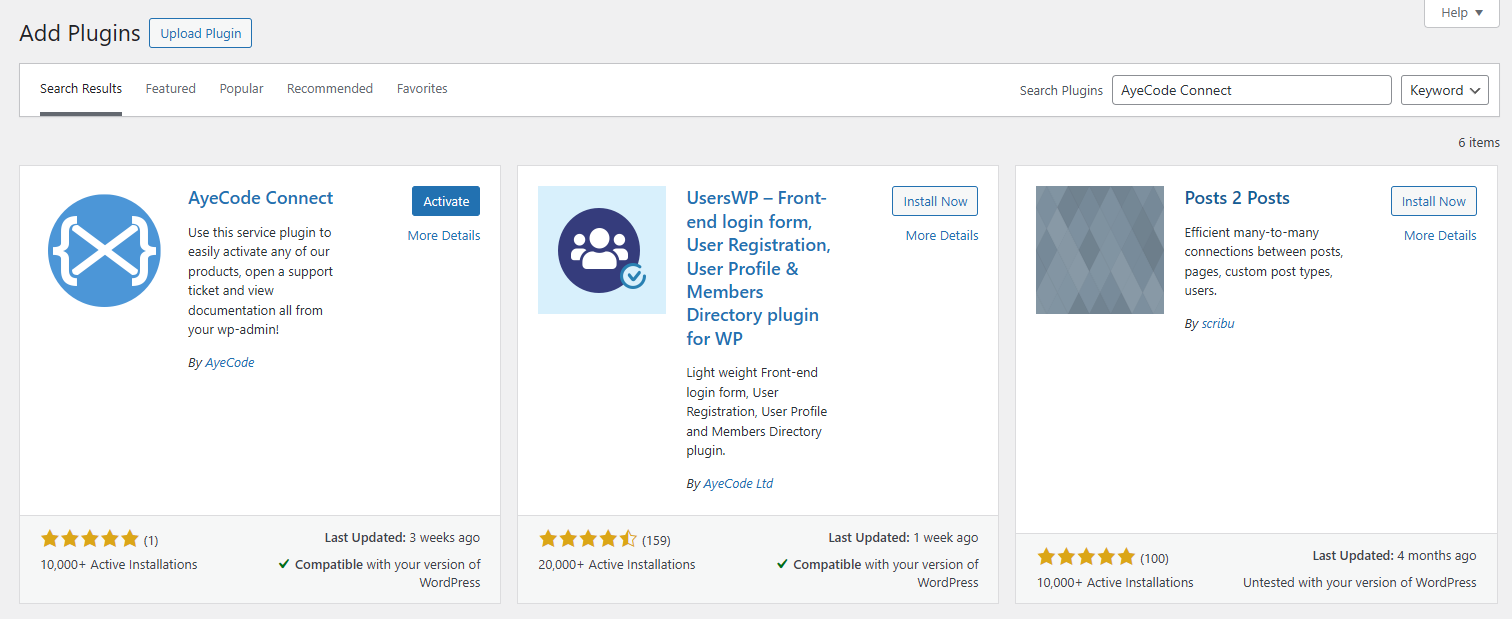
Click Install, then Activate.
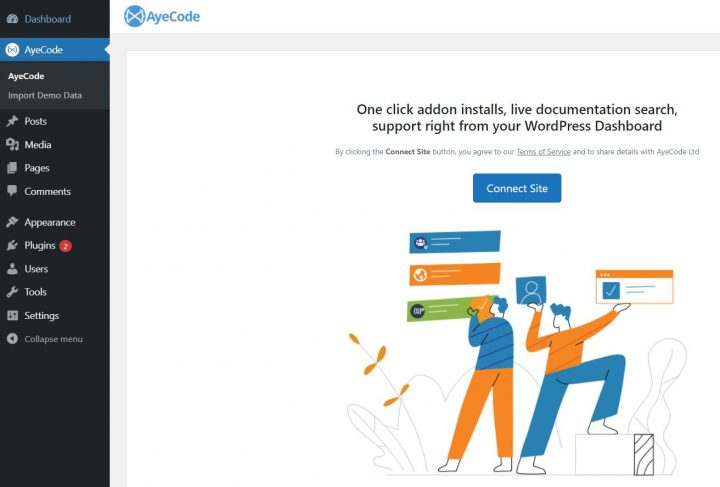
An AyeCode menu item appears in the WordPress sidebar.
Click it, then click the Connect Site button to link your WordPress site to the AyeCode demo library.
With a free account, the installer will skip installing premium add-ons, but the demo with the free theme and free plugins will work perfectly.
A paid account is only needed to install the full demo, including paid premium add-ons,
Step 2: Import the Real Estate Demo
From the AyeCode Connect interface, you can import a pre-built demo to skip the layout work entirely.
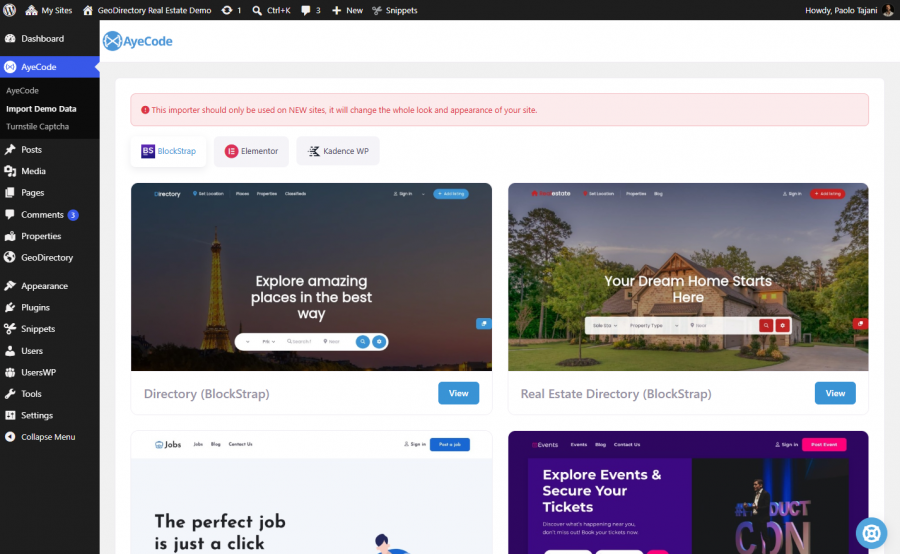
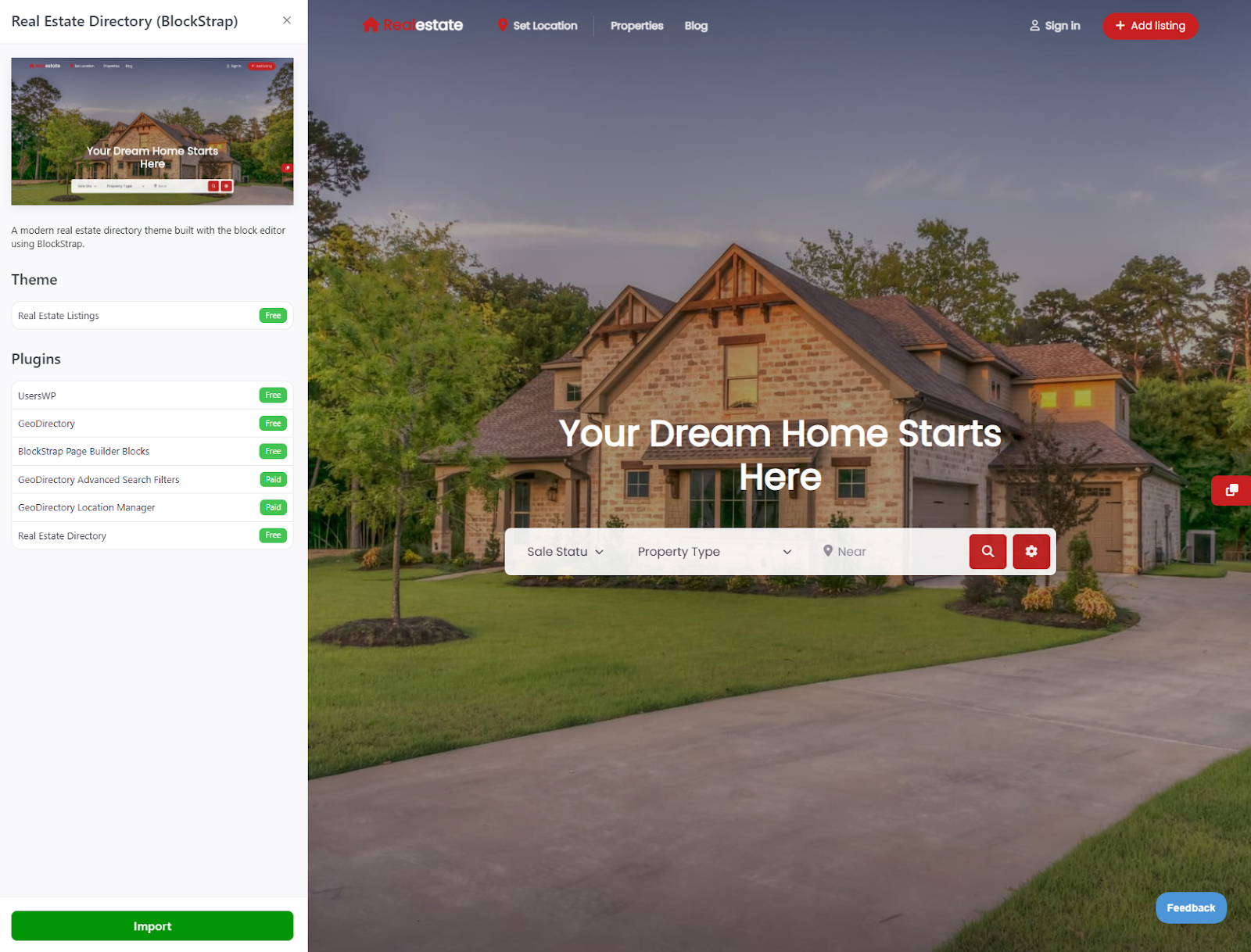
Select the Real Estate Directory (BlockStrap) demo.
Click Import.
The import installs the free Real Estate Listings theme, the GeoDirectory core plugin, the Real Estate Directory add-on, and a set of demo property listings to use as a starting point.
All this lets you build a real estate listings site for free!
When the import finishes, click View Site.
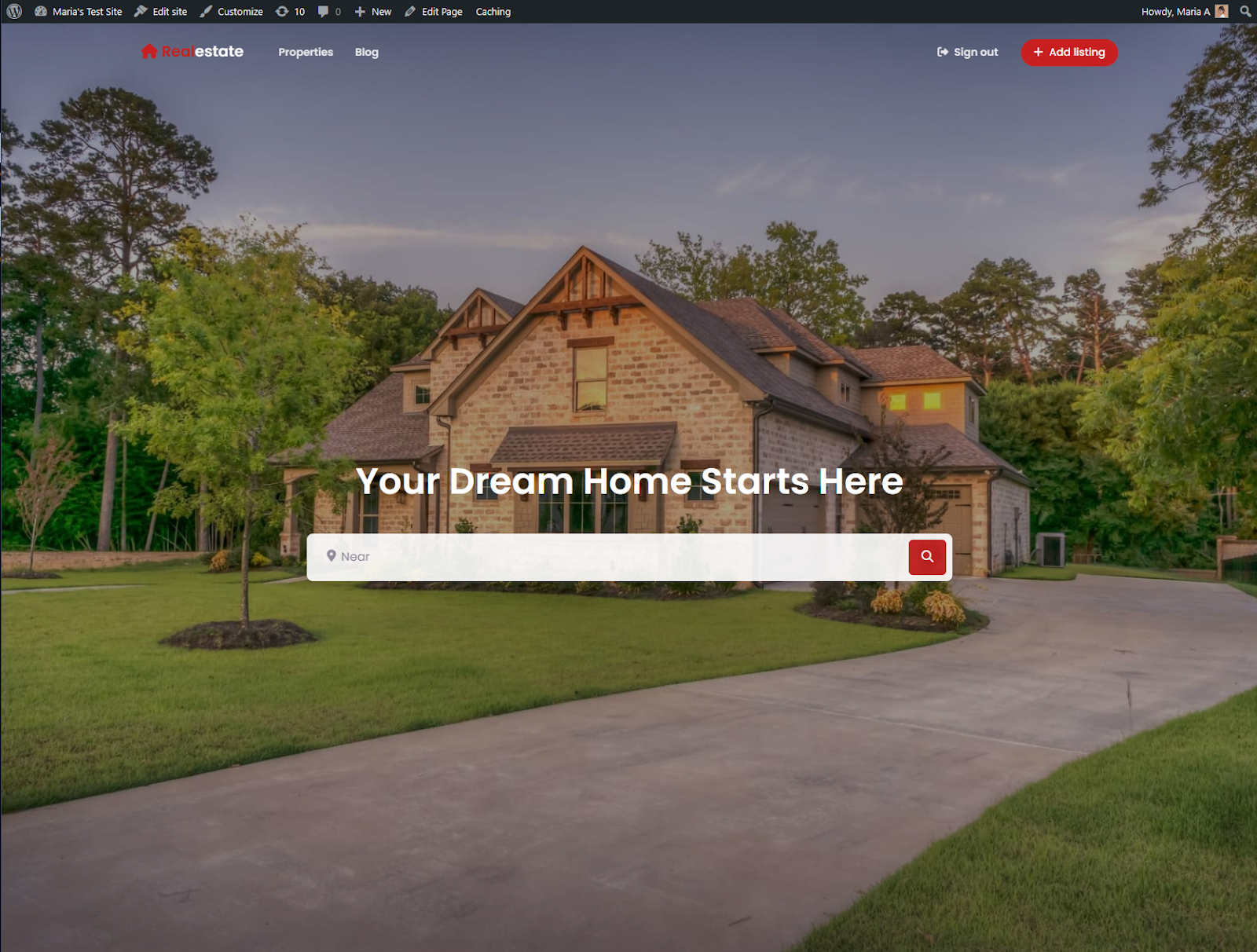
You have a working real estate site, identical to the demo, populated with sample listings.
The rest of the work is replacing the demo content with your own.
Step 3: Customize Branding
Navigate to Appearance → Editor.
The block editor opens with a customization menu on the left for templates, styles, pages, and navigation.
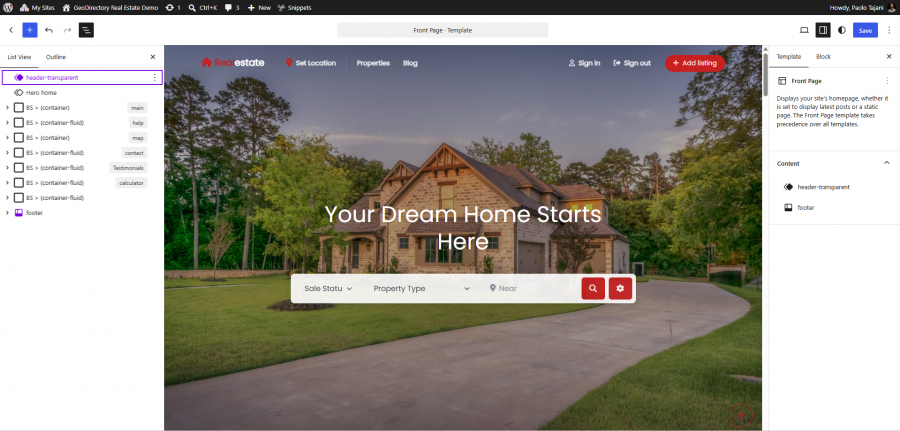
Logo and Navigation
Click the Real Estate Logo placeholder, then the Document Overview icon to reveal the header structure.
Click on Header Tansparernt > Edit Original. In the left column (the document overview), click the right chevron on the BS > Navbar block, next click the right chevron on the Menu Wrapper block and click on BS > Navbar Brand.
Now that the Navbar Brand block is selected, in the right column (the block options), replace the placeholder logo with your own brand mark by either editing the HTML CODE in the TEXT field (the logo of our demo is created with fonts), or delete the text and use an image through the Icon tab, which allows you to upload an image.
This video shows how to do it, if these instructions are not clear:
Edit the menu items in the BS Nav block to match your site’s navigation: Home, Listings, Agents, Areas, Contact, and any other top-level pages relevant to your business.
Colors and Typography
The Real Estate Listings theme ships with several style presets in the Styles menu.
Try each preset to see which fits your brand, or click the pencil icon to open the full style editor and create a custom palette.
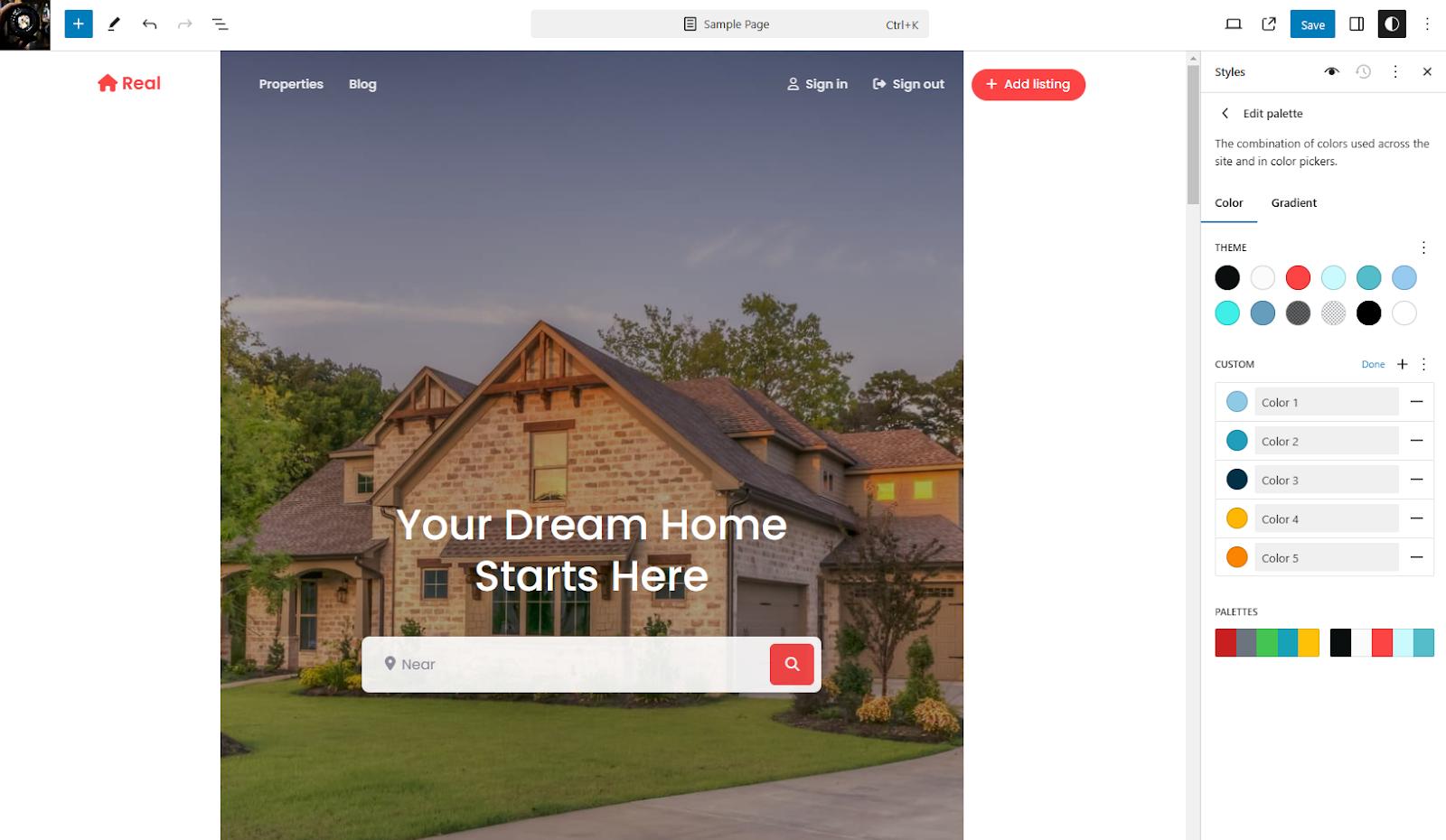
Under Colors → Palette → Custom, set your brand colors.
Under Colors → Elements, control the colors for text, links, backgrounds, buttons, and headings independently.
Under Typography, set the fonts for body, headings, and links.
Step 4: Replace Demo Listings With Real Properties
Demo listings live under Places in your WordPress admin (GeoDirectory’s default custom post type for listings).
For each property, the listing form captures:
- Property title (typically the street address or a descriptive headline)
- Description (the long-form copy for the listing page)
- High-resolution photos (drag and drop to reorder)
- Price, square footage, bedrooms, bathrooms, lot size
- Property type (single family, condo, townhouse, multi-family, etc.)
- Listing type (for sale, for rent, sold, pending)
- Address (auto-geocoded for the map)
- Agent assigned to the listing
- Mortgage calculator inputs (down payment %, interest rate, property tax, HOA)
- Energy rating (HERS for US, EPC for EU)
- Walk Score (auto-populated from a Walk Score ID)
- Virtual tour URL (Matterport, embedded 3D walkthrough, or 360-degree photos)
You can also add custom fields specific to your market (school district, HOA name, age of construction, recent renovation history, etc.) through the GeoDirectory Form Builder.
The listing front-end submission form allows agents on your team (or buyers’ agents in your network) to submit listings without needing WordPress admin access, with optional moderation through the Claim Listings add-on for verified agent submissions.
Real Estate-Specific Features
The free Real Estate Directory add-on ships four features tailored specifically for real estate sites.
Mortgage Calculator
Lets buyers estimate monthly mortgage payments based on price, down payment, interest rate, loan term, property tax, and HOA fees.
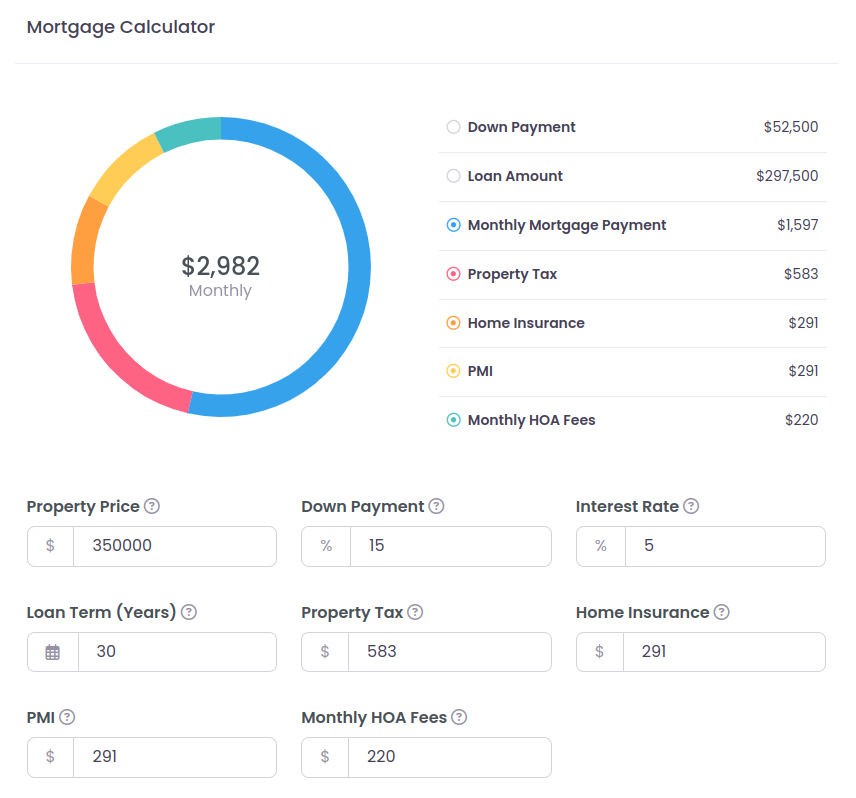
Shipped as a block on every listing page by default.
Customize the default values in Appearance → Editor → Templates → GD Single.
Energy Rating Chart
Displays a property’s energy efficiency as a letter grade and numerical score.

Supports both the US HERS rating and the EU EPC rating, configurable per property based on which standard applies in your market.
Energy ratings have become a meaningful selling point for younger buyers and a legal disclosure requirement in much of Europe.
Walk Score
Rates the walkability of a property’s location based on proximity to restaurants, shops, parks, schools, and other amenities.
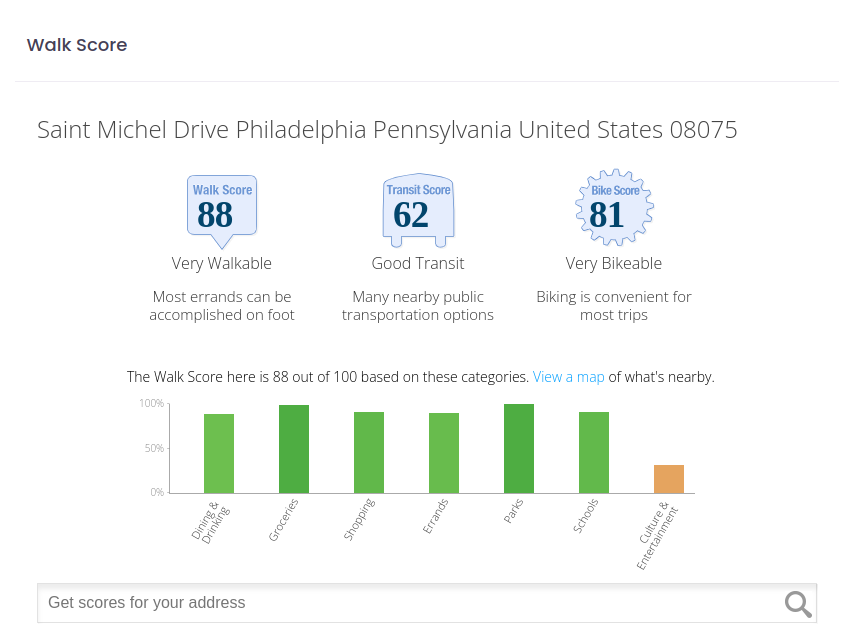
Pull a Walk Score ID for each property from walkscore.com, paste it into the listing form, and the data populates automatically on the front end.
Virtual Tour
Embeds a 360-degree interactive walkthrough of the property using Matterport, iGUIDE, or any other 3D virtual tour provider.
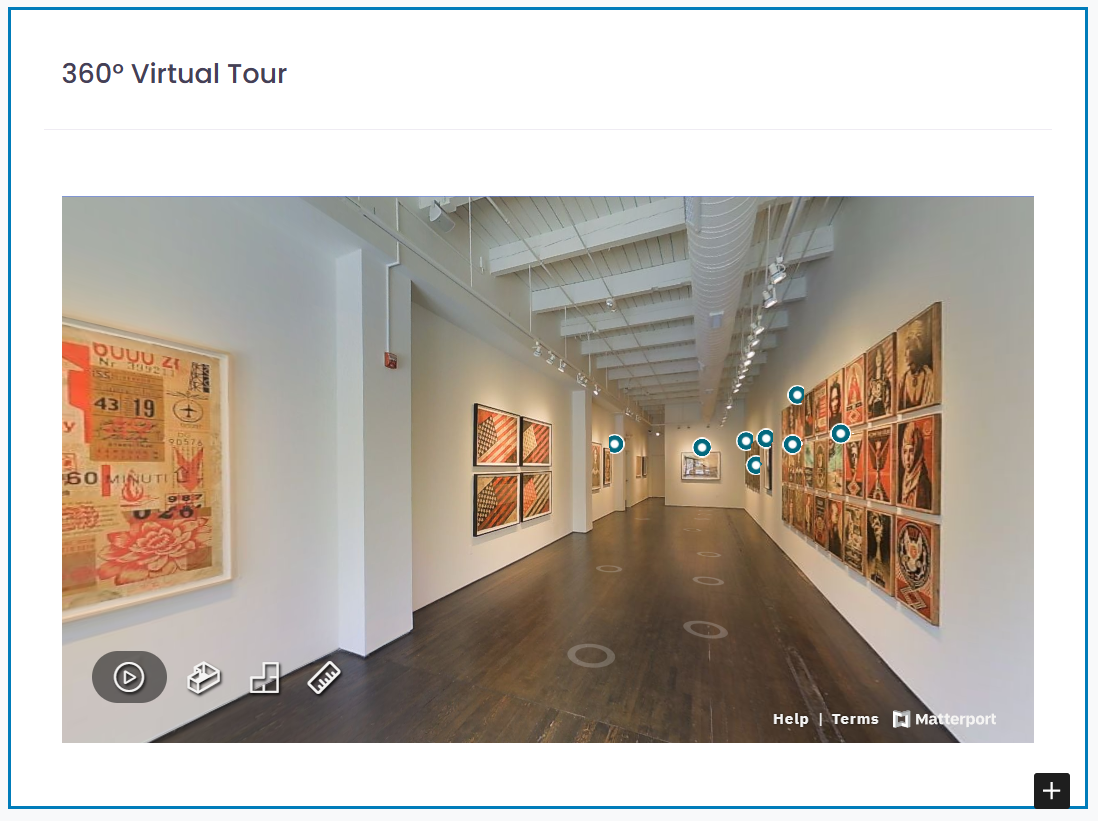
Virtual tours dramatically increase qualified buyer inquiries by letting prospects pre-screen properties before requesting an in-person showing.
Importing MLS listings
An MLS, or Multiple Listing Service, is a shared database used by real estate professionals to publish and exchange information about properties for sale or rent. It provides standardized listing data such as price, location, property details, photos, availability, and agent information.
For a real estate website, an MLS connection allows property listings to be imported and displayed automatically instead of being entered manually. When listings are added, updated, sold, or removed in the MLS, those changes can be synchronized with the website.
This allows a real estate website to offer visitors an up-to-date property search with filters for location, price, property type, bedrooms, amenities, and other criteria. Individual property pages can also display detailed information, photos, maps, and contact options.
GeoMLS – free MLS import plugin for GeoDirectory
We built a plugin that can import a single MLS feed for free. So if you are building a Real Estate website for a single city, your budget to recreate the demo in this tutorial is still zero.
The plugin is still in BETA and it will be possible to download it soon through its GitHub page.
We are in the process of listing the plugin on WordPress.org and we will announce it as soon as it is approved.
Importing the MLS feed
After installing and activating the plugin as you would with any regular plugin, you’ll find a new Menu Item: Geo MLS.
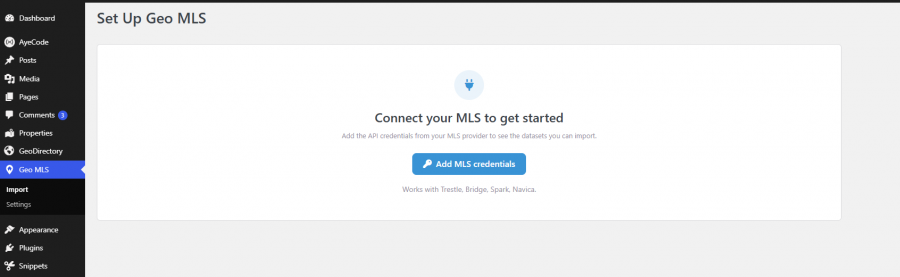
If you click on import or settings, you will be prompted to Connect your MLS to get started.
After selecting the MLS provider and adding your Server Token, you will be able to set up your fist import.
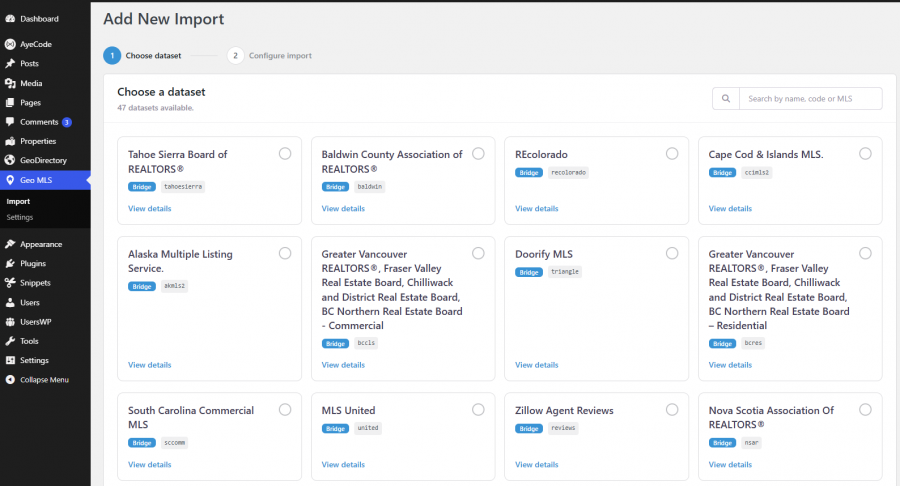
You can chose your dataset, in this case I can only use a demo feed, because as developers we only have access to Reference Servers.
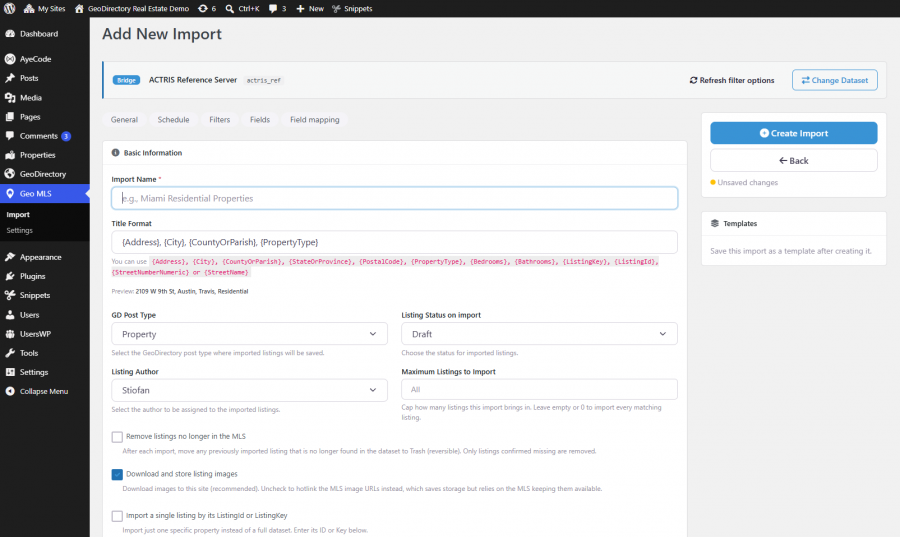
At this point I can setup the first import.
You can setup variables such as:
- Import Name
- The Listing Title Format
- Listing Status on import (draft or published)
- The Maximum number of Listings to Import
- Listing Status, Property Type, and Property Subtype
- The Location Filters (a neighborhood, a city or a wider are covered by the MLS)
You can also decide to import only listing from a specific Agent or Office.
Using an MLS import, allows you to have all listings in your area, importer and kept up to date, without user intervention.
What This Costs to Build and Run
Honest cost breakdown for the full setup:
- Domain: $10-15/year
- WordPress hosting: $5-15/month depending on traffic ($60-180/year)
- Real Estate Listings theme: Free
- GeoDirectory core plugin: Free
- Real Estate Directory add-on: Free
- GeoDirectory Membership (optional, for paid add-ons): $139/year single site or $229/year unlimited sites
- Walk Score API access: Free for basic, paid tiers for high-volume sites
- Matterport (optional, for virtual tours): $69/month for unlimited active spaces (or pass to your photographer)
Year-one total for a real estate site that does everything Zillow Premier Agent does (and more): $250 to $500 depending on hosting tier and which optional add-ons you install.
Year-one cost of Zillow Premier Agent in a competitive ZIP code: $6,000 to $18,000.
Year five of the same comparison: roughly $1,500 self-hosted vs $30,000 to $90,000 on Zillow Premier Agent.
The self-hosted version also produces a brand and SEO authority that compounds over those five years, instead of disappearing the moment you stop paying.
What to Build Around the Listings
The listing system is the core, but a real estate website that ranks needs more than listings alone.
The pieces that matter for organic traffic:
- Neighborhood guides for each area you serve (school quality, walkability, market trends, restaurants, commute times)
- Buyer guides (first-time buyer process, financing, home inspection, closing)
- Seller guides (pricing strategy, staging, photography, negotiation)
- Market reports updated monthly or quarterly (median prices, days on market, inventory levels)
- Agent profiles with bios, listings history, testimonials, and contact forms
- A blog covering local market news, new developments, and real estate education
This content compounds.
A neighborhood guide written today still attracts buyers searching for that neighborhood three years from now, with no additional spend.
The same buyer reached through Zillow Premier Agent costs you a fresh lead fee every single time, for as long as you keep paying.
The Practical Path
The fastest way to launch a real estate website that you own is:
- Buy a domain and basic WordPress hosting
- Install AyeCode Connect
- Import the Real Estate Directory demo
- Customize the branding (logo, colors, typography)
- Replace demo listings with your real properties
- Add 5-10 neighborhood guides for the areas you serve most
- Set up a contact form and lead capture flow
- Submit your sitemap to Google Search Console
A weekend of focused work gets you a working site.
The first three months of consistent content (one neighborhood guide per week, fresh listings added as you take them on) build the SEO foundation.
By month six, organic search starts producing leads that cost you nothing per acquisition.
By year two, your real estate website is producing more qualified leads than Zillow Premier Agent ever did, for a fraction of the cost.
Final Thoughts
The real estate industry runs on rented attention.
Zillow, Realtor.com, Redfin, and HomeLight have built billion-dollar businesses by sitting between buyers and the agents who serve them, charging both sides for the introduction.
The agents who own their own real estate websites stop paying that toll.
They build their own audience, brand, SEO authority, and customer relationships.
The technical setup takes a weekend.
The free GeoDirectory plugin and the free Real Estate Listings theme handle listings, maps, search, mortgage calculators, and virtual tours.
For a deeper comparison of WordPress real estate plugins, see our best real estate listing plugins for WordPress.
For the broader case against SaaS directory platforms, see our best business directory software guide.
Stop renting leads.
Build the asset.
Newsletter - Stay Updated!
Get the latest news, tips, and exclusive content directly in your inbox.
