GeoDirectory vs Directorist – which plugin will you trust?

What’s best, Directorist or GeoDirectory?
Full disclosure: we make GeoDirectory.
We’ve built directory tools for more than a decade, and we know both plugins well.
If you’re down to the 2 most popular WordPress directory plugins and want a straight answer, a feature table won’t help much.
Both have free versions, paid add-ons, search, maps, reviews, and frontend submissions.
The differences show up once you have listings and paying customers, when speed, SEO, and room to grow matter most.
That’s what this comparison covers.
Why we’re writing this
For years, we didn’t write competitor comparisons, even when other vendors got facts about us wrong.
They tend to be biased and age badly.
Directorist’s latest comparison on its blog, updated in November 2025, says GeoDirectory lacks Stripe, bank transfer, WooCommerce multi-vendor support, bookings, a frontend listing builder, GDPR readiness, invoices, and Elementor widgets.
GeoDirectory has all of them, as our site and WordPress.org show.
That’s marketing, but Google shows that page next to searches for GeoDirectory, so we wrote our own.
This is the first in a series of comparisons with the plugins most often shortlisted alongside ours. Next: GeoDirectory vs HivePress.
TL;DR
Directorist gets you a working directory faster and cheaper, and it’s more polished out of the box, but harder to customize.
GeoDirectory is built to grow, rank in search, make money, and run for years.
For a hobby project under 500 listings with no plans to make money, Directorist is a reasonable choice.
If you plan to run your directory as a business, GeoDirectory is the better fit.
The differences that matter most:
| GeoDirectory | Directorist | |
|---|---|---|
| Ease of use | More settings, steeper learning curve | Simpler admin, visual builder, more video tutorials |
| Multiple listing types | Paid Custom Post Types add-on | Free |
| Listing data storage | Custom database tables with indexing | WordPress post meta |
| Performance at scale | 2 million listings in production on a $600/month server | Slows with combined custom field filters on standard hosting |
| Location URLs | Location-category hierarchy (/restaurants/california/san-francisco/) | Flat taxonomy, no “X in Y” URLs |
| Map at scale | Server-side marker clustering up to 1M markers | Client-side clustering, slows past 2,000 markers |
| Events | Free Events add-on with dates, status, calendar, and archiving | No event dates or calendar |
| Multi-location businesses | Franchise Manager with parent and child listings | Multiple location terms on 1 listing |
| CSV importer | Imports and bulk-updates listings | Imports new listings only |
| Security record | Few CVEs since 2018, never closed by WordPress.org | Several critical CVEs, closed by WordPress.org for 12 days in 2023 |
| Support response time | 2h 31min average, 65% resolved in 1 reply | Not published |
| 3-year cost (unlimited sites) | $687 | $404 |
If the table answers your question, GeoDirectory Membership is $229 a year.
The rest of the article explains each row.
The full comparison covers:
- Features Comparison (free plugins)
- Design & Customization
- Listing Details
- Frontend Submission & User Dashboards
- Claim Listings
- The Search Engine
- Maps, Features & Locations
- Ratings & Reviews
- Monetization & Marketing Tools
- Mobile Features
- SEO & Schema
- Performance & Scalability
- Security
- Multilingual
- User Friendliness
- Developer Extensibility & Integrations
- Import / Export & Migration
- Support, Documentation & Reputation
- Pricing and TCO
- Verdict
Features Comparison (free plugins)
Both plugins are free on WordPress.org and include a working directory with search, maps, reviews, a custom fields builder with conditional logic, CSV import and export, and a REST API.
Listings and structure
GeoDirectory’s free version has 1 listing type (Places) tied to a single city, and that city’s page works as the directory home.
You need the Location Manager add-on to give other cities their own pages.
Directorist’s free version lets you create multiple directory types, like Places, Jobs, and Services, each with its own fields and layout.
Events
GeoDirectory has a free Events add-on with event dates, status (Upcoming, Ongoing, Past), past-event archiving, a calendar, and date search.
Directorist suggests a regular directory with an “Events” category, without event dates or a calendar.
Other differences in the free versions
- Locations: GeoDirectory gives each location its own page, so URLs like /restaurants/paris/ work out of the box. Directorist’s location taxonomy lets users browse by category or by location, but not both at once.
- Search: Directorist has sidebar filters and AJAX search. GeoDirectory’s keyword search also covers categories and tags, and results are sorted by distance.
- Maps: GeoDirectory includes the synced map and listings layout (Airbnb style). In Directorist, it’s part of the Listings With Map extension ($39 per year).
- Reviews: GeoDirectory builds 5-star reviews on WordPress comments. Directorist has its own review system.
- CSV import: GeoDirectory can update existing listings in bulk. Directorist’s importer only adds new ones.
- Contact forms: Directorist includes contact options on listings. GeoDirectory has a built-in form with the Blockstrap theme and uses Ninja Forms with other themes.
Design & Customization
Directorist is faster to set up, and GeoDirectory gives you more room to customize.
Directorist uses a visual Directory Builder
The listing form, single listing page, listings page, and search form each have a drag-and-drop canvas where you turn widgets on or off and reorder them.
You can build a good-looking directory in an afternoon.
The limit is that layouts have fixed slots and only Directorist’s components, so anything else needs custom PHP or a workaround.
GeoDirectory uses page templates
GeoDirectory has a template for every main part of the directory.
Developers can replace the PHP template, and everyone else can edit it with shortcodes and CSS, the block editor, or a builder with dynamic content, like Elementor Pro or Bricks.
Every listing field is available as a block or element, so you can place and style each one however you want, or start from a pre-built theme.
The downside is a steeper learning curve, which we’re addressing in GeoDirectory v3 with easier onboarding.
Listing Details
Listing types
Directorist’s multi-directory system lets you create unlimited listing types for free.
GeoDirectory needs the paid Custom Post Types add-on, so Directorist is better on price here.
Custom fields
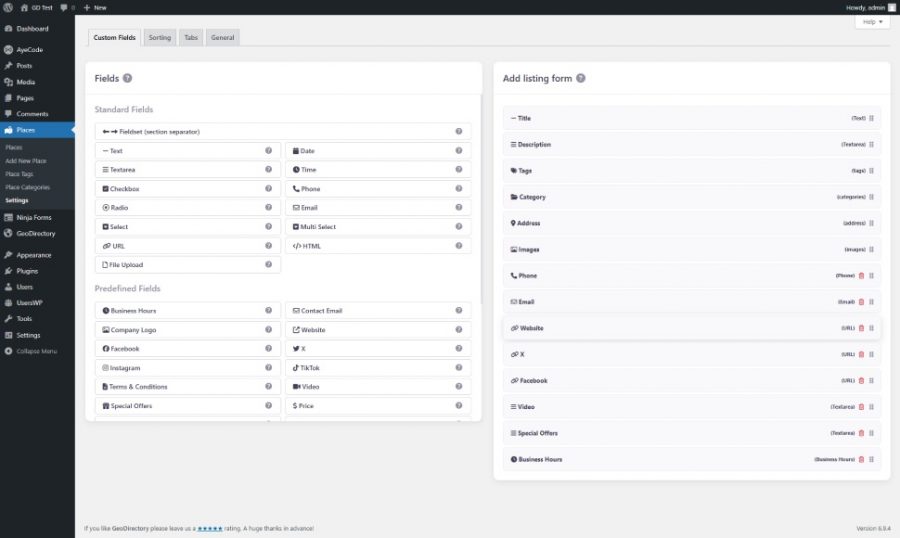
Both have the same standard field types, plus predefined fields like business hours, social profiles, video, and pricing.
The difference is storage: GeoDirectory uses custom database tables, and Directorist uses WordPress post meta, which matters for speed as the directory grows (more in the Performance section).
Franchise Manager
For businesses with several locations, GeoDirectory’s Franchise Manager add-on uses a parent listing for the chain and a child listing for each location.
Fields you lock on the parent, like title, description, or logo, update on every child, while address, phone, and hours stay editable per location.
You can create child listings in bulk with the CSV importer.
Directorist’s multi-location support assigns several location terms to 1 listing, so it appears in several location archives, but each location can’t have its own address, phone, or hours.
Compare Listings
Both have a Compare Listings add-on at a similar price that shows listings side by side, including custom fields.
GeoDirectory’s uses browser storage, so it needs no GDPR cookies, and it adds shareable comparison URLs and embeddable comparisons.
In Directorist, you can place the compare button anywhere with the Directory Builder.
Frontend Submission & User Dashboards
Frontend submission form
Both free versions let visitors register and submit listings with images, a map location, and custom fields, without seeing the WordPress admin.
Directorist has a built-in multi-step form for longer submissions.
GeoDirectory needs a third-party plugin for that until v3, which adds one.
Guest submissions
Both allow guest submissions for free, and GeoDirectory creates an account from the guest’s email automatically.
User dashboard
Directorist’s free version has a built-in user dashboard with listings, bookmarks, reviews, orders, and account settings.
GeoDirectory uses our free UsersWP plugin, whose basic dashboard is more generic.
The premium UsersWP Dashboard add-on is role-based, with separate views for admins (stats, moderation, payments), listing owners (listings, messages, bookings, inquiries), and regular users.
It works with GeoDirectory and GetPaid out of the box, so it suits directories with payments, bookings, and messaging.
Claim Listings
Both plugins have a paid Claim Listings add-on: a business owner finds their listing, submits a claim, and takes over the listing once the admin approves it.
Through each plugin’s pricing add-on, you can offer free claims, a fixed fee, or a paid upgrade that unlocks more listing features.
Directorist’s add-on is $29 per year for a single site, and GeoDirectory’s is $49.
GeoDirectory’s has more workflow options: automatic approval by email verification or payment, undoing approvals, custom claim forms with Ninja Forms, and a verified badge.
The claimed status is also a custom field, so you can filter or rank verified listings in search.
Directorist’s covers approval, rejection, email notifications, and the claimed badge.
The Search Engine
Search is the most important part of a directory, and the 2 plugins handle it differently.
Free version
Directorist’s free search has more features: drag-and-drop search fields, filters for price, tags, ratings, and custom fields, AJAX instant search, and radius search.
GeoDirectory’s free search has a keyword field and a “Near” field, and AJAX, radius search, and custom field filters need the Advanced Search add-on ($49 per year).
The add-on also adds autocomplete, geolocation, proximity search, and a separate search form for each listing type.
Speed
GeoDirectory’s custom tables let a filtered search run as 1 indexed query.
With Directorist’s post meta, each custom field filter adds a database join, so searches slow down as you add filters (more in the Performance section).
Open now
GeoDirectory can show only places that are open now, using each listing’s business hours and time zone.
A user in New York checking a Los Angeles restaurant sees the answer for Pacific Time.
It’s the only WordPress directory plugin we’ve found that does this.
Map search
GeoDirectory runs the search again when users pan or zoom the map, like Airbnb.
Directorist’s map updates the markers when filters change, but not when the map moves.
Saved and cross-type search
Both offer saved searches with email alerts as a paid add-on.
Directorist’s paid Universal Search searches across directory types at once.
GeoDirectory doesn’t, on purpose, because mixing types with different fields forces compromises, so we recommend categories within 1 listing type instead.
Enterprise scale
For sites with over a million listings and heavy traffic, Stiofan, our co-founder, is available to set up a custom Elasticsearch integration, priced per project.
Maps, Features & Locations
Map providers and tools
Both support Google Maps and OpenStreetMap, custom marker icons per category, and styled Google Maps.
Directorist includes custom markers and map styles in its Listings With Map extension, and GeoDirectory has a separate Custom Map Styles add-on.
GeoDirectory’s free version includes directions, street view, and “near me” location detection, and Directorist has similar tools across its free plugin and Listings With Map.
Neither supports route planning.
For custom markers, our free MapMarker Studio lets you design your own without a designer.
Marker clustering
Marker clustering keeps a map usable as the directory grows, and both plugins offer it as a $39 per year add-on.
Directorist’s clustering runs in the browser, which works for hundreds of markers and gets slow around 1,000.
GeoDirectory’s Marker Cluster add-on can also cluster on the server, and in our benchmarks it renders 1,000,000 markers with up to 300x less data.
Location architecture
Directorist treats locations as a taxonomy, so users can browse all listings in New York or all restaurants, but not “restaurants in New York” as 1 page.
GeoDirectory’s Location Manager add-on uses a hierarchy (country, region, city, neighborhood), and every location gets its own page and URL, combined with categories (more in the SEO section).
Its location switcher can also lock users to 1 city or region, which works like a multi-tenant directory in a single WordPress install.
Ratings & Reviews
Reviews build trust and send the signals local search relies on, and both plugins handle the basics well.
In both, admins can approve, reject, mark as spam, and reply, and listing owners can reply to reviews.
Multi-criteria reviews
Both offer separate ratings for things like food, service, and ambiance as a paid add-on.
GeoDirectory’s MultiRatings and Reviews ($49 per year) allows unlimited criteria per listing type and category, like “room service” for hotels but not for campsites, plus custom icons, any rating scale, and custom score labels.
Directorist’s Advanced Review allows up to 5 criteria with up to 5 stars each, and adds review headlines, helpful votes, sorting, filtering, and spam reporting.
Photos in reviews
Both let reviewers upload photos.
In GeoDirectory, review photos can have titles and captions, which add user-generated alt text for SEO, and they can appear in the listing gallery or in a separate slider.
Ratings in sorting
Both can sort listings by rating.
In GeoDirectory, the rating can also be combined with other ranking factors, like featured or verified status.
Embeddable Ratings Badge
GeoDirectory’s Embeddable Ratings Badge add-on ($39 per year) lets listing owners show their live rating from your directory on their own site, like the TripAdvisor widget.
Owners get social proof, and you get a backlink from every badge.
Directorist doesn’t have an equivalent.
Monetization & Marketing Tools
Search and reviews bring traffic, but pricing plans, featured listings, bookings, and lead sales pay for the directory.
Directorist includes more in the free version, and GeoDirectory goes further with its add-ons.
Free version and payment gateways
Directorist’s free plugin lets you charge for featured listings through offline bank transfer, so you can start charging without buying anything.
GeoDirectory’s free plugin has no built-in payments, but our free GetPaid plugin adds PayPal, Stripe, Authorize.net, and bank transfer.
In Directorist, PayPal, Stripe, and Authorize.net are paid extensions at about $39 each, so GeoDirectory is cheaper if you only need 1 or 2 gateways.
Regional gateways, like Mollie or Razorpay, cost extra in both.
Pricing plans
Both have a paid add-on for tiered plans, with pay-per-listing pricing, packages, and recurring subscriptions.
You can limit features per plan, for example more categories, more images, or featured placement on paid plans.
GeoDirectory’s Pricing Manager, with GetPaid, can also sell listing bundles, like “10 listings for $99.” Here’s a tutorial:
Bookings
Directorist has 1 Booking extension for services, rentals, and events.
GeoDirectory has 2 add-ons: Appointments for services (in beta) and Booking Marketplace for Airbnb-style rentals with calendars and multi-night stays.
Directorist’s is simpler to buy, and with GeoDirectory, you pay only for the booking type you need.
Pay Per Lead
GeoDirectory’s Pay Per Lead add-on lets you sell leads: a user sends an inquiry through a listing, and the owner pays to get the contact details.
It works well for service directories, like contractors or lawyers, and Directorist doesn’t have an equivalent.
Email marketing
GeoDirectory’s Dynamic User Emails add-on sends personalized emails triggered by user actions, like registrations, new listings, or reviews, plus bulk campaigns to filtered groups of listing owners.
For example, you can email verified owners in New York who list 3-bedroom places that allow pets, with each email filled in with that listing’s data.
Saved search alerts can use the same templates and segmentation.
If you market to your listing owners, it can replace a separate CRM and email tool.
Directorist has standard email notifications per event, without filtered bulk campaigns.
GeoDirectory also connects to 11 newsletter platforms, like Mailchimp, ConvertKit, and ActiveCampaign, through paid UsersWP add-ons.
Mobile Features
Most directory traffic comes from phones, and both plugins are responsive in the free version, with click-to-call, directions, and email.
Native apps
Directorist offers a native iOS and Android app as a service: you send your branding, and their team sets up the app and submits it to the App Store and Play Store.
In recent promotions, the first year has been free, with ongoing fees for updates.
The app covers the usual features, like push notifications, in-app purchases, and adding listings.
GeoDirectory works with partners who build native apps for GeoDirectory sites, like WP Apps, Tiny Screen Labs, and WP Mobile App Manager, at similar prices.
We leave apps to specialists because they need a lot of ongoing support, from App Store reviews to OS updates, and we’d rather keep our team on the plugin.
PWA in v3
GeoDirectory v3 will add Progressive Web App support, so users can install the directory from the browser without an app store.
For most directory uses, like browsing, searching, and contacting a business, a PWA does the same job as a native app and costs much less to maintain.
Directorist doesn’t currently offer PWA support.
SEO & Schema
Both plugins work with Yoast SEO and Rank Math for meta titles, descriptions, sitemaps, and breadcrumbs.
The differences are in schema, URLs, and internal linking.
Schema markup
Both output schema markup (JSON-LD structured data), and both pass Google’s Rich Results Test for the common case.
GeoDirectory sets the schema per category, like LocalBusiness, Event, or Restaurant, with business hours, ratings, address, coordinates, phone, and opening status.
Directorist’s schema is more limited, with 1 schema type per listing type.
Location-category pages
Directorist creates location and category archives separately, like /location/new-york/ and /category/restaurants/, but not a “restaurants in New York” page.
GeoDirectory’s Location Manager creates a page for every location and category combination:
/places/category/restaurants/united-states/california/san-francisco/
Each of these pages has its own meta tags, schema, H1, and content, and can rank for its local search.
You can change the URL structure in the permalink settings.
You can also add text above and below the listings, like an intro to San Francisco restaurants or an FAQ, so the page reads like a listicle with a map.
That format ranks well because it puts structured data and editorial content on the same page.
For a directory targeting hundreds or thousands of “X in Y” searches, this is the most important architectural choice in the plugin.
Internal links and images
GeoDirectory’s Related Listings widget links listings by location, category, or tags automatically.
Both support image alt tags, titles, and captions, and GeoDirectory’s CSV importer can add them in bulk.
Performance & Scalability
A blog post queries the database about a dozen times per page load, and a directory page can query it hundreds of times for custom fields, locations, categories, ratings, and images.
With a few hundred listings, almost any setup works, but at a few thousand, the database structure starts to matter.
GeoDirectory’s custom database tables
GeoDirectory stores listings in its own tables, with a column for every property, like title, category, rating, city, coordinates, phone, and business hours.
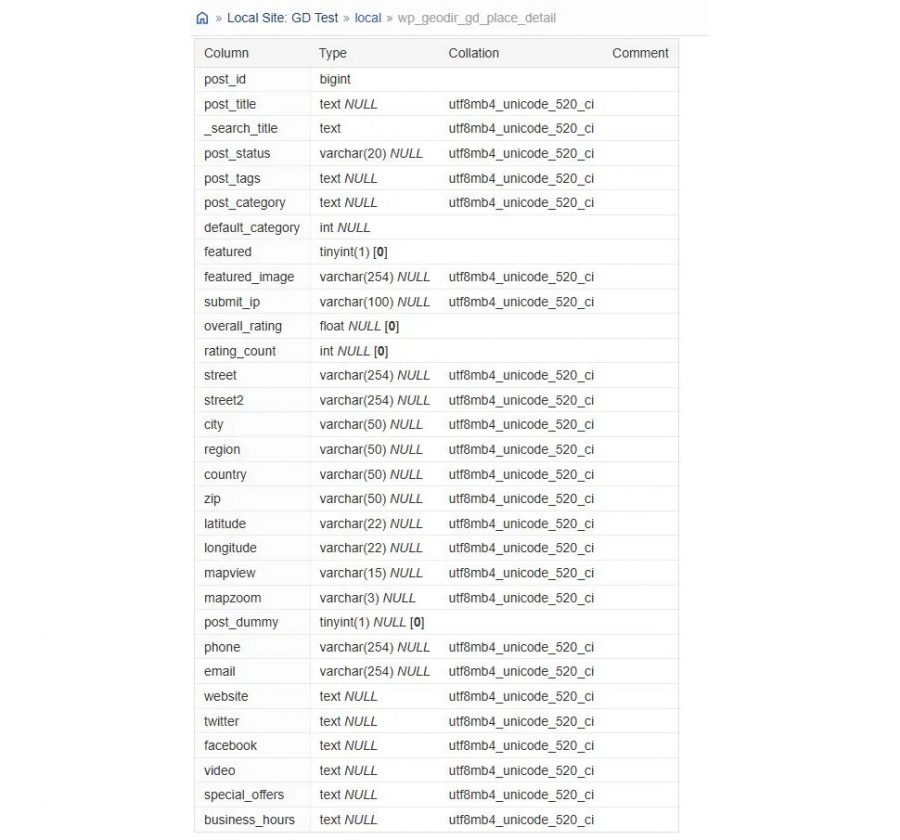
Attachments are stored with the custom fields instead of in the media library, which slows down at scale, and reviews and sort fields have their own tables.
A search by city, category, rating, and 3 custom fields runs as 1 query on 1 indexed table.
Data is also stored in its real type (text, whole numbers, decimals) instead of serialized strings, so the database can query it efficiently.
Directorist’s post meta
Directorist stores each custom field as a separate row in WordPress’s wp_postmeta table.
That works well for single lookups, but each search filter adds a database join, so a search with 5 filters runs 5 joins.
With 2 filters it might be fine, with 4 it starts to lag, and with 6 it can lock the page.
This is the usual cause of “my directory got slow” support tickets.
Caching and hosting
Both work with the major caching plugins, including object caching with Redis or Memcached and CDNs, and we recommend WP Rocket or FlyingPress for GeoDirectory.
GeoDirectory also supports AJAX pagination, so the map and listings update without a full page reload.
For hosting, Cloudways with Vultr High Frequency servers is a good start, and managed hosts like Rocket.net suit large directories, whichever plugin you choose.
Shared hosting is fine for testing, but not for a live directory.
What scale looks like
The largest GeoDirectory site we work with has about 2,000,000 listings and heavy traffic, and runs on a single $600 per month dedicated server, with our Elasticsearch integration handling search.
It belongs to a major US SEO agency we can’t name because of an NDA.
Security
A directory stores business data, user accounts, and payment information for years, so the plugin’s security record matters.
Both plugins have had vulnerabilities found and patched over the years, like most WordPress plugins.
You can see the full list for each on the National Vulnerability Database: GeoDirectory and Directorist.
Directorist has also had a few well-documented incidents:
- In November 2021, attackers used a Directorist vulnerability to put fake ransom notes on about 291 sites (BleepingComputer).
- In June 2023, WordPress.org closed the plugin for 12 days while 2 critical vulnerabilities reported by Wordfence were still unpatched (Wordfence, Directorist’s statement).
- In April 2026, a critical privilege escalation vulnerability (CVSS 9.8) was found in the Directorist Social Login add-on (CVE-2026-22337).
All of these have been patched, and the current version should be safe under normal conditions.
On our side, most security patches go from report to release within 12 hours, and GeoDirectory has never been closed on WordPress.org.
Multilingual
Both plugins use WPML for translation, with a free extension that makes their listings, categories, locations, custom fields, and emails translatable.
Both support translated slugs, hreflang tags, and WPML’s automatic and machine translation.
A 2025 G2 review reported Directorist’s WPML strings breaking on updates, and its February 2026 updates seem to have fixed that.
Neither officially supports Polylang, TranslatePress, Weglot, or GTranslate, so expect custom work if you use one of them.
Both support right-to-left languages, like Arabic and Hebrew.
The main difference is currency: GeoDirectory shows prices in each visitor’s local currency with GetPaid’s paid Multi-Currency add-on, and Directorist’s Pricing Plans supports 1 currency per site.
That matters if you sell listings to an international audience.
User Friendliness
Directorist is easier to use, and that’s one of its real strengths.
Both take a few minutes from install to first listing, with no technical knowledge needed.
GeoDirectory has more settings, and some are hard to find, which is why the admin has a “Show/Hide advanced” toggle for the rarely used ones.
Directorist’s admin has fewer settings, and its Directory Builder keeps most of them in one place, which helps if it’s your first directory.
GeoDirectory’s written documentation covers the core plugin and add-ons in detail, but we don’t have a large official video library yet.
One of our support agents runs a YouTube channel with tutorials, with our approval, and we’re working on official videos.
Directorist has invested a lot in video, so if you learn better that way, it’s easier to get started.
Non-technical users most often find GeoDirectory’s template system hard to learn, and it’s also the reason developers choose it.
GeoDirectory v3 will let you describe your directory to an AI chat, like Claude or ChatGPT, and have it built for you, without learning the templates first.
Developer Extensibility & Integrations
Both plugins are built with developers in mind and include the standard WordPress extension points: action hooks, filter hooks, a REST API, and template overrides through child themes.
This is one of the sections where they’re closest.
Hooks, filters, and REST API
GeoDirectory has hooks and filters across the whole plugin: listings, custom fields, search, maps, reviews, payments, emails, and more. If a hook you need is missing, we add it on request.
The REST API covers every data action you can do in the WordPress admin, so a custom application can create, read, update, and delete listings, manage users and categories, and trigger most workflows without using the WordPress interface.
Directorist has a similar hook system. Its REST API has the main endpoints for listings, users, categories, reviews, and media.
Both plugins are extensible, and both have the developer documentation you’d expect. If you’ve worked with one and need to integrate with the other, the patterns will be familiar.
Neither plugin is unusually restrictive or unusually open.
Page builders
GeoDirectory works with Elementor (and Elementor Pro), Bricks Builder, Divi, Beaver Builder, Oxygen, Breakdance, SiteOrigin, Avada Fusion Builder, and the WordPress block editor.
For Elementor Pro and Bricks, GeoDirectory integrates with their dynamic content systems, so you can use the page builder’s own elements with GeoDirectory data. We have official tutorials and remote templates for both.
Divi recommends GeoDirectory in its roundup of the best WordPress directory plugins and has published tutorials on building a directory with Divi and GeoDirectory.
A third-party developer (divigeo.com) maintains a GeoDirectory child theme for Divi users, which shows there’s an active developer community around the plugin.
Directorist has 25+ purpose-built widgets for Elementor, and similar widget sets for Bricks and Oxygen.
The catch is that they’re prebuilt widgets that show Directorist’s own designs.
They don’t pass Directorist’s listing data to the page builder’s dynamic content system, so designers using Elementor Pro, Bricks, or Oxygen can’t build custom layouts with Directorist fields the way they can with WooCommerce or other plugins that support dynamic data.
With GeoDirectory, every custom field, location, rating, and listing attribute is available in Elementor Pro’s and Bricks’ own elements, so designers can build any layout with the builder’s tools.
Theme compatibility
Both plugins work with any theme that follows WordPress best practices, and neither needs a specific theme.
Both have their own optional theme. GeoDirectory’s Blockstrap is a Full Site Editing (FSE) theme built for the plugin, and it’s the best-performing combination we’ve measured.
Directorist’s Onelisting theme is free and built around its layouts.
If you want a starting point that works with the plugin’s design out of the box, both have one.
Community plugins (BuddyPress and BuddyBoss)
Both plugins integrate with BuddyPress for social network features.
BuddyBoss lists both as integrations at buddyboss.com/integrations/, recommending each one separately.
For directories that want social features (member profiles, activity feeds, groups, messaging), either plugin fits on a BuddyBoss site.
Third-party plugin ecosystem
GeoDirectory’s official partner integrations include UsersWP (user profiles and dashboards, made by us), GetPaid (payments, made by us), Ninja Forms (custom forms), AffiliateWP and SliceWP (affiliate management), WP All Import (CSV imports), Yoast SEO and Rank Math (SEO), BuddyPress, and, through the GeoMarketplace add-on, WooCommerce with the major multi-vendor plugins (Dokan, WCFM, WC Vendors Pro, MultiVendorX).
GeoMarketplace turns each listing into its own WooCommerce shop.
Listing owners sell products, the directory admin earns a commission on every sale, and proximity-based product search lets users buy from the nearest shop.
Use cases include restaurant directories with menu items for delivery, Etsy-style marketplaces, and local thrift store networks.
Directorist’s ecosystem includes its FormGent integration, several multi-vendor plugins (Dokan, WC Vendors, WCFM), and integrations with Mailchimp, Stripe, and PayPal.
Its multi-vendor support lets vendors manage their own listings, but there’s no proximity-based product search.
Import / Export & Migration
You don’t think about moving data in and out of a directory until the day you need it.
Both plugins have CSV import and export in their free versions.
The differences are in what you can import and export, and in what happens when you want to move from another plugin.
CSV import in the free version
GeoDirectory’s free importer covers more than listings.
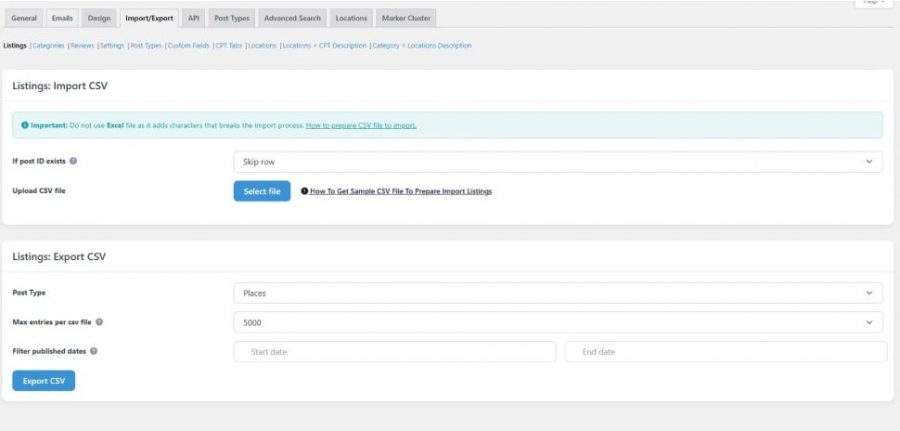
The Import/Export panel handles Listings, Categories, Reviews, Settings, Post Types, Custom Fields, CPT Tabs, Locations, Locations + CPT Description, and Category + Locations Description.
The last one lets you bulk-import the editorial content above and below location and category archives, which is the base of the pSEO listicle approach from the SEO section.
The free importer also handles bulk edits through re-import. Change the data in your CSV, upload it again, and the existing listings update in place.
For example, you added a new custom field and need to fill it in for 30,000 existing listings, you restructured your categories, you fixed a data entry error repeated across thousands of rows, or you need to update business hours after a holiday schedule change.
Without re-import, you have 3 options: edit each listing by hand in the admin (impossible at scale, especially on a directory that’s already slow), write custom SQL or a migration script (out of reach for 99% of directory owners), or delete all listings and import them again (which breaks every internal link, saved search, external link, URL indexed by Google, and review attached to the existing post IDs).
Directorist’s importer can currently only add listings, so those 3 options are all you have.
We covered this in Features Comparison, but it’s worth repeating because import and export is where this gap matters most.
If you prefer WP All Import’s interface, GeoDirectory works with it. Directorist has its own importer, with CSV mapping for custom fields.
CSV export
GeoDirectory’s exporter matches the importer: anything you can import, you can export.
It has built-in filters. You can choose the post type (Places, Events, or any CPT you’ve added), set a maximum number of entries per CSV file (5,000 by default), and filter by published date range.
It’s useful for backups, migrations, or processing your data outside WordPress.
Directorist exports listings to CSV with similar mapping options.
Migration from other directory plugins
GeoDirectory has a free Directory Converter plugin that moves listings from other directory plugins directly into GeoDirectory’s database.
Supported sources include phpMyDirectory, Listify, Business Directory Plugin (6.3+), eDirectory, Vantage Directory Theme, and Directorist (7.9.0+).
So Directorist users who outgrow its architecture can move to GeoDirectory without rebuilding their data.
The converter is in beta and meant for staging sites, but it does the heavy lifting of mapping field structures between plugins.
Directorist doesn’t have a converter for moving from other plugins.
Its migration option is “import via CSV,” which works if you have a clean CSV ready, but not if you need to keep metadata, taxonomies, and custom field structures when moving between systems.
Migration to other plugins
GeoDirectory doesn’t actively help users move to other directory plugins. We don’t do custom migration work or ship a “GeoDirectory to X” converter. That’s on purpose.
The exported CSV is open and complete, so anyone who wants to leave has the data to do it.
Backup compatibility
Both plugins work with standard WordPress backup plugins (UpdraftPlus, BlogVault, WP Vivid, BackWPup, and others).
These plugins back up the whole database, so GeoDirectory’s custom tables are included along with the standard WordPress tables, with no special setup.
Support, Documentation & Reputation
Most comparison articles skip this section, but buyers shouldn’t.
A directory plugin is a long-term relationship. You’ll run it for years, open support tickets when something breaks, and rely on the team to respond.
A plugin’s support record, and how the team behaves when things go wrong, will matter for longer than any feature compared in this article.
Both companies have been around long enough to have a public record. We’ll show ours first, then theirs.
Support channels
GeoDirectory has 2 ways to get support. Free users can post in the WordPress.org plugin forum or open a ticket in our email-based ticketing system.
Paid customers use the ticketing system only.
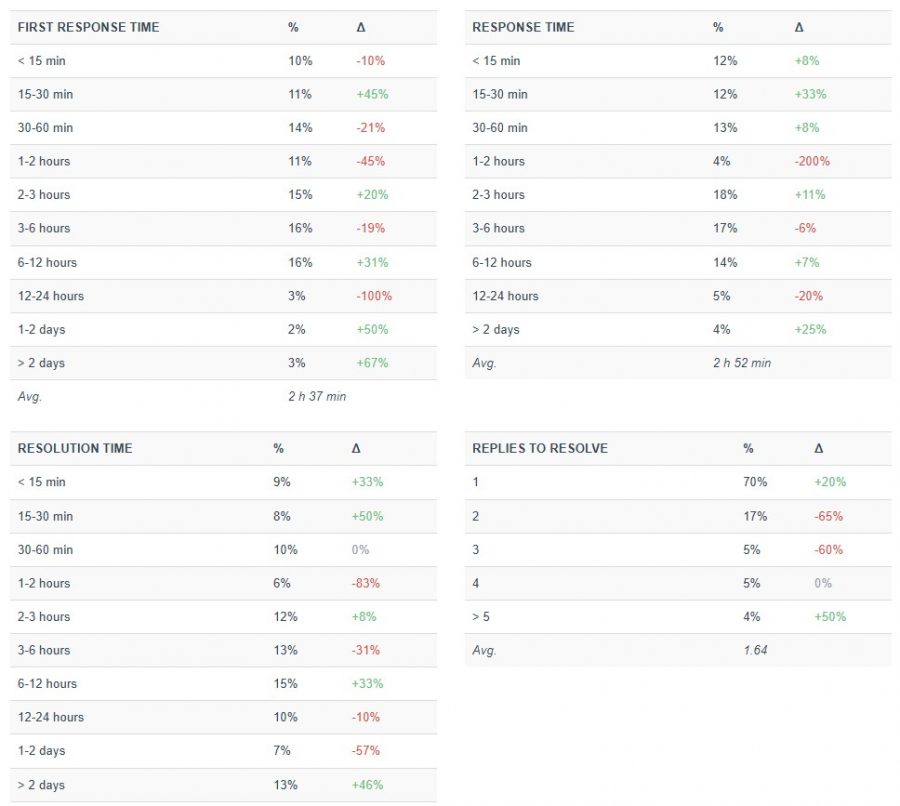
We commit to responding within 24 hours, and we rarely take that long. These are our numbers from the ticketing system for the current reporting period:
- Average first response time: 2 hours 31 minutes
- Average response time across all replies: 2 hours 27 minutes
- Average resolution time: 3 hours 6 minutes
- 65% of tickets were fully resolved in a single reply
- Average replies to resolve: 1.59
About 1 in 5 tickets gets a first response within 15 minutes, and most tickets are handled within an afternoon.
Directorist uses a similar model: WordPress.org forums for the free plugin and a separate ticketing system for paid customers.
We haven’t found any response time numbers published by Directorist.
Documentation
GeoDirectory’s written documentation covers the core plugin and add-ons in detail.
Video is where we fall short. We don’t have a large official video library, as we said in the User Friendliness section.
Directorist has invested a lot in video tutorials, so if you prefer video, its content is easier to find.
Team and continuity
GeoDirectory has been a plugin for 12 years, and the team goes back 14 years, to GeoTheme.com.
Stiofan and I founded the company and are still co-CEOs, with Stiofan as CTO and me as CMO. The core team works from India, Kenya, Australia, and Bali, and has been together since 2014 with little turnover.
Most directory owners don’t realize how much continuity matters until they’ve seen a plugin change owners and lose its direction.
Reputation
The numbers on WordPress.org as of this writing:
- GeoDirectory: 4.8 stars, 715 reviews
- Directorist: 4.6 stars, similar volume
They look similar on the surface, but the reviews behind them are different.
Our own track record
GeoDirectory has 29 one-star reviews on WordPress.org.
Almost all of them are from 1 period, the V1 to V2 transition, plus a few earlier and later issues.
We haven’t had a one-star review since May 2022, more than 4 years ago. Before that, there was another gap of about 2 years.
We hope the streak continues, but negative reviews are a normal part of running a software product.
When we read those old reviews now, we cringe. We didn’t handle pressure well back then.
We took criticism personally and answered in ways we shouldn’t have. Sometimes we were right on the technical points and wrong on the tone, and sometimes we crossed lines.
We can’t edit those responses, because WordPress.org doesn’t allow it. Even if it did, hiding them would be worse than leaving them up.
What we can do is point to the timeline. We changed how we respond years ago, and our recent forum and ticket history, which is also public, shows it.
To see how we used to respond, read our old one-star threads. To see how we respond today, read the recent forum activity. Both are public, and you can compare them side by side.
If there’s a lesson in our old reviews, it’s how not to handle criticism as a software vendor. We learned it the hard way.
Directorist’s recent reviews
Directorist’s recent reviews show a different pattern, and it’s still happening.
In November 2024, a verified Directorist user (see screenshot: digitronic) wrote a one-star review titled “What used to be a decent directory plugin got botched with the major update”.
The review included this complaint:
“Asking for a positive review as a condition for the support to be provided, is a no no, and no serious company that advocates customer love should be engaging in such practices.”
Directorist’s plugin support staff replied: “We also want to address the mention of positive review requests. Please rest assured that support agents do not ask for positive reviews as a condition for offering assistance.”
That was a clear public denial.
4 months later, in March 2025, a different user (see screenshot: Adam, @servicesportal) posted a separate review titled “A Terrible Three-Year Experience” that opened with this:
“First of all, I want to say that when you contact the support team, the developers ask you to leave a positive review about them. Otherwise, they refuse to provide consultation on their free plugin. Secondly, I had previously left a negative review, after which the support team personally messaged me and asked me to delete it.”
That’s 2 separate accusations: positive reviews traded for support, and private messages asking him to delete a negative review.
This time, Directorist’s response didn’t deny either accusation.
The reply asked him to “submit a support ticket detailing all the issues you’re facing. Please also mention the review you left so we can identify your case and follow up accordingly.”
In November 2024, Directorist denied the behavior. In March 2025, it didn’t address it and asked the user to identify himself by his review.
These are 2 independent users, 4 months apart, describing the same pattern. A denial in one thread and no denial in the other make the claim more credible.
2 more one-star reviews are worth reading here: “Unusable 7.4” and “After 3 years still not working”.
Both are public on Directorist’s WordPress.org reviews page.
Neither proves a pattern on its own. Together with the 2 threads above, they show a vendor relationship that some users found difficult enough to come back and document in a public forum.
The AI marketing problem
The plugin’s full name on WordPress.org is “Directorist: AI-Powered Business Directory, Listings & Classified Ads.”
The readme opens with “Powered by AI,” and the pricing page, the homepage, and the YouTube thumbnails all push the AI angle.
Their own AI landing page tells a different story.

The main product, “Directorist AI (Pro),” has a “Coming Soon” label, and the page says: “That’s exactly what we’re building, and it’s dropping soon.”
So a plugin marketed as AI-powered is selling a feature that hasn’t been released.
When a user called this out in a negative review, they replied that the Directory Builder is AI-powered.
We looked into it.
The only AI feature in the current plugin is a “Create with AI” option in the directory setup.
The plugin sends the user’s prompt to Directorist’s server, which processes it and returns suggested categories and form fields.
There’s no model running locally, no API key setting, and no choice of provider.
The endpoint URL is hardcoded on line 20 of includes/modules/multi-directory-setup/class-ai-builder.php.
What model is on the other end?
Their support team has said publicly that it’s Llama. We can’t verify that from the plugin code, since the model is behind their server.
It could be Llama, something else, or a rule-based template engine. The plugin doesn’t tell you.
2 other things stand out.
The wider AI features Directorist advertises on its site haven’t shipped yet.
Their support staff confirmed this in the WordPress.org forums, saying advanced AI features are part of “phase two” and haven’t been released publicly.
The AI Builder also sends what users type (your directory description, your business name, any prompt text) to an external server with no opt-in checkbox, no consent prompt, and no note in the readme about what’s sent or where.
For some teams, that doesn’t matter.
For teams working with client data, internal launches, or anything under GDPR, it’s worth knowing before you build on it.
What’s marketed as an AI-powered product today is labeled “Coming Soon” on Directorist’s own AI landing page, and that gap between marketing and reality is part of the trust question this section is about.
Pricing and TCO
Both plugins are free to install, but most directories need more than the free version.
This section covers what you’ll pay over 1, 2, and 3 years to run a directory in production.
Free tier capability
With the free GeoDirectory plugin plus our free GetPaid (payments) and UsersWP (user profiles and dashboards) plugins, you can run a real directory that makes money.
For example, a city guide that sells eBooks, or a directory that sells branded merch.
For more advanced cases, like paid registration for a members-only directory, you’ll need the UsersWP Membership plugin, which isn’t free.
Directorist’s free version is similar. It includes featured listings with offline bank transfer payments.
For Stripe, PayPal, recurring subscriptions, and tiered pricing plans, you need paid extensions with either plugin.
GeoDirectory pricing
3 membership tiers, each including every GeoDirectory add-on we make:
- Single site: $139 per year
- Unlimited sites (GeoDirectory only): $229 per year
- Unlimited sites + UsersWP + GetPaid bundle: $375 per year (covers the full stack)
Every membership includes the full add-on library, premium support, and updates for the term.
Renewals are at the price you signed up at, with no increase or decrease, for as long as you stay subscribed.
We don’t offer lifetime deals. We’ve seen too many WordPress plugin teams go under after selling once and supporting forever.
We’d rather charge a fair annual price and still be here in 5 years.
Every plan has a 30-day money-back guarantee.
Directorist pricing
3 tiers, packaged in a similar way:
- Starter (1 site): $129 per year, currently discounted to $109. Renews at $103.
- Pro (5 sites): $169 per year, currently discounted to $126. Renews at $118.
- Agency (unlimited sites): $219 per year, currently discounted to $142. Renews at $131.
There’s also a Lifetime tier on a separate tab.
The perpetual discount problem

Every Directorist tier above shows a strikethrough “regular” price next to a “Save 15-35%” discount.
We’ve checked over time. The discount is always there, and while the percentage sometimes changes, nobody pays the full price.
So it’s a marketing tactic, and the “discounted” price is the real price.
It’s also illegal in the UK under the Consumer Protection from Unfair Trading Regulations 2008, which prohibit showing a “from” or “was” price that hasn’t been the actual price for a meaningful period.
Fines can reach 10% of global turnover for repeat offenses.
We don’t run perpetual sales because we’d rather not break consumer protection law in our home market. The price you see for GeoDirectory is what you pay.
Also check the renewal column. Directorist’s renewal prices in the screenshot are different from the first-year prices.
Some plans renew lower and others renew higher, so check the small print for the plan you’re considering before assuming the discount continues.
Total cost of ownership over three years
The list prices don’t show what you’ll pay over time.
Here’s the cost over 3 years, assuming you stay subscribed and run a directory that needs the core add-ons from either plugin.
| GeoDirectory unlimited | Directorist Agency | |
|---|---|---|
| Year 1 | $229 | $142 |
| Year 2 | $229 | $131 |
| Year 3 | $229 | $131 |
| 3-year total | $687 | $404 |
| Difference | -$283 |
Directorist is cheaper over 3 years.
The question is what you get and what you don’t get for the difference.
With Directorist, for $283 less, you get:
- A plugin that WordPress.org closed in 2023 because the vendor didn’t respond to disclosed vulnerabilities, with more critical CVEs in 2025 and 2026.
- Custom fields stored in WordPress post meta, which, as covered in the Performance section, can lock up the front end at a modest scale with combined filters.
- A location setup that can’t generate location-category URLs, which, as covered in the SEO section, decides whether a directory ranks for “X in Y” searches.
- A support team some users have publicly accused of trading positive reviews for help on the WordPress.org forum.
With GeoDirectory, for the extra $283, you get:
- A vendor with a 14-year track record, no forced repository closures, a CTO who does WordPress security research professionally, and an average first response time of 2 hours 31 minutes against a 24-hour SLA.
- A directory engine built on custom database tables that holds up at scale.
- A location setup built for SEO at the URL level.
- A support team that doesn’t ask anyone for a review of any kind.
Hidden costs to factor in
Hosting is your choice with both plugins. Neither needs specific hosting, but a directory at any real scale won’t run well on $5 per month shared hosting.
Budget for better hosting whichever plugin you choose.
GetPaid’s premium gateways (Mollie, Razorpay, GoCardless, and others beyond Stripe, PayPal, Authorize.net, and bank transfer) are paid add-ons, if you need regional gateways.
Directorist’s gateway extensions (Stripe, PayPal, Authorize.net) cost about $39 each, unless they’re bundled in a higher tier.
For most directories, the gateway costs roughly cancel out.
The $229 per year unlimited sites membership is the GeoDirectory plan we recommend if you’re serious about building a directory.
It includes every add-on we make (Location Manager, Pricing Manager, Marker Cluster, Advanced Search, Events, MultiRatings, Franchise Manager, Claim Listings, Compare Listings, GeoMarketplace, Dynamic User Emails, Saved Search Notifications, Embeddable Ratings Badge, and the rest), premium support, and the same renewal price for as long as you stay subscribed.
The 30-day money-back guarantee gives you a month to check that everything in this article applies to your use case.
Final Verdict
We’ve covered 20 sections in detail. Here’s our conclusion.
For most readers of this article, the choice isn’t close.
GeoDirectory is the better long-term plugin for architecture, security, performance, SEO, and how the team behaves over time.
Each section above shows this in a different way, with sources.
Directorist is a reasonable choice in 1 case.
If you’re running a low-stakes hobby directory with a few listings, no plans to grow, charge users, or rank for “X in Y” searches, no real user data to protect, and a strong preference for the lowest first-year cost, Directorist gets you to a working site faster and cheaper.
In that case, the visual Directory Builder, the free multi-directory feature, the lower price, and the bigger video library all help.
That covers a small share of the people who search for “best directory plugin.” For everyone else, the picture is different.
If your directory grows beyond a few hundred listings, the architecture matters. GeoDirectory’s custom database tables hold up under load, and WordPress post meta doesn’t.
If your directory needs to rank for location-category combinations (“restaurants in San Francisco,” “lawyers in Manchester,” and similar searches across a region or country), GeoDirectory’s location hierarchy is built for it, and Directorist’s flat taxonomy isn’t.
If your directory will hold user data, payment information, or business records you wouldn’t want to see on a breach forum, GeoDirectory’s security record, fast patches, and CTO with verifiable independent bounty work matter. Directorist has documented incidents and a forced repository closure.
If monetization is a big part of your plan, the GeoDirectory ecosystem (Pricing Manager, Pay Per Lead, Dynamic User Emails, Booking Marketplace, GeoMarketplace with proximity-based product search) covers options Directorist doesn’t.
If vendor behavior matters to you, the pattern documented on the WordPress.org forums shows what to expect when something goes wrong.
The $283 difference over 3 years is real.
The question is whether saving it is worth what you give up, based on everything in this article.
We think it isn’t, but we make GeoDirectory, as we said at the start.
If you come to the same conclusion, GeoDirectory Membership is $229 a year for unlimited sites, every add-on, premium support, and a 30-day money-back guarantee.
Closer
Thanks for reading this far.
Comparison articles usually aren’t worth an hour of anyone’s time, and we tried to make this one worth it.
If you have questions, think we got something wrong, or want to push back on anything, we’re around.
You’ll find us in the WordPress.org forums under the GeoDirectory plugin, in our support ticketing system if you’re a customer, and through the contact form at wpgeodirectory.com.
Stiofan and I read most of what comes in and reply.
Good luck with whatever you build.
Newsletter - Stay Updated!
Get the latest news, tips, and exclusive content directly in your inbox.
