On this page
Home Page Map Custom Post Type Categories Listings Page Map Listing Slider Login Box Popular Post Category Popular Post View Recent Reviews Related Listings Search GD Listings GD Best Of Add Listing Form
Home Page Map
Shortcode: [gd_homepage_map]
This shortcode is the equivalent of the GD > GMap – Home Page widget.
Parameters:
- width – A number of pixels or percent (default = 960px)
- height – A number of pixels (default = 425px)
- maptype – One of HYBRID, SATELLITE or ROADMAP (default = ROADMAP) – not case sensitive
- zoom – A number between 1 (narrowest) or 19 (widest) (default = 13)
- autozoom – True or False (default = false)
- child_collapse – True or False (default = false)
- scrollwheel – True or False (default = false)
- marker_cluster – 1 or on – 0 or off, (default = 0)
Example: [gd_homepage_map width=100% height=300 scrollwheel=false]
Custom Post Type Categories
Shortcode: [gd_cpt_categories]
This shortcode is the equivalent of the GD > CPT – Categories widget.
Parameters:
- title – the title for the cpt categories
- post_type – The custom post types to use (default = shows all) (examples: ‘gd_place’ or ‘gd_place,gd_event’)
- hide_empty – Hide empty categories? True or False (default = false)
- show_count – Show category count? True or False (default = false)
- hide_icon – Hide category icon? True or False (default = false)
- cpt_left – Show CPT on same line? True or False (default = false)
- sort_by – Categories sort by. ‘az’ or ‘count’ (default = count)
- max_count – Maximum number of sub-categories count. (default = shows all)
- max_level – Maximum level of sub-categories depth. (default = 1)
Example: [gd_cpt_categories show_count=1]
Listings Page Map
Shortcode: [gd_listing_map]
This shortcode is the equivalent of the GD > GMap – Listing Page widget.
Parameters:
- width – A number of pixels or percent (default = 294px)
- height – A number of pixels or percent (default = 370px)
- zoom – A number between 1 (narrowest) or 19 (widest) (default = 13)
- autozoom – True or False (default = false)
- sticky – True or False (default = false)
- scrollwheel – True or False (default = false)
- marker_cluster – 1 or on – 0 or off, (default = 0)
- maptype – One of HYBRID, SATELLITE or ROADMAP (default = ROADMAP) – not case sensitive
- post_type – The slug for the post_type (default = gd_place)
- event_type – The events filter (for gd_event CPT only) (default = all)
Options: all, today, upcoming, past - category – ID number of the category to show – if more than one, separate by comma (default = 0 for all)
Example: [gd_listing_map width=100% height=300 scrollwheel=false category="2,3,4"]
Listing Slider
Shortcode: [gd_listing_slider]
This shortcode is the equivalent of the GD > Listing Slider widget.
Parameters:
- post_type – The slug for the post_type (default = gd_place)
- category – ID number of the category to show (default = 0 for all)
- post_number – Number of posts to show (default = 5)
- slideshow – True or False (default = false)
- animation_loop – True or False (default = false)
- direction_nav – True or False (default = false)
- slideshow_speed – A positive number of milliseconds (default = 5000)
- animation_speed – A positive number of milliseconds (default = 600)
- animation – Either slide or fade (default = slide)
- order_by – Options available: az, latest, featured, high_review, high_rating, random (default = latest)
- show_title – True or False (default = false)(this is the post title over image)
- show_featured_only – True or False (default = false)
- title – the title for the title of the slider
Example: [gd_listing_slider post_number=5 category=3 slideshow=true show_featured_only=true]
Login Box
Shortcode: [gd_login_box]
This shortcode is the equivalent of the GD > Login box widget.
No parameters
Example: [gd_login_box]
Popular Post Category
Shortcode: [gd_popular_post_category]
This shortcode is the equivalent of the GD > Popular Post Category widget.
Parameters:
- category_limit – Number of categories to show (default = 15)
- title – (default = ‘Popular Categories’)
- parent_only – true or false (default = ‘true’)
Example: [gd_popular_post_category category_limit=10 parent_only=true]
Popular Post View
Shortcode: [gd_popular_post_view]
This shortcode is the equivalent of the GD > Popular Post View widget.
Parameters:
- post_type – The slug for the post_type (default = gd_place)
- category – Category IDs to filter listings. Example: ’12’ or ‘12,33’. (default = 0 for all)
- post_number – Number of posts to show (default = 5)
- layout – Number of columns to show (default = 2)
- add_location_filter – Filter listings by current location. (true or false, default = false
- list_sort – Options available: az, latest, featured, high_review, high_rating, random (default = latest)
- use_viewing_post_type – Filter listings by current viewing post type. (true or false, default = true)
- character_count – Number of characters to show from the Excerpt (Min/default = 20)
- listing_width – A percent between 20 and 100 (default = ‘’)
- show_featured_only – Display only featured listings. (true or false, default = false)
- show_special_only – Display only listings with Special Offers. (true or false, default = false)
- with_pics_only – Only display listings which have an image available. (true or false, default = false)
- with_videos_only – Only display listings which have video available. (true or false, default = false)
- title – (default = ‘the name of the custom post type’)
- hide_if_empty – Hide widget if no listings found. (true or false, default = false)
Example:
[gd_popular_post_view category=3 layout=5 add_location_filter=true character_count=0 show_featured_only=true]
Recent Reviews
Shortcode: [gd_recent_reviews]
This shortcode is the equivalent of the GD > Recent Reviews widget.
Parameters:
- count – Number of posts to show (default = 5)
Example: [gd_recent_reviews count=5]
Related Listings
Shortcode: [gd_related_listings]
This shortcodes is the equivalent of the GD > Related Listings widget.
Parameters:
- post_number – Number of posts to show (default = 5)
- relate_to – Either category or tags (default=category)
- layout – Number of columns to show (default = 2)
- add_location_filter – True or False (default = false)
- listing_width – A percent between 20 and 100 (default = ‘’)
- list_sort – Options available: az, latest, featured, high_review, high_rating, random (default = latest)
- character_count – Number of characters to show from the Excerpt (Min/default = 20)
Example: [gd_related_listings relate_to=tags layout=3 add_location_filter=true list_sort=featured character_count=0]
Search
Shortcode: [gd_advanced_search]
This shortcode is the equivalent of the GD > Search widget.
No parameters unless Advanced Search addon is active:
- show_adv_search – If the advanced search section should be shown: (‘default’, ‘always’, ‘searched’)
- post_type – The custom post types to show by default (examples: ‘gd_place’ or ‘gd_event’)
Example: [gd_advanced_search show_adv_search='always']
GD Listings
Shortcode: [gd_listings]
This shortcode is almost the equivalent of what you see on the GD category listings pages.
Parameters:
- title – (default = )
- – Set the title(default = “”)
- post_type – The custom post type to use (default=gd_place)
- category – The category ids “1,3” (default = ”)
- list_sort – Options available: az, latest, featured, high_review, high_rating, random (default = latest)
- event_type – Event type filter. Should today, upcoming, past, all. Default empty.(default = “”)
- post_number – Number of posts to show per page (default = 10)
- post_author – Filter by current_user, current_author or ID (default = unfiltered)
- post_author=”current_user” will filter the listings by author id of the logged in user
- post_author=”current_author” will filter the listings by author id of current viewing post/listing
[Only for Detail pages: this option will show other listings of the same author on the detail page only]
[also works on Author pages, but only if you do not use any other plugin that replaces the Author page (for example UsersWP)] - post_author=”11″ will filter the listings by author id = 11
- post_author=” “ If left empty, all listings will be shown
- layout – Number of columns to show (default = 2)
- listing_width – A percent between 20 and 100 (default = ‘’)
- character_count – Number of characters to show from the Excerpt (Min/default = 20)
- add_location_filter – True or False (default = true)
- show_featured_only – options are 1 [true] or 0 [false] (default = 0)
- show_special_only – options are 1 [true] or 0 [false] (default = 0)
- with_pics_only – Display listings with images – options are 1 [true] or 0 [false] (default = 0)
- with_videos_only – Display listings with videos – options are 1 [true] or 0 [false] (default = 0)
- with_pagination – Display pagination – options are 1 [true] or 0 [false] (default = 1)
- top_pagination – Display pagination on top – options are 1 [true] or 0 [false] (default = 0)
- bottom_pagination – Display pagination on bottom – options are 1 [true] or 0 [false] (default = 1)
- tags – Filter by tags (default = unfiltered), for example tags=”Museum,Garden”. Note that this filter uses the name/title of the tag, not the slug, and that spaces should be removed. ex. “Great Place” becomes “GreatPlace”.
- show_favorites_only – options are 1 [true] or 0 [false] (default = 0)
- favorites_by_user – Values should be “current”‘ or user id [eg 5] or empty (default = empty)
- favorites_by_user=”current”, shortcode will show the listings which are favorites by author of current viewing post.
- favorites_by_user=”12″, shortcode will show the listings which are favorites by user id “12”.
- favorites_by_user=”” or empty, shortcode will show the listings which are favorites by current logged user(if logged in).
Example:
[gd_listings post_type="gd_place" layout=4 category="1,3" post_number="4" list_sort="high_review"]

[gd_listings post_type="gd_event" add_location_filter="0" layout="4" post_number="4" show_favorites_only="1"]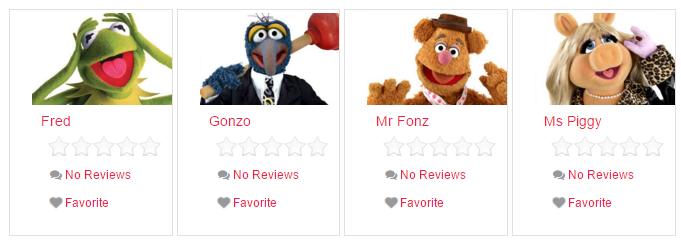
Note:
When displaying a grid of 4 or 5 listings the description will be automatically hidden. To unhide it, use the following custom CSS at GD – Design – Scripts – Custom CSS
[css]
.geodir_category_list_view li.geodir-gridview .geodir-content .geodir-entry-content {
display: block;
}
[/css]

GD Best of
Shortcode: [gd_bestof_widget]
Parameters:
-
-
- title – widget title (default = ”)
- post_type – The custom post type to use (default=gd_place)
- post_limit – Number of posts to show (default = 5)
- categ_limit – The number of category to show (default = 3)
- character_count – Number of characters to show from the Excerpt (Min/default = 20)
- use_viewing_post_type – overridess parameter post_type if visiting another custom port type archive (default = false)
- add_location_filter – True or False (default = false)
- tab_layout – bestof-tabs-on-top or bestof-tabs-on-left or bestof-tabs-as-dropdown (default = bestof-tabs-on-top)
-
Example:
[gd_bestof_widget title="widget title" post_type=gd_hotel post_limit=5 categ_limit=6 character_count=50 use_viewing_post_type=true add_location_filter=true tab_layout=bestof-tabs-as-dropdown]
Add Listing Form
Shortcode: [gd_add_listing]
- This shortcode allows you to create your own Add Listing page(s).
- By default GD uses the same Add Listing page to generate different forms for all different Custom Post Types and/or price packages. For example:
- https://yoursite.com/add-listing/?listing_type=gd_place&package_id=1
- https://yoursite.com/add-listing/?listing_type=gd_event&package_id=6
- Do not add this shortcode to the Add Listing page selected at GD > Permalinks > GeoDirectory Pages > Add Listing page.
That page is reserved for GD generated pages, so only add this shortcode to any extra WP pages. - After you have created all your custom Add Listing pages, you might have to permanently delete the temporary default Add Listing page that is selected at GD > Permalinks > GeoDirectory Pages > Add Listing page before your custom Add Listing pages will work.
Parameters:
- listing_type – The custom post type to use (default=gd_place)
- login_msg – The message to show to logged out users (default = You must login to post.)
- show_login – show the login widget to logged out users (default = false)
Example: [gd_add_listing listing_type=gd_event login_msg="Please register and login to submit listings" show_login=true]