How we built wp-rankings.com: 60,000 listings and 16 million rows on GeoDirectory
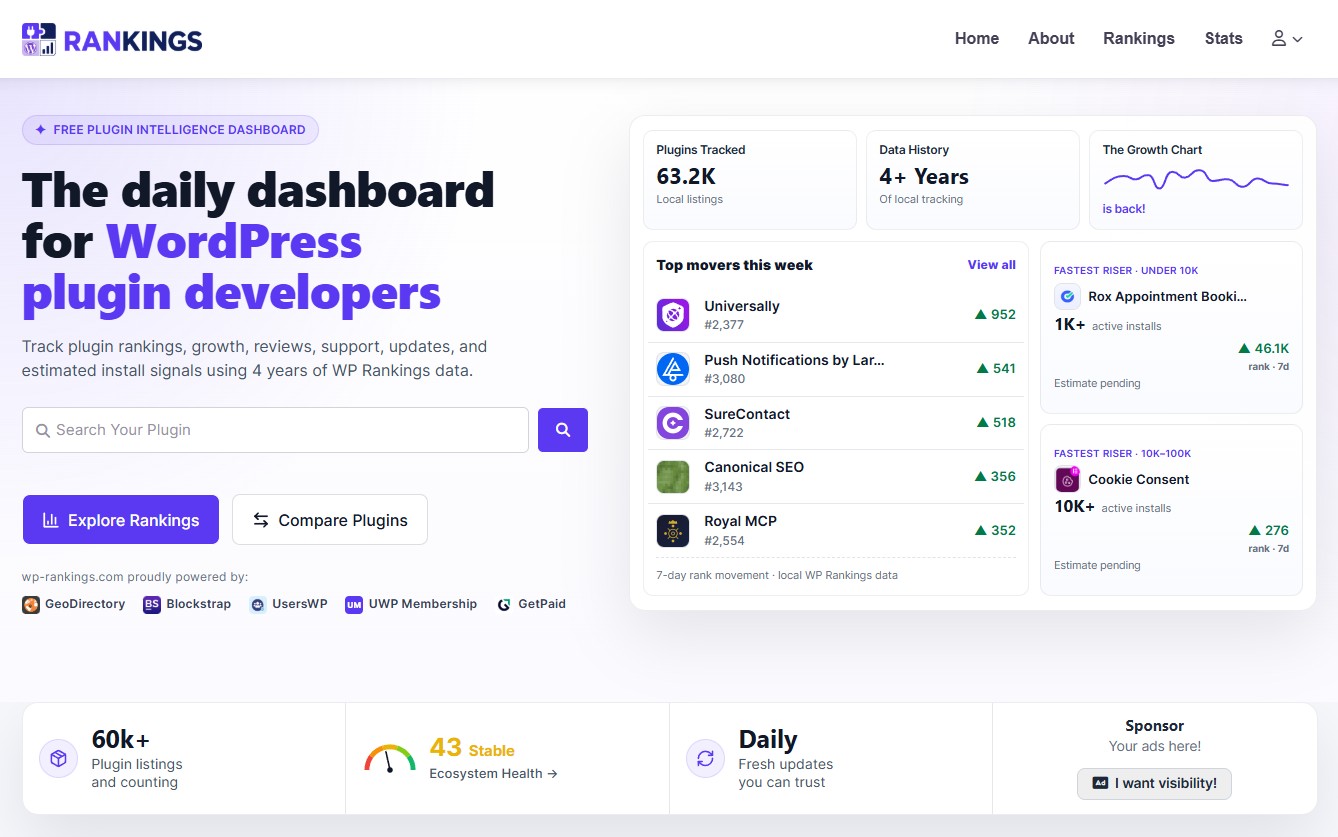
Last week, we put wp-rankings.com live.
It tracks every plugin in the WordPress.org repository: growth, install estimates, rankings, momentum, keyword positions, and competitor comparisons.
Here’s what it runs on:
- 60,000+ listings
- 40 custom fields on every one of them
- 16.2 million rows of historical data behind it
- 3,000 real human visitors on launch day, most of them inside a few hours
- 10,000+ uniques in the first 5 days, still in beta
- Google PageSpeed score of 92, before we’ve done any optimization work at all
All of it on GeoDirectory.
Search runs through our own Elasticsearch extension, a GeoDirectory add-on we built for sites at this scale. More on why we needed it later.
People ask us constantly how far GeoDirectory scales. The answer used to be “further than you think, and here are some client sites.” Now there’s a public site anyone can go and hammer.
This post is how it was built.
Why the site exists
WordPress.org used to show an active-install growth chart on every plugin page. At some point, they took it away. The Trac ticket asking for it back, #6511, is still open.
That chart was the only way to see whether a plugin was actually growing.
Without it, you get a number in a bucket, “10,000+ active installs,” and no idea whether that’s 10,000 climbing fast or 19,000 quietly bleeding out.
So, 4 years ago, we started pulling the WordPress.org plugin API every day, storing the results, and we built wp-rankings V1.
We haven’t missed a day since.
4 years of daily snapshots across the entire repository. That’s the one thing you can’t go back and create later.
V2 is the evolution of that, with a lot more statistics, and it’s what happens when you finally build a world-class front end for the data.
The listing structure
Every plugin in the repository is a GeoDirectory listing. A gd_place post, with its data in GeoDirectory’s detail table, wp_geodir_gd_place_detail.
40 custom fields on each one. Active installs, downloads, rating, number of ratings, support threads, resolved threads, version, tested-up-to, WordPress.org rank, plus the values we compute ourselves and write back in.
This is the part people underestimate.
GeoDirectory custom fields are a real schema, in a real table, with real column types. Our computed growth rates live in FLOAT columns.
They index, they sort, they filter. They behave like database columns because that’s what they are.
If you’ve ever tried to sort a WordPress archive by a post meta value on a site of any size, you know why this matters.
Post meta is a key-value store wearing a schema costume, and it falls apart exactly when you start asking interesting questions.
Everything else in this post depends on this one decision. Get your data into custom fields properly, and the rest becomes possible.
Search and sort, and the mistake we made
If you read one section of this post, make it this one.
We needed a trending sort. Order the archive by 7-day growth to see what’s moving right now.
Claude Code does most of the implementation on this project, and its first answer was custom SQL. Custom JOINs and a custom order-by hook bolted onto GeoDirectory’s query.
It looked reasonable. It ran fine locally.
On the live site, performance collapsed. A search that had been quick took tens of seconds.
We spotted it immediately and made the AI throw the whole thing away and do it GeoDirectory’s way instead.
The correct fix was small. Add growth_7d as a GeoDirectory custom field, which gives you a FLOAT column in the detail table. Compute the value in a background job. Write it into the field.
Then register the sort with GeoDirectory’s own sorting system and let GeoDirectory order by it, just as it orders by anything else. growth_7d_desc. Done.
Fast again. On 60,000 listings.
Here’s the lesson, and it goes well beyond this project.
AI coding tools will rebuild your infrastructure by default. Hand one a sorting problem, and it reaches for SQL because it’s seen it a million times in training.
It doesn’t know that Stiofan spent years optimizing GeoDirectory’s query layer for large datasets.
It doesn’t know that everything it’s about to build has already been built, tested in production, and sanded down over a decade.
It’ll confidently ship a worse version of a solved problem, and it’ll be very pleased with itself.
So if you’re using Claude or ChatGPT on a GeoDirectory site, the single most valuable instruction you can give it is this:
Do not bypass GeoDirectory’s native search, sort, and filter infrastructure. Extend it with custom fields.
That’s what custom fields are for. That’s the whole trick.
Where GeoDirectory ends, and our code begins
We have 2 custom plugins.
The first is the scraper. Stiofan built it 4 years ago, and it has one job: pull the WordPress.org plugin API every day and write what it finds into the listings. It’s the reason the dataset exists at all, and it’s been running quietly ever since.
The second is the analytics plugin, new for V2. It owns the 16.2-million-row snapshot table. One row per plugin per day: rank position, install bucket, estimated installs, growth rate, momentum state.
Time series is not a directory’s job, and we’d never ask GeoDirectory to do it. That table has its own schema, indexes, and background jobs, and it sits entirely outside GeoDirectory.
But the results come back in.
The analytics plugin performs the heavy lifting on its own data, then writes the output to GeoDirectory custom fields. A 7-day growth rate is computed from millions of rows of historical data and appears as a single FLOAT in the listing.
From GeoDirectory’s perspective, it’s just another field. It sorts it, filters it, and displays it like any other.
Compute outside. Store inside. Let GeoDirectory query.
That’s the architecture in 3 lines, and it’s why the site is quick despite sitting on a very large dataset. The archive query never touches the 16 million rows. It reads one number that was computed hours ago.
The single listing page
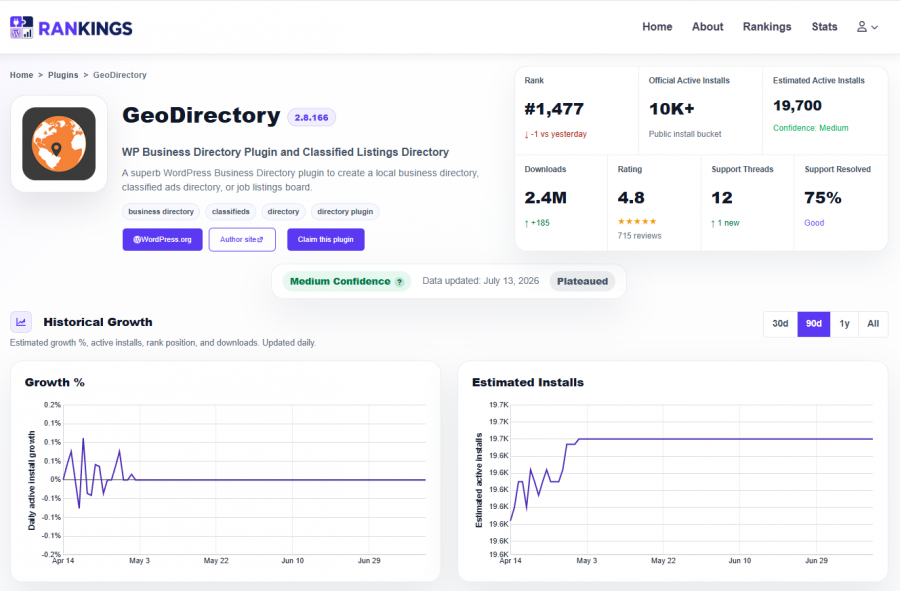
The plugin page is a dashboard. Metrics card, estimated active installs with a confidence rating, growth charts across 30 days, 90 days, 1 year, and all time, a momentum classifier, a next-milestone projection, review and support stats, WordPress.org keyword rankings, and a comparison card against up to 3 competitors.
Underneath, it’s a standard GeoDirectory single-listing page in the stock Blockstrap. No custom theme.
The dashboard itself is our code. Chart.js, fed from the custom fields. A regular Blockstrap user couldn’t build that by hand, and there’s no point pretending otherwise.
Here’s the thing worth saying out loud, though: they don’t have to build it by hand anymore.
2 years ago, a page like this meant hiring a developer for weeks.
Today, you describe what you want, and an AI builds it. Charts, cards, comparison tables, and conditional badges.
It’s close to trivial now because the hard part was already done. The data was sitting in GeoDirectory custom fields, structured, typed, and queryable.
AI is very good at building on top of a clean data layer. It’s very bad at inventing one.
Give it a well-structured custom field and ask for a growth chart, and you’ll have one before lunch. Let it design your query layer, and it’ll cheerfully break your site, as we found out.
So the split is simple. GeoDirectory owns the data and the querying. AI builds whatever you want on top.
Do it in that order, and this kind of site is within one person’s reach.
The archives
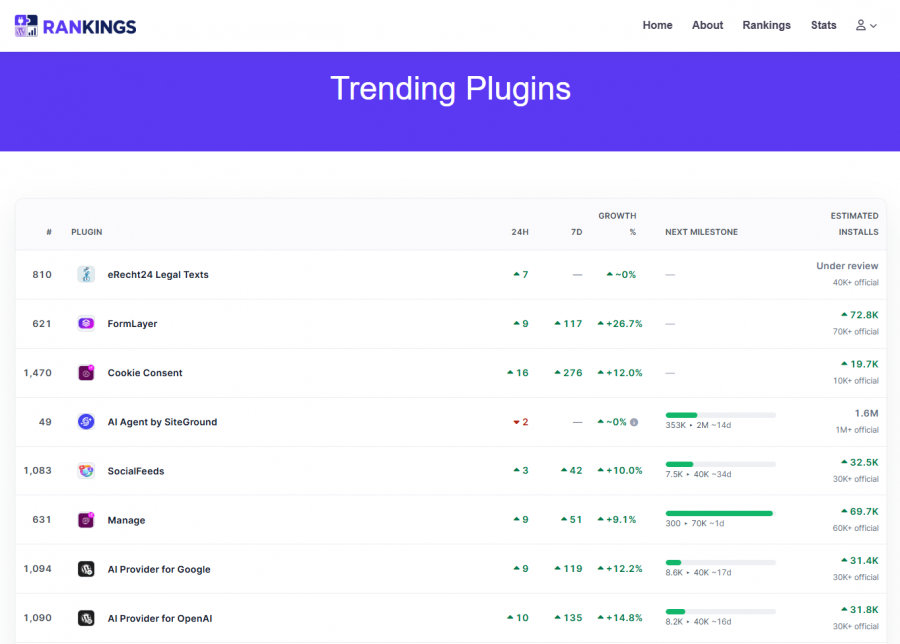
This is where everything above pays off.
The trending page shows plugins with at least 10,000 active installs, ordered by how fast they’re growing over 7 days. Rank, plugin, 24-hour movement, 7-day movement, growth percentage, and estimated active installs.
The whole thing is a GeoDirectory Listings block.
GeoDirectory’s own listings block, sorted by a GeoDirectory sort option, reading GeoDirectory custom fields. The trending sort sits in GeoDirectory’s sorting system alongside every other sort, so it works anywhere listings work.
There’s no custom SQL in it anywhere.
The statistics page links straight into it.
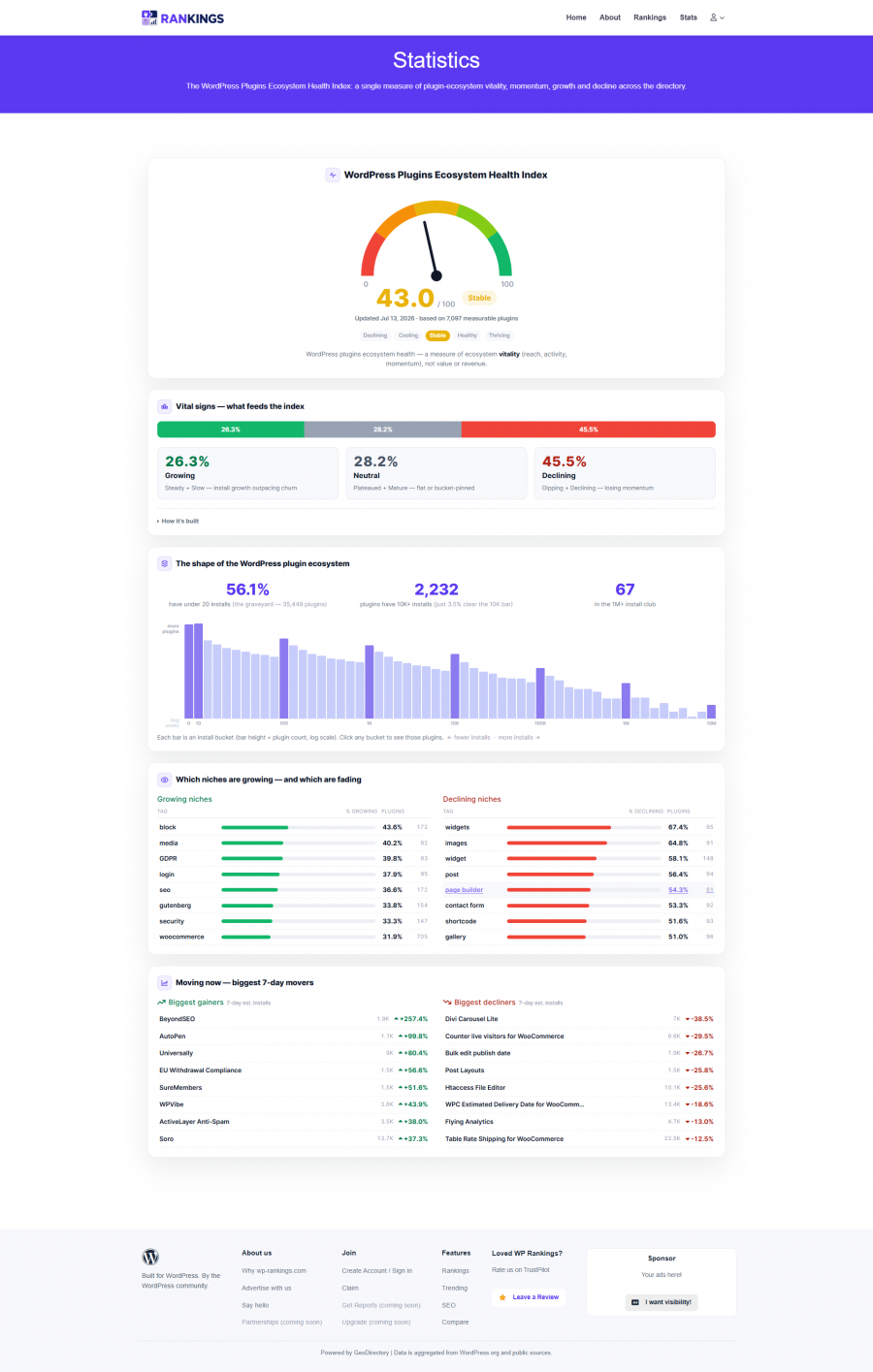
Every install bucket on that page is a link into trending with the floor already applied, so “show me the plugins above 100,000 installs that are moving” is one click.
Get the data into custom fields, register the sort properly, and the archives assemble themselves out of parts that GeoDirectory already ships.
The claim flow
Plugin owners can claim their listing. That’s GeoDirectory’s native claim feature, with our verification logic bolted on top.
We check the plugin’s Plugin URI: header, the one in the main PHP file, and verify the claimant controls that domain.
Email verification, auto-approve on click.
About 100 plugins were claimed in the first week.
Same pattern as everywhere else on this site.
GeoDirectory ships the feature. Your business rules sit on top of it.
Traffic, speed, and the Elasticsearch question
Launch was driven almost entirely by X.
The post went wide, a few high-profile people in the WordPress space picked it up, and the traffic arrived in a burst.
3,000 real humans on launch day. Not spread evenly over 24 hours, but stacked into a few of them.
A word on measurement, because this catches people out. Cloudflare reported 72,000 uniques for that period. Server logs said around 3,000 humans. The rest were bots.
If you’re reporting directory traffic to a client, check the server logs before you celebrate.
The stack held. GeoDirectory Cloud, Cloudflare in front, LiteSpeed caching.
Nothing exotic.
Google PageSpeed gives it 92, and we haven’t started optimizing yet (that happens once beta ends).
Now the honest part.
Search on this site runs through our own Elasticsearch extension for GeoDirectory.
At 60,000 listings with 40 custom fields, and sorting on computed values, search plus custom sorting was getting slower than we wanted.
MySQL was doing more work than it should have been.
Most directories will never get near that.
GeoDirectory’s native search is fast, and if you’re running a few thousand listings, it’s already the right answer. We’d tell you so.
wp-rankings is genuinely at the far end of the curve, and the Elasticsearch extension is something we install and configure on custom builds for sites that have outgrown MySQL.
The important part is that it plugs into GeoDirectory’s search layer.
It swaps the engine underneath, and everything above it stays native. GeoDirectory still owns search, sort, and filter.
Same principle as before, from the other direction.
Work with GeoDirectory’s infrastructure, never around it. One of those scales the site. The other one breaks it.
The rest of the stack
UsersWP for accounts, login, registration, and profiles.
Blockstrap, plus the Blockstrap page builder plugin, for the templates and everything visual.
Turnstile on login and register, via AyeCode Connect.
GetPaid and UsersWP Membership for the premium tier if the demand proves real. We haven’t built it yet.
The demand we didn’t expect is advertising.
Half a dozen people have asked to sponsor the site already, so the GeoDirectory Advertising add-on goes in next, self-service, this way sponsors can buy their own placements without us touching anything.
The whole AyeCode stack, doing what it was built to do. Nothing here is a workaround.
What this proves
“How far does GeoDirectory scale?” used to be a question we answered with a shrug and a list of client sites.
Now there’s a public one you can go and break.
60,000 listings. 40 custom fields on each. 16 million rows of history behind them.
A traffic spike that would flatten most directory sites, absorbed without a wobble.
Two of us built it.
Most of the implementation was AI-assisted, and the only time we hit real trouble was when we let the AI redesign GeoDirectory’s plumbing instead of using it.
Go and look: wp-rankings.com
If you want to build something like it, you already know what it runs on.
Newsletter - Stay Updated!
Get the latest news, tips, and exclusive content directly in your inbox.
