Guust

Forum Replies Created
-
AuthorPosts
-
Hi Jan, disable the recapchta plugin by renaming the plugin folder using FTP.
Once logged in name it back the way it was and make sure to use correct keys for the version of the recaptcha you are using.
ThanksYes, it extends the free plugin so you can add listings outside the default city.
Thanks.The free version of the plugin is restricted to one city.
If you want to add listings in other cities you will need this addon:
https://wpgeodirectory.com/downloads/location-manager/“Records not found” is usually because your permalink settings:
https://wpgeodirectory.com/docs-v2/geodirectory/settings/permalinks/#404
https://wpgeodirectory.com/docs-v2/geodirectory/settings/permalinks/Thanks
That would be site specific most likely.
If you can give us the URL of that page and WP Admin login details in a private reply, then we can have a look.
ThanksYou’re welcome
I cleared the cache of the StackCache plugin.
Please review https://wpgeodirectory.com/docs-v2/faq/performance/#cache
Maybe switch to a different caching plugin?Thanks
You’re welcome 🙂
I don’t consider myself to be a coder, so please could you explain how I get to the place where I can add pagination [gd_loop_paging] to the top of the page (I am running Listimia by the way.
GD > Settings > General tab > Pages sub-tab > GD Archive
GD > Settings > General tab > Pages sub-tab > SearchAlso how to I get to the admin page where I can add all listings to the archive map element please?
Appearance > Theme editor.
I suggest you ask Listimia for assistance with that, it is built in into one of their templates.Thanks
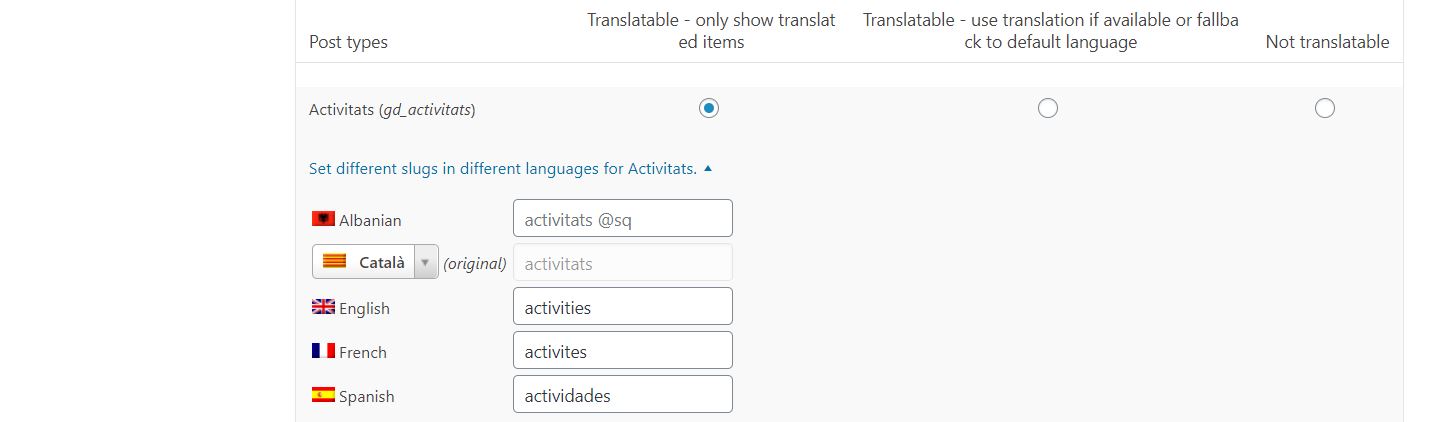
February 22, 2020 at 7:06 am in reply to: Problems translating CPT Names with WPML String Translation #531694You translate the CPTs at WPML > Settings > Multilingual Content Setup > Scroll to “Post Types Translation” like in your image:

Is this what you are looking for?
https://inforoses.com/wp-admin/admin.php?page=wpml-string-translation%2Fmenu%2Fstring-translation.php&search=activitats#icl-st-toggle-translationsWhat is it exactly what you are trying to translate?
I have asked a developer to have a look to see if there is a simple fix for that.
Thanks
I’ll get a developer to have a closer look at that for you.
ThanksHave a look at GD > Settings > Locations tab > Show Advanced > Disable move map pin from changing address fields.
Thanks
Increase the number or listings per page at WP Settings > Reading > Blog pages show at most
You can add the pagination to the top of the page too. Just add the [gd_loop_paging] element above the GD Loop.
You can show all listings on the map, just add
all_posts="1"to the archive map element.
Some people have added infinite scroll plugins with some success.
Thanks
Do not create more than one Add Listing page.
The same Add Listing page is used for all CPTs, for example
/add-listing/?listing_type=gd_event
/add-listing/?listing_type=gd_place
etcThanks
That is a DETAIL page, not a Listing (Archive), CPT, or Location page.
To remove the country from detail pages, go to WP Settings > Permalinks > and set to a custom GD URL of/%region%/%city%/%category%/%postname%/Thanks
-
AuthorPosts