Kor
Forum Replies Created
-
AuthorPosts
-
Hi Edison,
Looks like this plugin “Antispam Bee” is preventing you from posting a comment. Could you please check?
Thanks!
October 13, 2017 at 8:35 am in reply to: After Update – PinPoints / MapMarker do not display anymore #400394Hi Josef,
Please share the URL of the site in question so we can take a better look at it and also WP temp admin access to your site. You can post the details here using the private reply option below.
Hi Edison,
Please share the URL of the site in question so we can take a better look at it and also WP temp admin access to your site. You can post the details here using the private reply option below.
Hi josef,
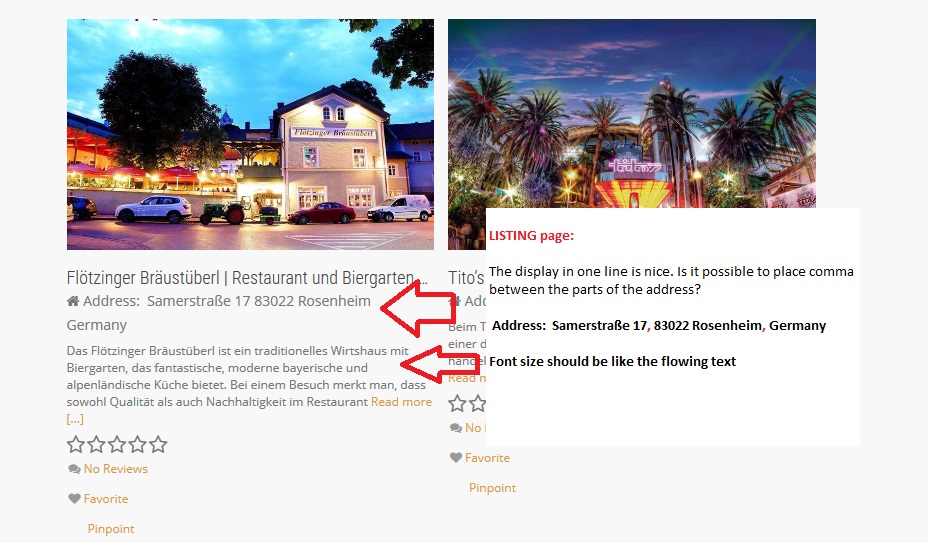
You can achieve that using custom CSS. Insert the code below into GD > Design > Scripts > Custom Style CSS.
span[itemprop="streetAddress"] { display:block!important; } span[itemprop="addressCountry"] { display:block!important; }Where can I find the listings with addresses as shown in this screenshot? https://wpgeodirectory.com/support/wp-content/uploads/sites/11/2017/10/LISTING-Page-display-address.jpg . Can you share a link?
Thanks!
Hi Gene,
Sorry, I’m not getting this, could you elaborate a little bit more? If you’re trying to create custom fields for your CPT, you can refer to this section of the documentation https://wpgeodirectory.com/docs/core-place-settings/#custom
Thanks!
October 13, 2017 at 5:34 am in reply to: How to see categories and see subcategories only when clicking #400365Hi orishas,
Unfortunately, achieving this would require customization and I hope you understand.
Thanks!
Hi Lotte,
Thanks for your reply and I’m sorry for the misunderstanding. You can achieve this by uploading different map markers for your categories. The custom CSS code I’ve provided earlier will only affect the texts on that particular widget. Let me know if I’m misunderstanding your question.
Thanks!
This reply has been marked as private.October 12, 2017 at 4:24 pm in reply to: How to see categories and see subcategories only when clicking #400243Hi orishas,
Could you possibly show us some screenshots? I’m not really sure if I’m getting this.
Thanks!
Hi there,
Please share the URL of the site in question so we can take a better look at it and also WP temp admin access to your site. You can post the details here using the private reply option below.
Thanks!
This reply has been marked as private.Hi Josi,
Looks like you’re using the wrong code. Could you try correcting it following this article and see if it helps https://wpgeodirectory.com/docs/changing-the-layout-of-addresses/ ?
Thanks!
Hi Faye,
Yes, this is possible with the custom CSS code below. But, are you sure that you want to do that?
li.sd-my-account.menu-item { display:none!important; }Thanks!
Hi Faye,
Since we provide updates directly to our Supreme Directory Child Theme. I’d suggest that you use the code snippet plugin https://wordpress.org/plugins/code-snippets/ for all your custom code.
Thanks!
-
AuthorPosts