Paolo

Forum Replies Created
-
AuthorPosts
-
December 8, 2016 at 4:18 pm in reply to: Strange behavior on Best_of and Listings short codes #321439
ok let us know,
Thanks
Hi,
that would require a customization, but what if a user owns more than one listing, each with a different price?
Let us know,
Thanks
Hi,
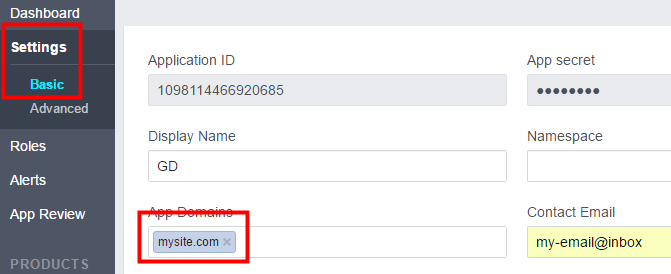
please provide a screnshot of your FB app settings.
The equivalent of this: https://wpgeodirectory.com/docs/wp-content/uploads/sites/3/2014/12/social8.png
Let us know,
Thanks
Hi,
I see the map working. The Google Maps API key may take up to 15 minutes before it is fully functional.
Maybe that was the problem?
Let us know,
Thanks
You need to remove disable W3 total cache, clear it’s cache, deactivate it and delete it, than visit wp-content and make sure there is nothing left from that plugin (it creates files and folder).
Once that done, use only a compatible caching plugin. (gd booster or wp super cache)
Thanks
Hi,
it doesn’t looks like you followed the instructions here : https://www.arbolife.com/wp-admin/admin.php?page=geodirectory&tab=managelocation_fields&subtab=geodir_location_translate
Translate the countries you want to via .po file and then upload the .mo file to your server, then tick the countries you translated and click the Update button.
in your fr_FR.mo file you should translate switzerland to suisse, than click update.
If users submit a listing from the french version of your website, yes, it will use the translated country.
Let us know how it goes,
Thanks
December 8, 2016 at 1:41 pm in reply to: Categiry description showing top and bottom of listings in Supreme theme #321325Child themes that depend on plugins may have to be updted as frequently as the plugin is.
https://wpgeodirectory.com/wordpress-child-themes-in-2016/
Thanks
Now it is late, we will take care of it tomorrow, thanks for your patience.
Please @kiran have a look at all of Marc’s tickets: https://wpgeodirectory.com/support/members/arbolife/topics/
I believe most problems are related and have to do with the WPML implementation.
Let us know,
Thanks
Developers will check and they’ll let you know asap.
Thanks
I used Firefox, did you try clearing your browser cache? If you attach the correct image we’ll put it back up.
Let us know,
Thanks
Please see: https://wpgeodirectory.com/support/topic/remove-time-from-listings/#post-117199
Let us know how it goes,
Thanks
hi,
you have 56 plugins installed 48 of which are active, do you need them all? Some of them could be creating conflict. All Google Maps plugins should be disabled, all plugins of the previously used theme should be disabled too.
It would be better to also completely delete all the plugin that are not 100% necessary and all the themes that are not used. (the website would load a bit faster)
Also how did you add this below the footer?
copyright Ciaomedico.it 2016 – 2017 sito internet realizzato da Nardoniweb
Let me know,
Thanks
css was probably easier and yes you will lose your changes after every updates. Where exactly you want to hide the event time?
I asked to the developers to let us know if there is a hook for this.They’ll let you know asap.
Thanks
I believe the error lies here:
the country in English: Switzerland and the slug “suisse”
If you use the country in English, you should use the english slug too.
However without having a look at your settings, it’s not possible to solve this kind of problems.
If you provide admin credentials in a private reply, we will check and help you fix it.
Thanks
-
AuthorPosts