Paolo
Forum Replies Created
-
AuthorPosts
-
Hi,
that is because an embed code (iframe) shoulc be used instead.
Thanks
Do you need the CSS or you know how to get it?
Let us know,
Hi,
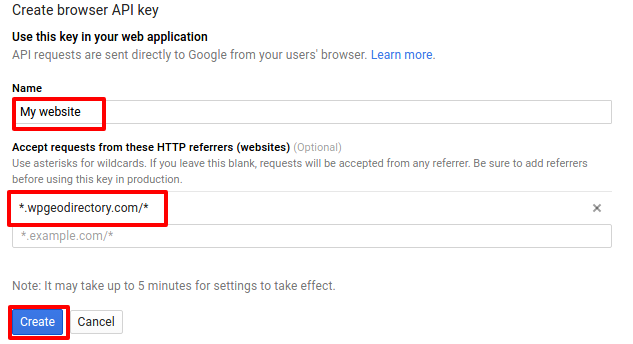
we need to see these settings: https://wpgeodirectory.com/docs/wp-content/uploads/sites/3/2016/06/gkey2.png
Let us know,
Thanks
If the maps are still working you don’t need to do anything.
It is 25 thousands map loads per day.
Thanks
Hi,
the only way to format the list as a table would be via CSS. It is not possible to change the html from a list to a table without a much harder customization.
Post codes cannot be abbreviated.
This as well would require a customization I fear.
Customizations are beyond support.
Thanks
You are welcome 🙂
June 25, 2016 at 5:44 pm in reply to: This page didn't load Google Maps correctly. See the JavaScript console for tech #215990You are welcome 🙂
Hi,
you can simply change the title of the GD Choeck out page to achieve that. However it should be translatable too and it seems like it’s not from my tests too, so I’m going to make sure the devs know about this.
Thanks for spotting this.
Please see: https://wpgeodirectory.com/google-maps-api-key-and-new-limits/
Thanks
June 25, 2016 at 5:30 pm in reply to: This page didn't load Google Maps correctly. See the JavaScript console for tech #215985Hi,
you didn’t enter it correctly.
The url should be:
*.kamasvalley.info/*
Instead you entered:
*kamasvalley.info*
the dot after the 1st asterisk and the slash before the last asterisk are necessary.
Correcting that should fix it. Remember it will take about 5 minutes after you correct it for the maps to start working.
Let us know if that helped,
Thanks
You are welcome 🙂
June 25, 2016 at 5:23 pm in reply to: This page didn't load Google Maps correctly. See the JavaScript console for tech #215975print screen of your API settings and your API key?
We cannot access your google account.
Let us know,
Thanks
Hi,
go to Place settings >> Double click on the Category field to open it’s settings and change the selection from Ajax Chain to Select or CheckBoxes.
Thanks
Hi,
that is not possible without a customization.
However you could hide it with CSS in the add-listing form and only have it in the check out page where it is showing again.
Let us know if that would help.
Thanks
You are welcome 🙂
-
AuthorPosts