Guust

Forum Replies Created
Viewing 15 posts - 4,186 through 4,200 (of 27,116 total)

Viewing 15 posts - 4,186 through 4,200 (of 27,116 total)
Make sure you update your language files as explained here: https://wpgeodirectory.com/docs/updating-your-language-files/
Thanks
That URL does not work for me, can you check please.
You do not have a post_type called
gd_placesbut
gd_place.
I corrected the post_type and uploaded the listings without any problems to your site.
You just have to upload the images.
Thanks
Just select nothing in “show in what locations” in the custom field settings.
Thanks
You can just add 2 videos to the video field.
Please post your URL and WP admin details in a private reply and we’ll check it out.
Thanks
The search page is not using the location page: https://menudev.usmenuguide.com/search/?geodir_search=1&stype=gd_place&s=+&snear=&sgeo_lat=&sgeo_lon=&city=pensacola-beach
I guess that you maybe mean that if using the location switcher in the menu to navigate to a location, then yes, the location page will be used.
You could use the categories widget in the sidebar, then it will show at the end of the page on mobile.
I’ll get the developers to have a look at the question about “show more” categories in case you limit the categories initially.
Thanks
Hi Tim, please leave your setup alone for the moment, we are busy looking into it and will report back soon. Thanks
When you imported, the system could not find the image so forgot about it and moved on to the next listing.
By adding the image now, no connection will be made unless you update the listing by CSV or in the backend.
Thanks
Firstly, you should correct your WP permalinks: https://wpgeodirectory.com/docs/basic-installation/#postnames
There is a difference between a NEAR search and an IN search, see https://wpgeodirectory.com/docs/gd-search/#near
IN Tacoma: https://www.advodoctors.com/?geodir_search=1&stype=gd_place&s=+&snear=&set_location_type=3&set_location_val=4&sgeo_lat=&sgeo_lon=
The search will not work correctly with the permalinks being set incorrectly.
Let us know how you went.
If you want us to check your settings, post your WP Admin details in a private reply.
Thanks
Can we have WP admin details in a private reply to check please. Thanks
A category IS a parent category unless you make it a child category, I already posted the image about an hour ago:
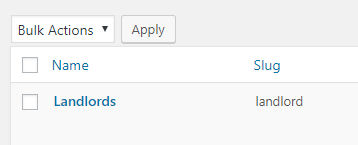
So if it took a while to show up anywhere else, it may be because of some caching or because you have a lot of categories.
Bit hard to review with not all data in the CSV.
Let us know if you have more troubles.
You do get the option when creating a new category to select a parent.
If you do NOT select a parent, then the new category will automatically be a parent.
The first image is where you would choose a parent when adding a new category in the backend.
The second image is how to upload a parent and a child using CSV.
Get the latest news, tips, and exclusive content directly in your inbox.
Confirm your email address, and instantly receive the discount code :)