Paolo
Forum Replies Created
-
AuthorPosts
-
Hi,
did you follow this doc? https://wpgeodirectory.com/docs/core-place-settings/
Which type of custom field did you use and how did you set it up?
If you provide admin credentials we’ll have a look.
Thanks
Hi,
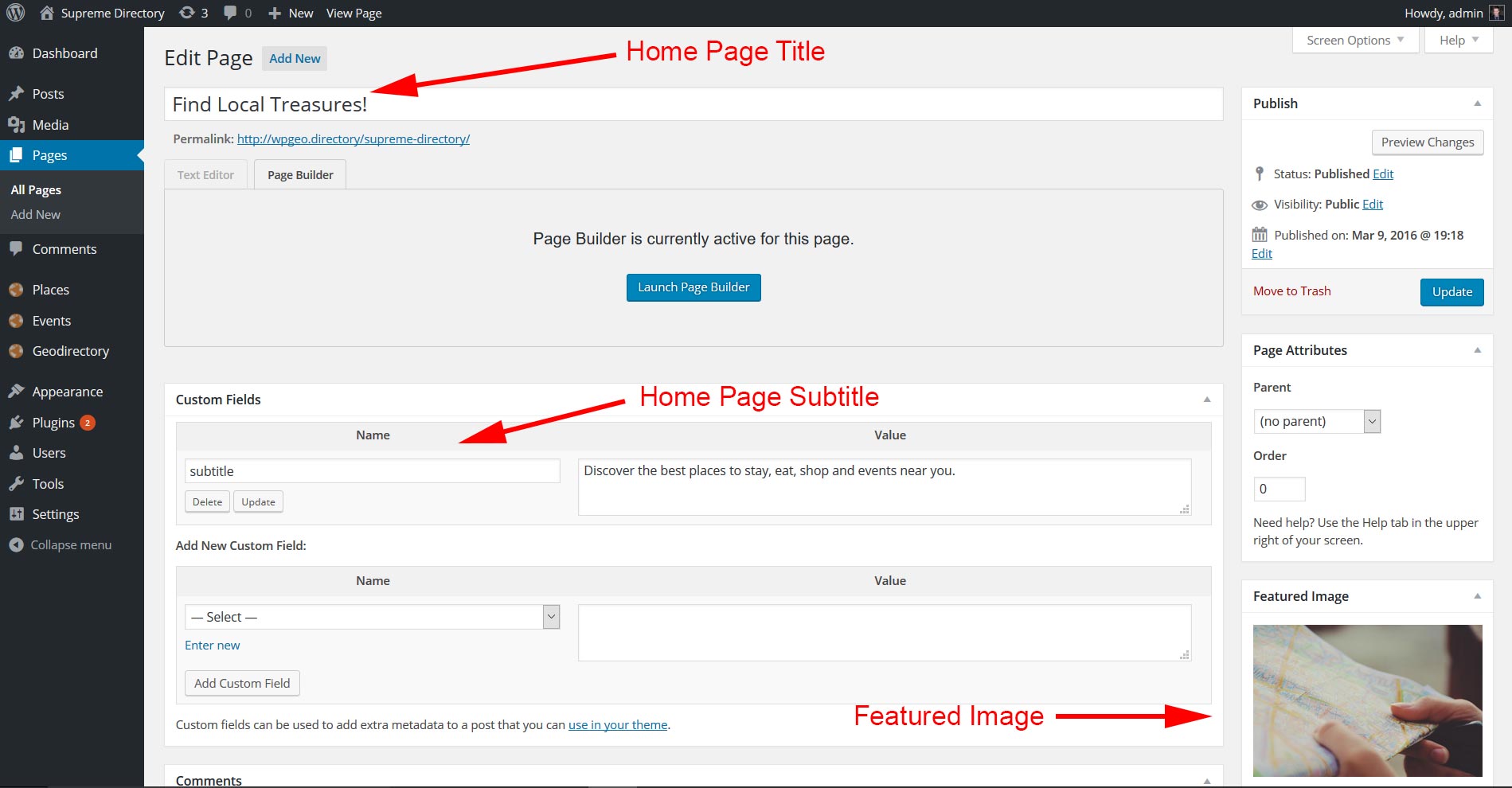
please see: https://wpgeodirectory.com/docs/supreme-directory-overview/
In particular this section: https://wpgeodirectory.com/docs/wp-content/uploads/sites/3/2016/03/home.jpg
Let us know how it goes,
Thanks
Hi,
that’s something you should ask to your hosting provider.
If the email log is logging the emails, but they are not sent, most likely the problem is SMTP related (still a server problem).
There are plugin to fix this very common problem: https://wpgeodirectory.com/support/search/?bbp_search=smtp+plugin
Let us know how it goes,
Thanks
What do you mean it happens in the mobile version, the error doesn’t happen when on desktop???
If yes, which mobile device are you testing with?
There should be no difference between desktop and mobile.
Autocomplete is not working on your website and I see a Javascript error on the desktop add listing page too, but i can’t find what’s causing it. I asked to the developers to follow up.
Thanks
It should work with any CPT, if you provide a link and admin credentials, we will have a look.
Remember to let us know on which page you are trying to use the shortcode.
Thanks
hi,
Please provide admin credentials in a private reply and we will check your settings.
Thanks
Hi,
that’s normal behavior, once the location is set, all links are filtered by that location unless you clear the location by clicking vendor, or by adding the location switcher somewhere on your website.
That will make everything clearer.
Thanks
You are welcome 🙂
To avoid hiding that widget from other pages too (in case you wish to use it), change that css to:
.sd.home .geodir-category-list-in { display: none!important; }That way it’ll be hidden only in the front page.
Thanks
Hi,
I guess you are using the Supreme Child Theme, in that case with this CSS added in GeoDirectory >> Design >> Scripts >> Custom CSS :
.sd-my-account.menu-item { display: none; }Thanks
Hi,
please provide a link and admin credentials in a private reply and we will have a look.
Thanks
Hi,
What kind of server are you using? How many plugin did you install? Is the website cached?
If you provide admin credentials, we’ll have a look.
Thanks
Hi,
there is no address at the top of the detail page of supreme, just City, Region and Country.
What are you trying to change?
Thanks
Hi,
normally that would happen when you have 2 map widgets in place.
If you provide a link and admin credentials we will check and let you know.
Thanks
Again after 1st attempt: You have been locked out due to too many invalid login attempts.
Please disable it.
Thanks
-
AuthorPosts