GeoDirectory vs Brilliant Directories
Full disclosure first.
We built GeoDirectory.
So read this the way you would read any comparison written by one of the two companies in it.
Check the claims.
We link our sources and name every feature, so you can verify each line yourself.
One thing makes this comparison different from most on our blog.
Brilliant Directories is a hosted platform.
GeoDirectory is a self-hosted WordPress plugin.
Those are two different kinds of product, and that difference shapes almost everything that follows, from how you build the site to whether you own it at the end.
Most “GeoDirectory vs Brilliant Directories” pages skip past that.
They line up features in a table and treat the two as interchangeable, which quietly hides the decision that actually matters.
If a plugin-to-plugin comparison is what you’re after, we already put GeoDirectory head-to-head with Directorist and with HivePress.
This one runs deeper, because the competitor is a closed platform, so the question sitting underneath every section is ownership.
Who holds your code, your design, your data, and your freedom to leave when you want to.
No fluff.
No fake neutrality.
Just verifiable facts and the conclusions a buyer can check.
Here’s what we’ll cover.
- The core difference: a hosted platform vs a self-hosted plugin
- Features: what you get out of the box
- Design and customization: why every Brilliant Directories site looks related
- AI: page-level content help vs building the whole site with AI you own
- The data model: your database is the real moat
- Vertical depth: real estate, events, jobs, and the MLS question
- Frontend submission and member dashboards
- Search and filtering: a directory is only as good as its search
- Maps and location pages: the SEO that compounds
- Monetization: the same suite, plus the models they cannot reach
- SEO and schema: their system vs the whole WordPress toolbox
- Performance and scalability: the part you cannot fake
- Data ownership, portability, and lock-in: the question under every other question
- Multilingual: a translate button vs a real second language
- Support, onboarding, and reputation: where the two are evenly matched
- Pricing and total cost of ownership: rent forever, or own outright
- The verdict: who each one is actually for
- Before you decide
TL;DR: the short version before the long one
This is a long, detailed comparison, so here is the short version before you commit to reading all of it.
Brilliant Directories is a hosted platform you rent, where everything is handled for you and your site stays on their servers.
GeoDirectory is a self-hosted WordPress plugin you own, where your data and your entire site are yours to move, rebuild, or sell, with a fully managed SaaS version launching soon that keeps that ownership intact.
If you want a membership site live this week and never plan to touch a server, Brilliant Directories fits, and its support is genuinely good.
If you are building a directory you intend to grow and keep as an asset, GeoDirectory is the stronger choice on nearly every axis that follows.
The table sums up the differences, and the rest of the article backs up every line of it.
| GeoDirectory | Brilliant Directories | |
|---|---|---|
| Type & hosting | Self-hosted WordPress plugin, managed SaaS launching with V3 | Hosted SaaS platform, hosting included |
| Ownership | Own your site and data (export both, self-host, sell as an asset) | Export data only, site stays on their servers |
| Pricing | Free core; membership $139/yr single site, $229/yr unlimited sites, plus your own hosting | $145/mo, or lifetime $725 to $2,950; hosting included |
| Refund | 30-day money-back guarantee | 7-day money-back window |
| Scale | Millions of listings on custom database tables; 65,000+ live on wp-rankings.com | Plan caps, up to 100,000 members per site |
| Data model | Unlimited custom post types, custom fields, own indexed tables | Fixed listing and member model |
| Design | Any theme, any page builder, full template control | Fixed theme system, recognizable template look |
| AI | Build the entire site with Claude Code on a local install, no metering | Page-level content generation, metered credits |
| Search | Filter by any custom field, near-me radius search | Built-in search within their defined fields |
| Location pages | Real country/region/city/neighbourhood hierarchy, your URLs and templates, Google or OpenStreetMap | Auto-generated search-result pages, Google Maps with added API cost |
| Schema | Category-level JSON-LD you control | Whatever the platform emits |
| SEO tooling | Full WordPress SEO stack (Rank Math, Yoast, and more) | Built-in SEO only, no plugins |
| Monetization | 10+ models via GetPaid, no WooCommerce for listings: paid and featured listings, claims, leads, ads, memberships, appointments, rentals, event tickets, marketplace | Bundled membership and listing monetization suite |
| Real estate | GeoMLS (launching soon) connects to any modern MLS provider over the RESO Web API | Themed skin, no native MLS |
| Multilingual | True multilingual via WPML, each language indexed | English admin, Google Translate overlay, paid third-party for indexed languages |
| Front-end submission & members | Free via GeoDirectory core and UsersWP | Native and turnkey, their strongest area |
| Support | Excellent, 4.8 across Trustpilot and Capterra | Excellent, 4.8 on Capterra |
| Onboarding | Steeper learning curve, deep docs and community | Faster, turnkey start, their edge |
The core difference: a hosted platform vs a self-hosted plugin
Before any feature comparison, you need to understand what you are actually choosing between, because these are two different kinds of product.
Brilliant Directories is a hosted platform.
You sign up, pick a theme, and add listings from a web admin, and Brilliant Directories runs everything behind it: the servers, the updates, the backups, the security.
You never touch code, and you never manage a server, which is the entire appeal.
GeoDirectory is a self-hosted WordPress plugin.
You install it on your own WordPress site, on hosting you control, and the site belongs to you from day one.
That single difference decides most of what follows, so it is worth being honest about both sides.
Here is the fair part for Brilliant Directories.
Managed convenience is a real advantage.
If you have no interest in hosting, updates, or maintenance, a platform that handles all of it removes a genuine burden, and for a non-technical founder, that burden is often the difference between launching and never starting.
We are not going to pretend that away.
Here is the catch.
Brilliant Directories lets you export your data.
It does not let you export your website.
The design, the templates, the code, and the site itself live on their infrastructure and stay there.
There is no moving the site to another host, and no selling it as a self-contained asset a buyer can take over.
Even on their lifetime plan, that stays true, because paying once removes the monthly bill but not the lock-in; your site still lives on their infrastructure and cannot leave it.
So the listing database you spent years building, the real moat, sits trapped inside a house you can pay off but never actually own.
With GeoDirectory, that same database lives on hosting you own, in a standard WordPress install, and you can move it, back it up, hand it to a developer, or sell the whole business with the site attached.
Ownership is the frame for every section below, from design to SEO to pricing, so keep it in mind as we go.
What about managed hosting?
Fair question, because handling the servers for you is the one thing a hosted platform does that a plugin, on its own, does not.
So we built a managed version.
A fully hosted GeoDirectory SaaS is launching with GeoDirectory V3 after the summer, with native AI support built in.
It already runs in production today on wp-rankings.com, our live plugin directory with more than 60,000 listings and millions of rows in the database, so this is a platform we run at scale ourselves before we hand it to anyone.
Here is the part that matters.
You can move off it whenever you want.
A simple export and import lifts your entire site from our managed hosting to your own server, with your data and your design intact, so you are never locked in.
You get the convenience of a hosted platform, and you keep the ownership of self-hosted WordPress, and you decide which one you want at any point along the way.
That is the choice Brilliant Directories cannot offer, and it is the reason this comparison runs the way it does.
Features: what you get out of the box
In our plugin comparisons, this is where we line up the two free versions side by side.
That does not work here, because Brilliant Directories has no free version.
You get a 7-day trial with no credit card, and after that you need a paid plan to keep the site online.
So the honest question is what each product gives you on day one, and what “free” even means on each side.
Start with GeoDirectory, because the answer there is simple.
The whole directory engine is free.
The free core plugin on WordPress.org gives you unlimited listings, a drag-and-drop front-end submission form so users add their own listings, custom fields across thirteen field types, unlimited categories with custom map markers, cached Google Maps, built-in search, user reviews, and CSV import and export.
It runs on custom database tables built to hold millions of listings, so the free version is the same engine that powers wp-rankings.com.
You only pay when you want to extend it, and then you pay for the specific piece you need: the Location Manager to go multi-city or global, the Pricing Manager to charge for listings, and so on.
Nothing is bundled that you did not ask for.
Brilliant Directories takes the opposite approach, and for some buyers that is the appeal.
Everything is on from day one.
A paid plan gives you listings, member profiles, search and filtering, auto-generated location pages, reviews, the full monetization suite, email marketing, managed hosting, SSL, backups, and monthly AI credits, all wired together and working without you assembling anything.
For a non-technical founder who wants to skip integration entirely, that turnkey breadth is a genuine strength, and we give them full credit for it.
The trade sits underneath it.
With Brilliant Directories, the breadth is bundled, so you take the whole platform at a plan price whether you use every part or not, and each plan carries caps on members and listings.
With GeoDirectory, the engine is free and uncapped on listings, and the breadth is modular, so you assemble exactly the directory you need and pay only for the extensions you use.
One gives you a finished box.
The other gives you a foundation you own and build on.
Which fits depends on whether you value speed of setup or control of the result, and the sections below test both.
Design and customization: why every Brilliant Directories site looks related
Here is a test you can run yourself.
Open a handful of live Brilliant Directories sites, and you start to recognize them within seconds.
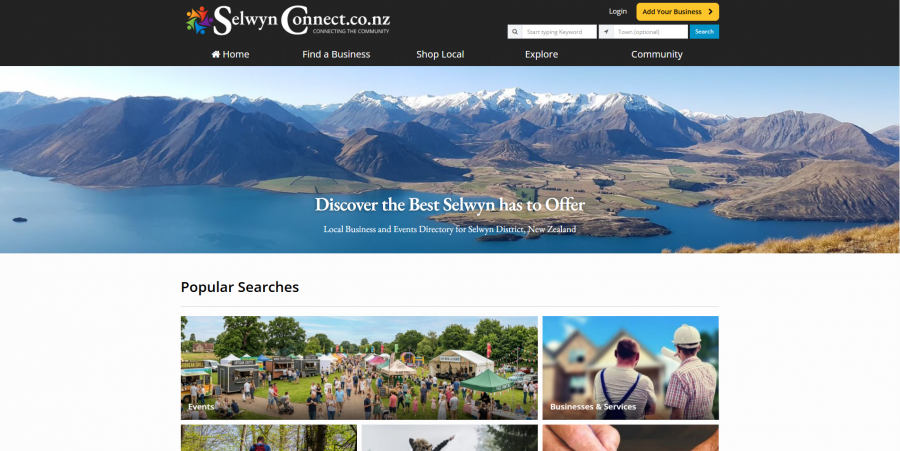
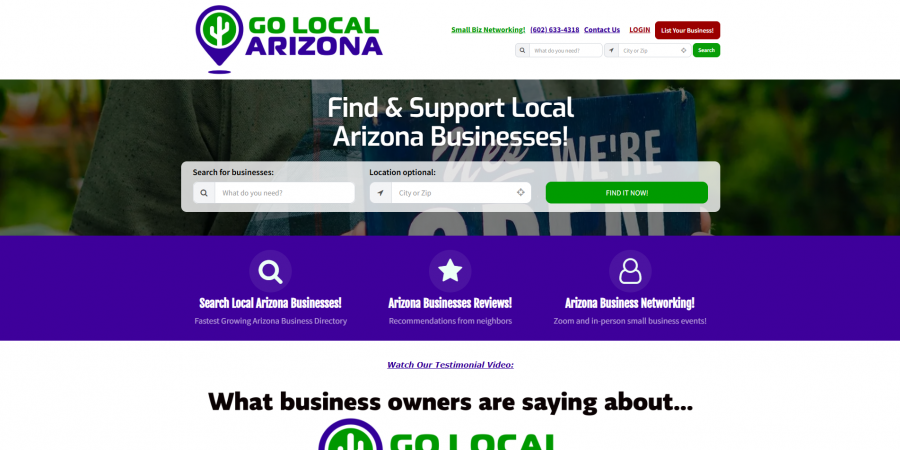

The same header shapes, the same listing cards, the same sidebar boxes, the same busy layout, turning up again and again.
That sameness comes straight from how the platform is built.
You design within their theme system, using their editor, inside the boundaries they set.
You can change colors, swap a logo, pick from their layouts, and rearrange some blocks, and that covers most of what a hosted editor allows.
What you cannot do is rebuild the template layer itself, so most sites settle into the same recognizable shape.
You do not have to take our word for the result.
Independent reviews say the same thing, describing the templates as cluttered and visually dated, with too many bars, badges, and sidebars competing for attention, closer to an early-2000s directory than a modern product.
A dated interface comes up again and again as a recurring complaint.
For a directory, this matters more than vanity, because the template is the product your visitors actually use: the search page, the listing card, the lead form, and a dated shell costs you trust before anyone reads a word.
Now credit where it is due.
If you have no design skill and no interest in acquiring any, a fixed template that looks acceptable on day one is a real convenience, and Brilliant Directories gets you there fast.
GeoDirectory makes the opposite trade.
It imposes no look at all.
Because it is a WordPress plugin, it runs with any theme and every major page builder, Gutenberg blocks, Elementor including PRO dynamic data, Bricks, Divi, Beaver Builder, and Breakdance, so you can design the front end however you and your builder can imagine.
Our own free BlockStrap theme takes that further.
It is a full block theme with more than thirty Bootstrap blocks, and it builds the entire site, the header, the footer, the menus, and every template, all from inside the WordPress editor.
You can start from one of our free vertical themes for directories, real estate, or job boards, restyle it beyond recognition, or override any template in code if you want to go all the way down.
The ceiling is whatever you or your tools can build, and wp-rankings.com is what that looks like at full scale.
Here is the honest trade in one line.
Brilliant Directories hands you a finished look and a boundary you cannot cross.
GeoDirectory hands you the tools, a set of free themes to start from, and no boundary at all, which means the design work and the design freedom are yours.
AI: page-level content help vs building the whole site with AI you own
Both products now put AI front and center, and this is the clearest place to see the difference between a hosted platform and software you own.
Brilliant Directories built its AI into the admin panel.
Their BD Butler assistant drafts site text, writes emails, and generates page sections, and their page generator spins up landing pages, blog posts, and newsletters from a short prompt.
You describe a page, the AI builds the sections, text, and images, and you refine the result in their editor.
For a non-technical founder, that is genuinely useful, and it produces a decent page in minutes.
Notice the unit of work, though.
It is the page.
Their own marketing frames the whole feature around building web pages fast, one page at a time.
The AI writes and designs content that lives inside the site.
It does not build the site.
The header, the footer, the templates, the search behavior, the data model, the architecture underneath, none of that is on the table, because a hosted platform cannot hand its own foundations to your prompt.
The credits make the boundary concrete.
Their AI runs on a monthly credit allowance, and when you run out, you buy more, so the help is metered by design.
They have also added an MCP server recently, which lets an AI assistant talk to their platform through the API they expose.
That is a real step, and it is worth acknowledging.
It still operates inside their walls.
An MCP against a hosted API can manage what the API allows, posts, members, and the like, and it never reaches the codebase, because there is no codebase for you to reach.
GeoDirectory starts from a different place, and it changes what AI can do for you.
You own a standard WordPress install, so you can run the entire site on your own computer with a tool like Local, and point an AI coding agent straight at the real files.
We use Claude Code for this.
It edits templates, functions, custom fields, and the database directly, builds new features, and reshapes the whole site, with no meter and no boundary beyond your own skill and the tools you point at it.
The proof is wp-rankings.com.
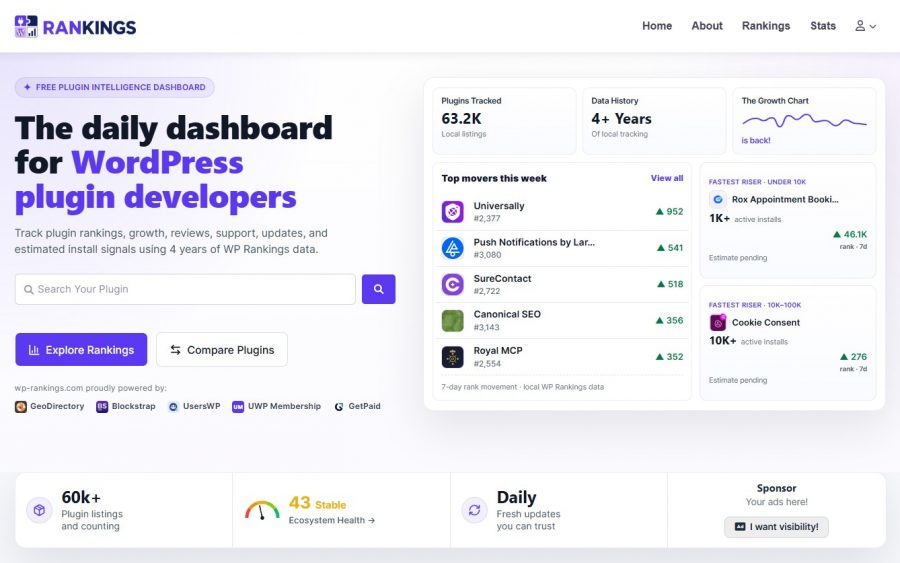
We built it with Claude and Claude Code on a local GeoDirectory install, and it runs over sixty-five thousand listings, millions of rows across its database tables, and around ten thousand visitors a week.
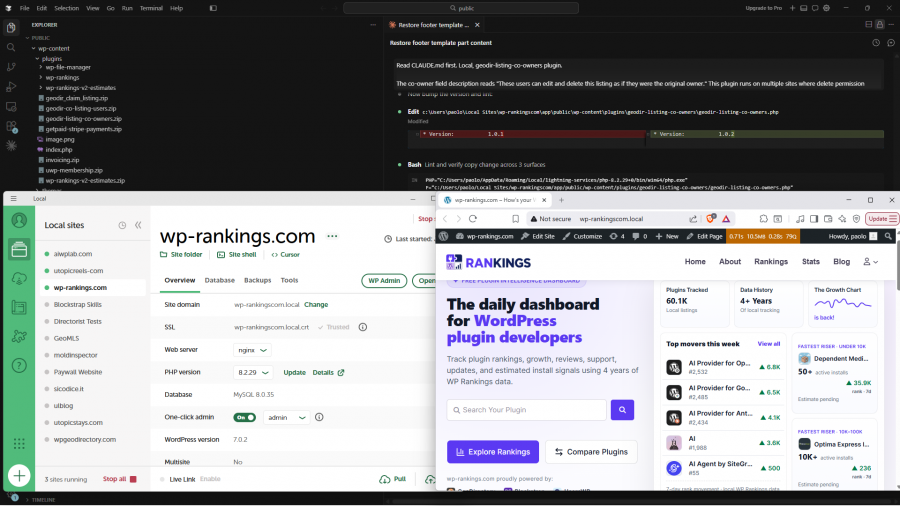
No hosted admin panel builds that, no matter how many AI credits it hands you, because building it is site engineering, and a page generator only fills a page.
GeoDirectory V3 brings native AI support into the product itself, launching after the summer, so this stops being something you wire up and becomes something built in.
Here is the trade, stated fairly.
Brilliant Directories gives you AI you can switch on today with zero setup, bounded to content inside pages and metered by credits.
GeoDirectory gives you AI with no ceiling and no meter, aimed at the entire site, in exchange for setting up WordPress locally and using an agent like Claude Code or Codex.
One helps you fill a website faster.
The other helps you build one.
The data model: your database is the real moat
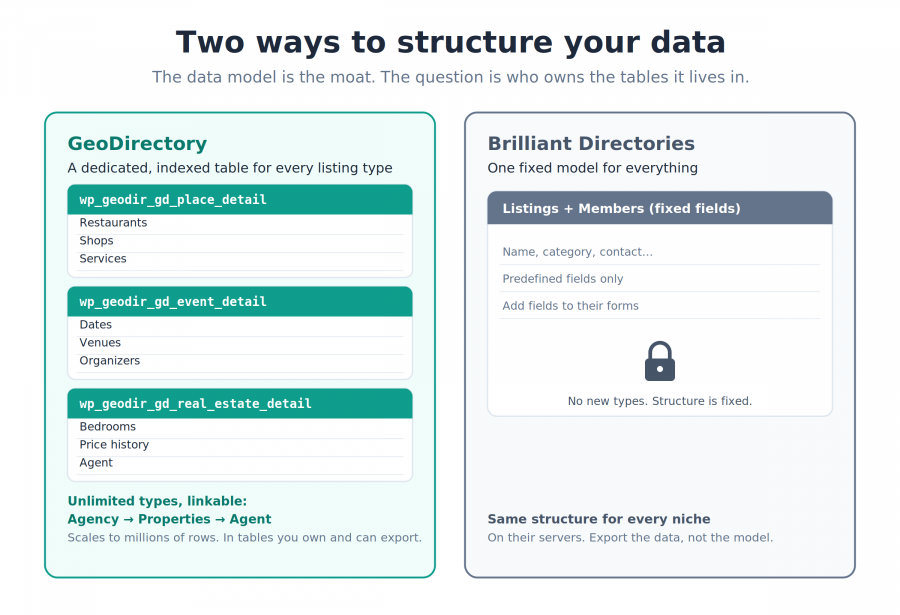
Strip a directory down to what actually matters, and you are left with a database.
The listings, the fields that describe them, the categories, the locations, and the relationships between them.
That database is the business.
It is the thing that took you years to build, the thing competitors cannot copy overnight, and the thing a buyer would actually pay for.
So the question that matters is who owns the tables it lives in, and how freely you can shape them.
GeoDirectory stores your directory in its own database tables.
The default listing type, Places, lives in a dedicated table called wp_geodir_gd_place_detail, and every additional listing type gets its own table in the same pattern, wp_geodir_gd_{cpt-name}_detail.
This is why GeoDirectory holds millions of listings without slowing down, because the data sits in purpose-built, indexed tables instead of the generic wp_postmeta table where most plugins store everything.
You can export all of it to CSV, re-import it, move it to another WordPress install, back it up, or hand it to a developer to query directly.
It is yours, in a standard format, on hosting you control.
You also get to shape the model to fit reality.
The free core gives you one listing type with its own custom fields across thirteen field types.
Add the Custom Post Types add-on, and you can create as many listing types as you need, each with its own fields, categories, tags, and form, and you can link them together.
A venue with all its events on a tab.
A hospital with every doctor who works there.
An agency with its properties, and each property with its agent.
You model the actual structure of your niche, and each type lands in its own table built to scale.
Brilliant Directories works the other way.
The data model is fixed.
You get listings and members in the structure the platform defines.
You can add fields to the forms they give you, and that is the extent of it.
You cannot create independent listing types with their own storage.
You cannot change how or where the data is held, and the tables live on their servers.
You can export a CSV of your data, which is worth having, and even then the structure, the relationships, and the site that gives the data meaning stay behind.
There is a fair side to their approach.
A fixed model is simpler.
Someone decided the architecture for you, so there is less to learn and fewer decisions to make, and for a straightforward business directory that can be enough.
Here is where it leaves you, though.
With Brilliant Directories, the moat you spend years building sits in a structure you rent and cannot take with you.
With GeoDirectory, the same moat lives in tables you own, in a format you can export, on hosting you control, shaped the way your business actually works.
The database is the asset, and only one of these two lets you keep it.
Vertical depth: real estate, events, jobs, and the MLS question
Brilliant Directories markets itself for plenty of niches: real estate, events, job boards, classifieds, professional membership sites, and more.
Look at how it delivers them, and the pattern is the same every time.
One fixed platform, restyled and reconfigured for the niche.
The listing and member model underneath does not change, so a real estate site and a job board are the same structure wearing different themes and settings.
For a lot of directories, that is perfectly fine, and we will not pretend otherwise.
GeoDirectory approaches verticals from the data layer instead of the theme layer.
Because you can create custom post types with their own fields, taxonomies, and tables, each vertical is modeled properly rather than skinned.
A job board gets fields for salary, contract type, and remote status.
An events directory gets dates, venues, and organizers.
A property portal gets bedrooms, price history, and agent links.
We also ship free vertical themes to start from, a Real Estate theme, an Events theme, and a Job Board theme built on BlockStrap, plus add-ons like Events for date-driven listings, so you are not building each niche from a blank page.
Then there is the one that separates the two products completely.
Real estate.
On Brilliant Directories, a real estate site is a directory of properties you add or import by hand, styled to look the part.
GeoDirectory is launching GeoMLS, which connects your directory to any modern MLS provider over the RESO Web API
Live property listings flow straight into your site and update automatically as they change on the MLS, with photos, pricing, and full property details.
That is the difference between a real estate skin and a real estate platform, and live MLS integration is not something Brilliant Directories does natively.
Here is the honest boundary.
If your niche is a straightforward business or membership directory, and you never need live data feeds or deep per-type fields, Brilliant Directories reaches an acceptable result without you thinking about structure at all.
If your niche has its own shape, its own fields, and its own data sources, that structure is the whole game.
Brilliant Directories gives every niche the same skeleton under a fresh coat of paint.
GeoDirectory gives each niche its own skeleton, and when a vertical carries real structure, and real estate always does, that gap decides everything.
Frontend submission and member dashboards
This is the section where Brilliant Directories is strongest, and it is worth being clear about why.
Brilliant Directories was built as a membership platform first and a directory second.
So everything to do with members is native and polished: front-end signup and login, member profiles, account dashboards, and a submission flow where a user adds a listing without ever seeing an admin area.
It is all wired together on day one, with nothing to install and nothing to configure.
For a site whose whole point is paying members managing their own entries, that turnkey membership layer is a real strength, and it is probably the thing the platform does best.
GeoDirectory reaches the same place with two free plugins built by the same team to work together.
GeoDirectory core handles front-end submission on its own.
Users add and edit their own listings through a front-end form, and they never touch wp-admin.
UsersWP handles the member side.
It gives you front-end registration, login, password recovery, profile pages with avatars and cover images, and a searchable members directory, all from a drag-and-drop form builder, and it sets up in a couple of minutes.
The integration between the two is built into GeoDirectory core, so a member’s profile shows a tab for the listings they submitted, their reviews, and their favorites, and once you add GetPaid an Invoices tab appears alongside them.
A listing owner logs in, submits, manages their listings, and pays, all from the front end, which is exactly the journey Brilliant Directories offers.
Both plugins are free.
Here is where GeoDirectory moves ahead.
You own and can redesign every form, every profile, and every user’s dashboard template, the same way you edit any WordPress page, so the member experience is yours to shape rather than theirs to define.
The members directory is itself a real searchable directory, sortable and filterable like any other.
And the whole thing extends through add-ons, social login, signup moderation, WooCommerce orders, newsletter opt-in at registration, each adding a tab or a step without custom work.
The trade is the familiar one.
Brilliant Directories hands you the membership layer pre-assembled, and GeoDirectory has you run two official plugins designed to snap together, both free, with the connection already in core.
You give up a few minutes of setup, and you get a member experience you own outright and can rebuild to fit.
On their strongest ground, that is a fair fight, and ownership is what tips it.
Search and filtering: a directory is only as good as its search
A directory people cannot search well is a list.
So this is where the two products either earn their keep or fall short, and both of them ship working search on day one.
Give Brilliant Directories its due first.
Search is built in, it understands location, and it works the moment your listings are live, with nothing to configure.
For a directory of a few hundred or a few thousand entries with standard fields, that is enough, and most visitors will find what they came for.
GeoDirectory starts from a similar place and then goes much further.
The free core already searches by keyword and by location, with a “Search For” field and a “Near” field, and it sorts results by proximity, rating, reviews, or date.
Add the Advanced Search Filters add-on and the search turns into something closer to a marketplace.
Visitors get autocomplete on both fields, a “near me” option that reads their location and returns results within a radius they choose in miles or kilometers, the real distance shown under each listing, and filters for any custom field you created.
Pet-friendly hotels with disabled access within ten miles of me, sorted by distance.
Taco stands open now within a mile.
Both examples come straight from you having built those fields into your data model in the first place.
That is the point worth sitting with.
Search quality is downstream of the data model.
Because you own and shape the structure, as we covered earlier, every field you invent becomes a filter you can offer, and every listing type can carry its own set of search filters.
Brilliant Directories searches the fields it defined, in the way it defined them.
If their model has no field for a thing, there is no filter for it, because you cannot add the field in the first place.
There is a performance side to this too.
GeoDirectory runs search against its own indexed tables, so it stays fast as the directory grows into the tens and hundreds of thousands of listings.
wp-rankings.com searches across over sixty-five thousand entries without breaking stride, on the same engine you would be using.
On Brilliant Directories, the plan caps keep you well below those volumes, so you are unlikely to ever test the ceiling, which cuts both ways.
Here is the honest read.
If your directory is modest and your fields are standard, Brilliant Directories gives you search that works with zero effort.
If you want visitors to slice your listings by the details that matter in your niche, that depends on owning the data model, and owning the data model is exactly what a hosted platform withholds.
Maps and location pages: the SEO that compounds
Location pages are where a directory quietly builds its SEO.
Every city, every region, every category in a city becomes a page that can rank for the searches real people type, and those pages compound as the directory grows.
Both products understand this, and both generate location pages automatically, so let me give Brilliant Directories a clean hearing first.
Their location SEO is genuinely good out of the box.
Brilliant Directories builds a page for every member, every category, and every city automatically, wires SEO into all of them by default, gives them tidy URLs like united-states/city/profession, and lets you add custom headings, intro text, and FAQs to the important ones.
For a non-technical owner, that is a lot of programmatic SEO for zero effort, and we are not going to wave it away.
Here is what sits underneath it, though.
Those location pages are dynamic search-results pages with pretty URLs layered on top, generated by their platform, living on their infrastructure, styled inside their template system.
The location features on those pretty URLs lean on the Google Maps API, and their own documentation notes that switching the fuller version on adds Google Maps API cost.
GeoDirectory builds location pages a different way, and the difference is structural.
The Location Manager add-on gives you a real location hierarchy: country, region, city, and optionally neighborhood, and each level is a genuine page with its own clean URL, like location/united-states/new-jersey/maple-shade.
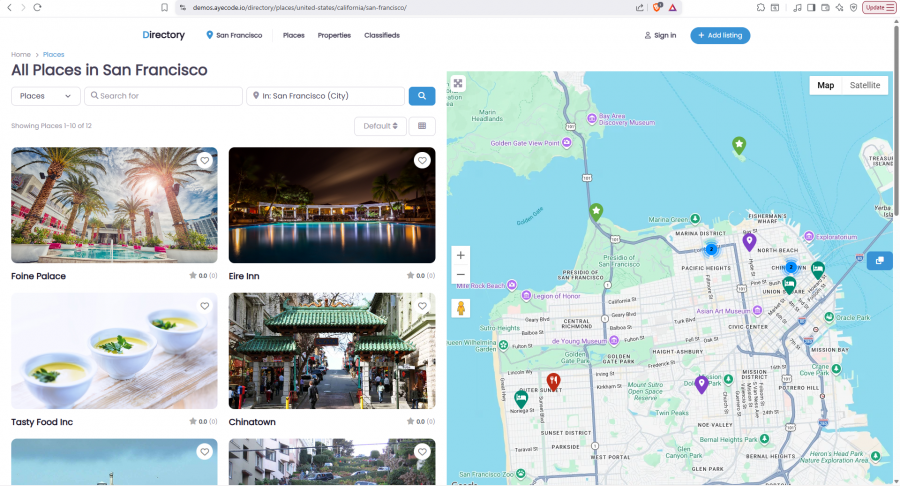
Every one of those pages carries its own meta title, its own description, its own featured image, and its own text, and you can redesign the whole location template the way you edit any WordPress page.
Locations populate themselves as users add listings, geocoded automatically, so the convenience matches theirs.
The maps underneath are your choice.
GeoDirectory runs on Google Maps or OpenStreetMap, so you can skip Google entirely, avoid the API keys, and sidestep the per-page Maps costs, while the maps stay cached and fast even with thousands of markers.
Now the part that ties back to everything else.
Programmatic location pages are an asset, often the most valuable SEO asset a directory owns.
On Brilliant Directories, that asset ranks inside a house you rent, and the pages and their URLs stay behind if you ever leave.
On GeoDirectory, those same pages, their URLs, their rankings, and their templates live in a WordPress install you own, so the SEO you spent years compounding moves with you.
Both platforms help you rank.
The difference shows up the day you decide to leave.
GeoDirectory hands you every ranking page, its URL, and its template intact.
Brilliant Directories hands you a spreadsheet.
Monetization: the same suite, plus the models they cannot reach
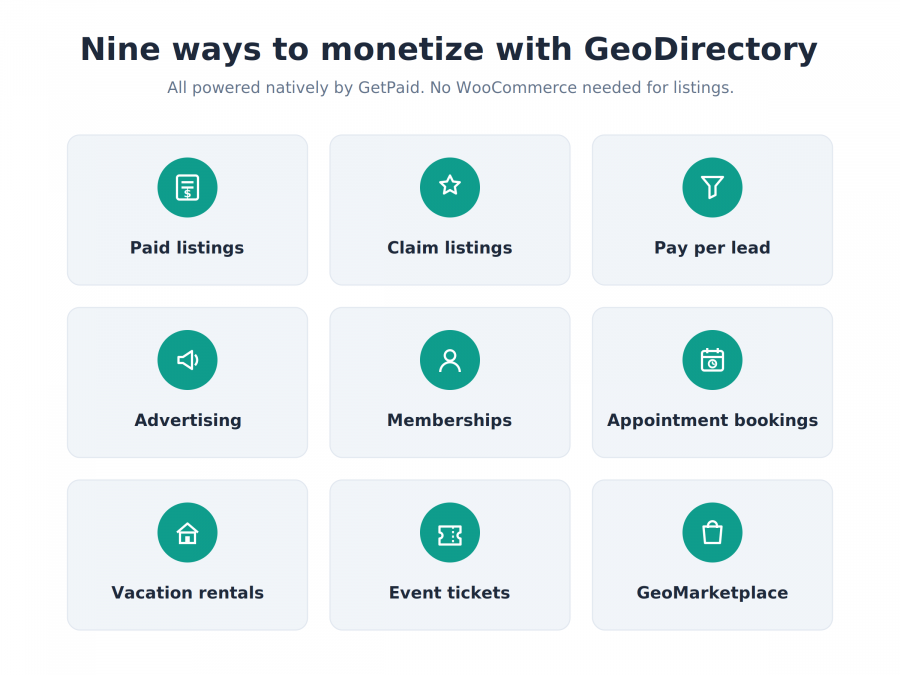
There is a lazy assumption worth killing up front.
Because Brilliant Directories was built as a membership platform, people assume it wins on monetization.
It does not, and it is worth walking through why.
Give them the fair credit first.
Their revenue tools are bundled, polished, and on from day one, recurring membership billing, paid and featured listings, paid claims, lead tools, and ad slots, all sitting inside the platform with nothing to wire up.
That turnkey suite is a real convenience, and for many owners it is enough.
Convenience is where their advantage stops, though.
GeoDirectory monetizes through GetPaid, its own free payments engine, with more than twenty gateways and global tax compliance built in, and it does it without WooCommerce for anything to do with listings.
On top of that engine, the Pricing Manager add-on lets you charge per listing, one-off or recurring, sell featured placements at the top of results, run free trials, and set expiry and renewals on autopilot.
Then the revenue models widen well past what a fixed platform offers.
You can charge to claim a listing with the Claim Listings add-on, charge per lead, run advertising, and gate access as membership through UsersWP.
You can take slot-based appointment bookings for a commission, the way Treatwell or Fresha works.
You can run a vacation-rental booking marketplace in the shape of Airbnb or Booking.com.
You can sell event tickets and keep a commission on every sale with the Events Tickets Marketplace, turning your events directory into your own Eventbrite.
And you can turn every listing into a full shop with GeoMarketplace (coupled with a WooCommerce Marketplace plugin), where owners sell products, and you take a cut, with buyers even searching for the nearest shop by proximity.
That is a wider menu of revenue than a hosted membership platform is built to provide.
Here is the honest trade, and it is not the one you might expect.
Brilliant Directories gives you a strong monetization suite pre-assembled, bounded by the models they decided to support.
GeoDirectory gives you a broader set of revenue models as modular pieces, powered by a native payments engine you do not pay a platform to use, switched on only where you want them.
You assemble a little more, and in return you can build revenue streams their platform has no answer for: a booking marketplace, a ticket marketplace, a vendor marketplace, each one its own business.
Every directory needs revenue, and both platforms deliver it.
What separates them is reach.
A fixed suite offers the models its makers chose.
A modular, self-owned stack keeps adding them as your business finds new ones.
SEO and schema: their system vs the whole WordPress toolbox
We covered location pages and programmatic SEO earlier, and gave Brilliant Directories real credit there.
This section is about the rest of SEO, the schema, the markup, and the tooling, and here the gap widens.
Start with the ceiling on their side, because it is easy to miss.
Brilliant Directories has its own SEO system, built in, with editable title and meta templates, variables, and social sharing tags.
It is competent, and it works without you installing anything.
What you cannot do is reach past it.
You cannot install Rank Math, or Yoast, or SEOPress, or any of the tools the rest of the WordPress world uses, because it is not WordPress, so your SEO is whatever their system emits, and however they choose to improve it.
GeoDirectory sits inside the entire WordPress SEO ecosystem instead of replacing it.
Out of the box, it manages its own titles and meta for every page and every listing type, with replacement variables, so you need no plugin at all to start.
When you want more, it integrates natively with Rank Math and Yoast, and works alongside the other major SEO plugins, so you can run the same best-in-class SEO stack that the most competitive sites on the web run, and hand meta and schema control to whichever one you prefer.
That matters most for structured data, and here GeoDirectory does it natively.
It outputs JSON-LD schema for your listings out of the box, and you set the schema type at the category level, so a restaurant category emits restaurant schema, a hotel category emits hotel schema, and a category of events emits event schema, all from core with no SEO plugin required.
Review stars feed in from your ratings on top of that.
Rich results are how a listing earns stars, prices, and details in Google, and increasingly how AI search understands what a page is.
On a fixed platform, you get the schema they emit.
On GeoDirectory you get the schema you decide to emit, and you can adopt every new type Google introduces the day it lands, without waiting for a roadmap.
The same holds for the technical levers, canonical tags, redirects, robots rules, hreflang, sitemaps, and the caching and CDN choices that drive Core Web Vitals.
On GeoDirectory, every one of those is yours to set.
On Brilliant Directories, you get the ones they expose.
Good SEO is a moving target, and Google moves it constantly.
The question is who gets to keep up: you with the full toolbox and your own markup, or a platform deciding on your behalf and on its own schedule.
Performance and scalability: the part you cannot fake
Most directory comparisons argue about speed with no directory big enough to test it.
We can do better, because we run one.
Start with the architecture, since that is what decides everything downstream.
GeoDirectory stores listings in its own custom database tables, as we covered earlier, rather than the generic tables WordPress uses for ordinary posts.
That sounds like a technical footnote, and it is the single biggest reason the plugin holds up as a directory grows.
Purpose-built tables stay fast when a directory reaches tens of thousands of listings, hundreds of thousands of rows, and search queries that would crawl on a generic setup.
Here is the proof, and it is a live site you can open right now.
wp-rankings.com runs on GeoDirectory, with more than sixty-five thousand listings, millions of rows across its database tables, and more than ten thousand visitors every week.
It searches, filters, and loads at that size without straining, on the same free core engine you would be installing.
We built it with Claude and Claude Code on a local install, so it also happens to be the proof behind the AI section and the design section, one real directory standing behind three different claims.
Now Brilliant Directories.
Their platform performs well for the sizes their plans allow, and their managed hosting is tuned for it, so a typical directory runs smoothly.
The limit is not speed; it is the ceiling.
Their plans cap members, and a directory that wants to hold a hundred thousand entries, or several hundred thousand, runs into the boundaries of what a hosted plan is designed to carry.
You also cannot move the site onto heavier infrastructure of your own when you outgrow the plan, because the site does not leave their servers.
With GeoDirectory, the ceiling is your hosting, and you can raise it.
Start on modest shared hosting, then move to a bigger server, add caching, add a CDN, tune the database the same path every large WordPress site takes as it grows.
The directory that starts small and the directory that ends up enormous are the same install, on hosting you keep upgrading.
That is the difference scale exposes.
One platform performs beautifully up to the line it draws for you.
The other keeps going as far as your hosting will take it, and you decide how far that is.
Data ownership, portability, and lock-in: the question under every other question
Every section so far has circled the same point, so let me put it in the middle of the table now.
When you build a directory on Brilliant Directories, you are building on rented land.
They say as much themselves, in the fairest possible terms.
You can export your data.
You cannot export your website.
Those are two different things, and the gap between them is the whole argument.
Your data is the spreadsheet underneath the site, the listings, the members, the categories, the reviews, exported as a file.
Your website is everything that makes that data worth anything: the design, the templates, the URLs, the location pages, the schema, the search behavior, the code, and the rankings those pages spent years earning.
Brilliant Directories hands you the first and keeps the second.
So the day you decide to leave, whatever the reason, price, a policy change, an outage, a better idea, you walk out with a CSV and start over.
The rankings stay behind on URLs you no longer control.
The design stays behind.
The build stays behind.
You rebuild the site from scratch somewhere else and hope Google forgives the move.
That is lock-in, and it is not an accident of the platform.
It is the shape of the platform.
GeoDirectory inverts the whole arrangement.
The site is a standard WordPress install on hosting you control, so the data and the website are the same asset, and both are yours.
You can back it up, move it to another host, hand it to a developer, or sell the entire business with the site attached, the listings, the design, the URLs, and the rankings all moving together as one thing a buyer can actually take over.
A directory you own is an asset on a balance sheet.
A directory you rent is a subscription you cannot stop paying without losing everything.
Now the part that closes the trap Brilliant Directories leaves open.
The one honest advantage of a hosted platform is that someone else runs the servers, and we built that convenience without the cage.
The GeoDirectory SaaS, launching with V3 after the summer and already running wp-rankings.com today, gives you fully managed hosting where we handle the maintenance and the updates.
The difference is the door.
A simple export and import lifts your entire site, data, design, templates, URLs, and all, off our managed hosting and onto your own server whenever you want, with nothing left behind.
You take the convenience for as long as it serves you, and you keep the freedom to leave the moment it no longer does.
That is the choice this whole comparison comes down to.
Build your database, the one asset that actually compounds, on land you own, or build it on land you rent and hope the landlord never changes the locks.
Multilingual: a translate button vs a real second language
If your directory serves more than one language, this section matters, and the two products mean very different things by “multilingual.”
Brilliant Directories starts in English, and its admin area stays in English, that part cannot be translated.
For the front end, you have two routes.
Their built-in interface languages cover English, Spanish, French, and German, so you can set one primary language from that short list for labels and emails.
Beyond that, they point you to a Google Website Translator add-on, which drops a Google Translate menu on the site so a visitor can flip the page into their language on the fly.
That is machine translation layered on top, and by their own documentation, the basic version leaves your site indexed only in English.
To get the other languages actually indexed by Google, they send you to a paid third-party service billed monthly, and even then the content is auto-translated rather than written.
For a site that just wants a visitor to read it in their language, that is fine, and it takes almost no setup.
For a directory that wants to rank in each language, it falls short, because auto-translated, thinly indexed pages do not compete with real content.
GeoDirectory treats a second language as real content through WPML, the established WordPress multilingual system.
Every listing, custom field, category, and location page can carry a proper human translation; each language gets its own clean URLs and hreflang tags, and each one is fully indexable in its own right.
The admin can run in other languages too, so your team works in theirs.
Here is the test that settles it.
Search for one of your listings in the second language.
With a translate overlay, a page of yours rarely shows up.
With real translated pages on their own indexed URLs, it can.
For a multilingual market, that decides whether your second language earns traffic or just comfort.
Support, onboarding, and reputation: where the two are evenly matched
Not every section ends with a clear winner, and this is one where being straight with you means calling it close.
Take support first, because it is the one both companies are known for.
Brilliant Directories has a strong reputation for responsive, helpful support, and it shows up again and again in their reviews.
Ours does too, and it is the thing our customers single out most.
On Trustpilot one reviewer calls it “the best support I have ever had from any software supplier,” and that theme runs through the rest, fast replies, real solutions, named people at the desk who stay with a problem until it is solved.
Capterra tells the same story, praising fast, personal responses before and after the sale.
So on support, we are not going to claim an edge we cannot prove, and neither can they.
Both teams are genuinely good at this, and you are in safe hands either way.
Onboarding is where an honest difference shows up, and here Brilliant Directories has the easier start.
It is hosted and guided, so you can go from signup to a live site quickly without touching a server, and that low barrier is a real strength.
GeoDirectory asks a little more of you at the beginning.
It is more powerful and self-hosted, so there is a learning curve, and reviewers say so plainly, though they tend to add that the depth is worth it once it clicks.
We soften that curve with extensive written documentation, video guides, and an active community, and for anyone who would rather not learn it at all, the GeoDirectory Experts directory lets you hire someone who already has.
On reputation, the two sit close as well.
Both have been around for over a decade, both carry ratings around 4.8 out of 5 across hundreds of reviews, and both have large, established user bases that are not going anywhere.
Neither one is a risky bet on longevity or quality of care.
So here is the honest read on this section.
Support is a tie, reputation is a tie, and onboarding goes to Brilliant Directories for the sheer ease of getting started.
If the whole decision rested here, it would be a coin flip.
It does not rest here, and everything the earlier sections covered: the ownership, the data model, the freedom to leave; is where the coin stops spinning.
Pricing and total cost of ownership: rent forever, or own outright
Let me put the real numbers on the table, because this is where the comparison turns concrete.
Brilliant Directories charges $145 a month for a single site.
That is $1,740 a year, every year, for as long as the site exists.
They also sell a lifetime license: $1,450 for a single site, currently half off at $725, with higher tiers for three, five, or ten sites, up to $2,950, each capped at 100,000 members.
Their money-back window is seven days.
GeoDirectory works differently, starting from free.
The core plugin costs nothing, and a full membership that unlocks every add-on and theme, with support and updates, is $139 a year for a single site or $229 a year for unlimited sites you own, backed by a 30-day money-back guarantee.
There is an honest asterisk on our side, and here it is.
GeoDirectory is self-hosted, so you pay for your own hosting, which Brilliant Directories bundles into its price.
For most directories, that hosting is modest; it is yours to choose, and it scales on your terms as the site grows.
Now the five-year math, which is where the models separate.
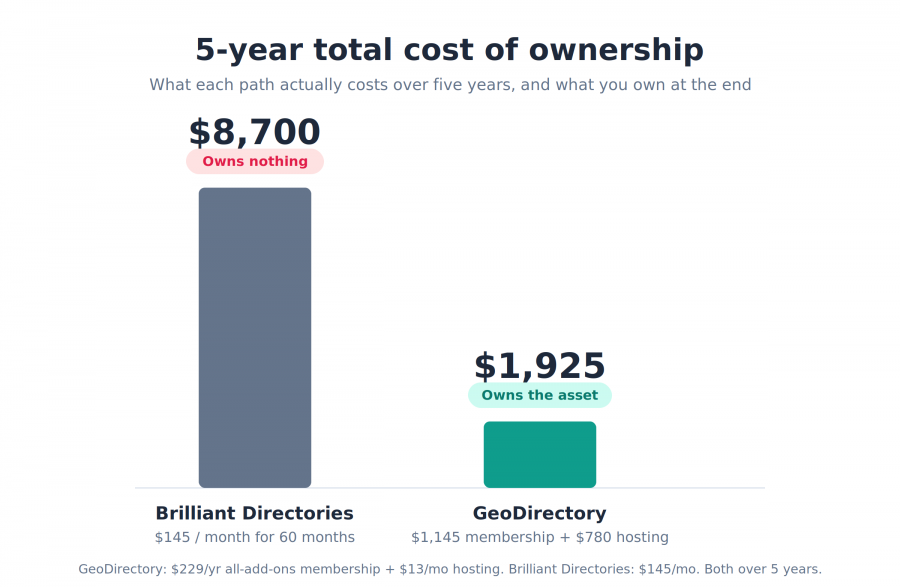
Five years on Brilliant Directories at $145 a month comes to $8,700, and at the end you own nothing; the site still lives on their servers and leaves with a CSV if you go.
Five years of GeoDirectory membership at $229 a year comes to $1,145, and even after you add solid hosting, the total sits well below their monthly path, with one difference that outweighs the gap itself.
You own what you paid for.
There is a simple test that makes that concrete.
Stop paying Brilliant Directories, and a monthly site goes dark, because the hosting was theirs.
Stop paying GeoDirectory, and your site keeps running exactly as it is on your own hosting, because the install is yours; you simply stop receiving new updates and support until you renew.
That is the whole of ownership, measured in what happens the month you stop paying.
A fair word on their lifetime option, because it is real.
If all you weigh is upfront cost, and you never intend to move, $725 once is genuinely cheap.
It buys you out of the monthly bill.
It leaves the platform, the member cap, and the walls exactly where they were, on hosting that stays theirs.
So what you own is a license to keep renting.
And if you want the hosting handled without that cage, the GeoDirectory SaaS is built for exactly that, launching with V3, managed hosting from us with an export door that moves your whole site to your own server whenever you choose.
Here’s how to read the price tag.
The cheaper monthly number ends in a CSV file and a site you no longer control.
The annual number, plus hosting, ends in a directory you can run, move, or sell like any asset you own.
That is what the money actually buys, and it is the choice this whole comparison has been circling.
The verdict: who each one is actually for
Strip away every section, and the decision came down to one question, asked in one section after another.
Do you want to own your directory, or rent it?
Both answers are legitimate, so let me be straight about who should choose which.
Brilliant Directories is the right call for a specific person.
You are not technical, you have no interest in becoming technical, and you want a membership site live this week without touching a server or assembling anything.
Your directory will stay within their limits, comfortably under a hundred thousand members, and you are happy to treat it as a service you subscribe to rather than a property you hold.
You accept the shared template look and the walls around the platform, because in return everything is handled for you, and the support behind it is genuinely good.
If that is you, Brilliant Directories will serve you well, and we would rather you knew that than bought GeoDirectory and resented the learning curve.
GeoDirectory is the right call for everyone building something they intend to keep.
You want a directory that can grow from a hundred listings to a hundred thousand and beyond, on an engine proven at that scale.
You want a data model shaped to your niche, monetization that reaches models a fixed platform cannot, design and SEO and schema you control down to the markup, and real MLS, events, or marketplace depth when your vertical demands it.
Above all, you want the thing to be yours, an asset you can move, rebuild, hand off, or sell, with the database you spent years building living in tables you own.
For years there was one honest reason to pick the hosted platform anyway, and it was the servers.
That reason is closing.
The GeoDirectory SaaS launches with V3 and hands you the same managed convenience, the hosting, the updates, the maintenance, with a door you can walk out of, your whole site exporting to your own server whenever you decide.
Which is something you’ll never be able to do if choosing Brilliant Directories.
Convenience without ownership was always the trade they asked you to make.
Soon you will not have to make it.
A directory is a database that compounds in value the longer you run it.
The only question that outlasts every feature on this page is who owns that database when it finally becomes worth something.
On GeoDirectory, the answer is you.
Before you decide
We built GeoDirectory, so you already know which way this article leans.
That is exactly why we kept every claim checkable.
The pricing is on both companies’ own pages, the review scores are on Trustpilot and Capterra, the scale is a live site at wp-rankings.com you can open right now, and every add-on and feature links to its own documentation.
Go verify the parts that matter to you.
Try the free core plugin on WordPress.org and build something real with it before you spend anything, which is a test Brilliant Directories cannot offer, since there is nothing to try without a paid plan.
If you get stuck, our support is a message away, and the reviews will tell you what to expect.
And when you are weighing the monthly bill against the annual one, keep asking the only question that lasts.
Who owns the website and its database when it becomes the most valuable thing you built?
Newsletter - Stay Updated!
Get the latest news, tips, and exclusive content directly in your inbox.
