
This page is a work in progress, please visit the forum if you need extra help in the meantime.
Introduction GD > Are you interested GD > Related Events Listing
Introduction>
When you install the Events Addon, you’ll find a number of new GD widgets in the appearance section of your WP admin area.
| Widget name | Can be used on these pages: | |||||
| Home | Listings | Search | Detail | Author | Non-GD pages | |
| GD > Are you interested |  |
|
|
 |
|
|
| GD > Related Events Listing | |
|
|
|
|
|
GD > Are you interested
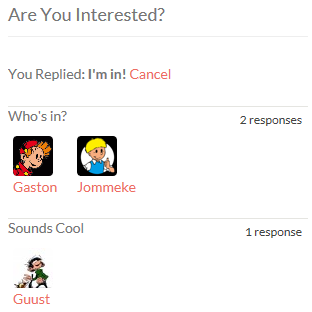
- This widget can only be used on the detail pages of your listings, and will show only on events detail pages.
- The widget will only show to logged in users.
- Logged in users will be able to confirm they are attending the event or they maybe will be attending.
- Once an event has passed, the buttons to attend will disappear, but the information will stay visible.
- Here is an example:
GD > Related Events Listing
Settings
This Events widget is specifically for the detail pages of your listings, and will show the events that have been submitted for a particular place.
The widget will only work on the default custom post type Places; it will not show on any other custom post type detail pages.
Most of the settings are self-explaining, and are the same as some of the settings of the Popular Post View widget, with one main difference:
| Enable Location Filter: | You can show events at a listing automatically on the detail page of that listing if you have both the Prices and Payment Addon and Events Addon enabled. Just follow these steps:
|