
Introduction
Once you installed your GD directory plugin, you will need to create categories before you can add any listings to your directory.
The free GD plugin will automatically create a new custom type of WordPress posts, which allows you to add content to your directory. The GD plugin calls these custom posts Places, and you will find them in the main WP admin menu.
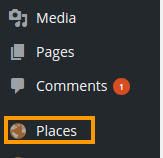
In the GeoDirectory context, these posts are called listings.
Every listing will need to be in a category, or the listing will not be added to the GD maps.
GD will work with one level of sub-category as well:
Places > Category > Sub-category > Listing
Examples using GD core
One example is a local directory, and this could be your setup:
| Category | Sub-category | Listing | OR | Category | Listings |
|---|---|---|---|---|---|
| Restaurants | French | L’escargot | Restaurants | L’escargot | |
| La Baguette | La Baguette | ||||
| Italian | Mario | Mario | |||
| The Pizza Dude | The Pizza Dude | ||||
| Accommodation | Hotels | The Sleep Inn | Accommodation | The Sleep Inn | |
| The Rich | The Rich | ||||
| Bed and Breakfast | Chez Nous | Chez Nous | |||
| The Rooster | The Rooster |
Extending your directory
The above examples are based an the standard free GD plugin installation: All your listings and categories will need to be of the same custom post type Places.
Custom Post Types Addon
The Custom Post Types Addon (CPT) lets you add as many CPTs as you need.
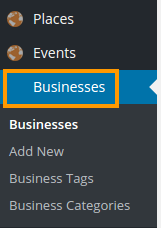
As standard, GeoDirectory comes with one CPT called Places (see above), new CPTs will have their own dedicated sidebar menu and management system just like Places.
Why and when to use Custom Post Types?
The advantages of this plugin are that instead of trying to manage a large diverse directory with many categories all under the one post type, you can split these into more manageable CPTs.
Factors worth considering whether you want to organise your site with different CPTs:
- you can add different custom fields to each Custom Post Type
- it is easier to manage different pricing levels with CPTs than categories
- a listing can only be submitted to one CPT at the time, but it is possible to submit the same listing to more than one category
- Some widgets can only be filtered on one CPT at the time.
- Maps can only show one CPT at the time but can show multiple categories at the same time.
Events Addon
The Events Addon is a custom post type specifically designed for the way events are prioritized by dates.
With this plugin you can let users add their events to your site. Events are ordered by upcoming date by default. Users can enter recurring dates for their events instead of having to create lots of separate events. As this is also a custom post type you have the usual ability to add custom fields and sort options.
Examples using CTP and Events addons
| CTP | Category | Sub-category | Listing |
|---|---|---|---|
| Enjoy | Restaurants | French | L’escargot |
| La Baguette | |||
| Italian | Mario | ||
| The Pizza Dude | |||
| Accommodation | Hotels | The Sleep Inn | |
| The Rich | |||
| Bed and Breakfast | Chez Nous | ||
| The Rooster | |||
| Events | Markets | Weekly Farmers Market | |
| Antiques Show | |||
| Music | Concerts | Milli Vanilla | |
| Elvis Presley Live | |||
| Lessons | Bagpipe School | ||
| Local | Health | Doctors | Doctors R Us |
| Fitness Centres | Fitness4U | ||
| Building | Hardware | Nuts&Bolts | |
| Carpenters | We’ll Nail You | ||