The World’s Most Advanced And Scalable WordPress Directory Plugin
GeoDirectory is an enterprise-grade WordPress plugin for building scalable business directories, city guides, real estate listings, job boards, event sites, classifieds, and local discovery platforms. Unlike generic listing plugins, it uses custom database tables, not WordPress post meta, so sites perform well from small local portals to directories with hundreds of thousands or millions of listings. Core features include optimized search, maps, reviews, frontend submission, and an extensive add-on ecosystem for customization. Rated 4.8/5 across 700+ reviews on WordPress.org and Capterra.
Get GeoDirectoryWhat can i do with GeoDirectory?
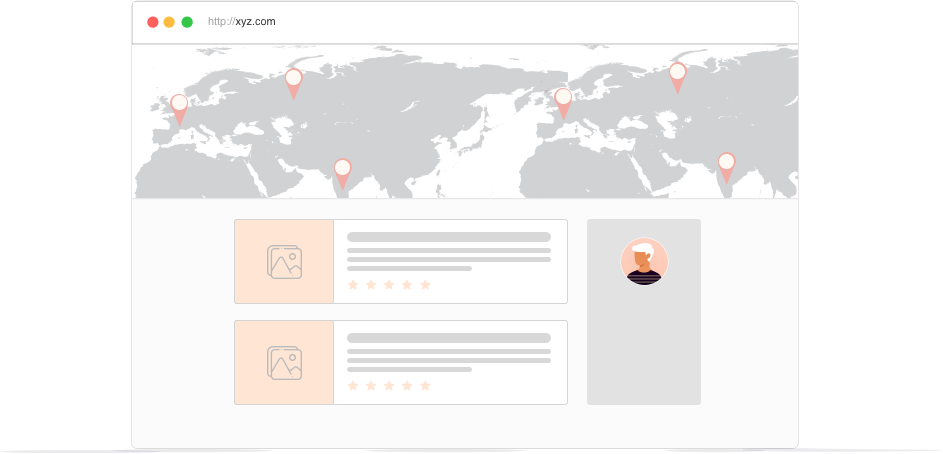

If you’re starting (or already running) a business directory, one of the ways to monetize your directory website should be premium listings.
These paid listings add value to your directory and make it more attractive to businesses looking for visibility in the marketplace.
But how exactly does a premium listing gives businesses an edge over their competitors? How do you sell them on it?
In this blog post, we’re going to share four things that will convince businesses to pay for a premium listing on your directory website.
And then, we’ll show you how to start offering one with the GeoDirectory plugin.
Ready? Let’s go.
What is a premium business listing? And how is it different from a free listing?
A premium business listing is essentially a paid version of a basic or free business listing.
It typically includes more information about a business and typically comes with additional features or benefits.
Here are a few key differences between premium and basic/free business listings:
- Businesses can add more information: A premium business listing typically includes more details about a business, such as its address, phone number, hours of operation, hi-res photos & videos, and description of the products or services it offers. A basic or free listing may only include limited information like the business name, address, and logo or a basic picture.
- Gain more visibility: Premium business listings are often given more visibility on websites or directories, meaning they may appear higher in search results or be more prominently displayed. This can be especially useful if you want to attract more customers to your business.
- Get special privileges: Premium business listings may come with additional features or benefits, such as the ability to add more photos or videos, the option to highlight your listing, the ability to add links to their social media, or the ability to respond to customer reviews (new feature coming soon into the pricing manager add-on). Basic or free listings may not have these options.
- There’s a cost: Of course, the main difference between premium and basic/free business listings is the cost. Premium listings typically come with a fee, while basic or free listings are, well, free.
Overall, a premium business listing is a great way to get more exposure for a business and provide potential customers with more information about what they do.
It can be a valuable investment, especially if you’re looking to attract new customers or stand out in a crowded market.
Show them all the enhanced features and functionality
When customers are searching for local businesses, they want to find the most relevant and up-to-date information.
They want to learn as much as possible about a business before they visit.
So, the more information you let businesses provide to customers, the better!
A premium business listing gives companies access to a range of enhanced features and functionality, such as:
- Contact information and hours of operation
- The option to upload unlimited photos – putting a face and place to a business helps to build trust with potential customers.
- Add videos and other multimedia – video can be a great way to show off businesses in action or company culture.
- Include links to your website and social media profiles – this helps customers learn more about any business and stay connected.
- Highlight listings – draw attention to important offers or promotions with the ability to highlight your listing.
When you build your directory website on GeoDirectory, you can tailor the information you collect/display, including adding your own custom fields.
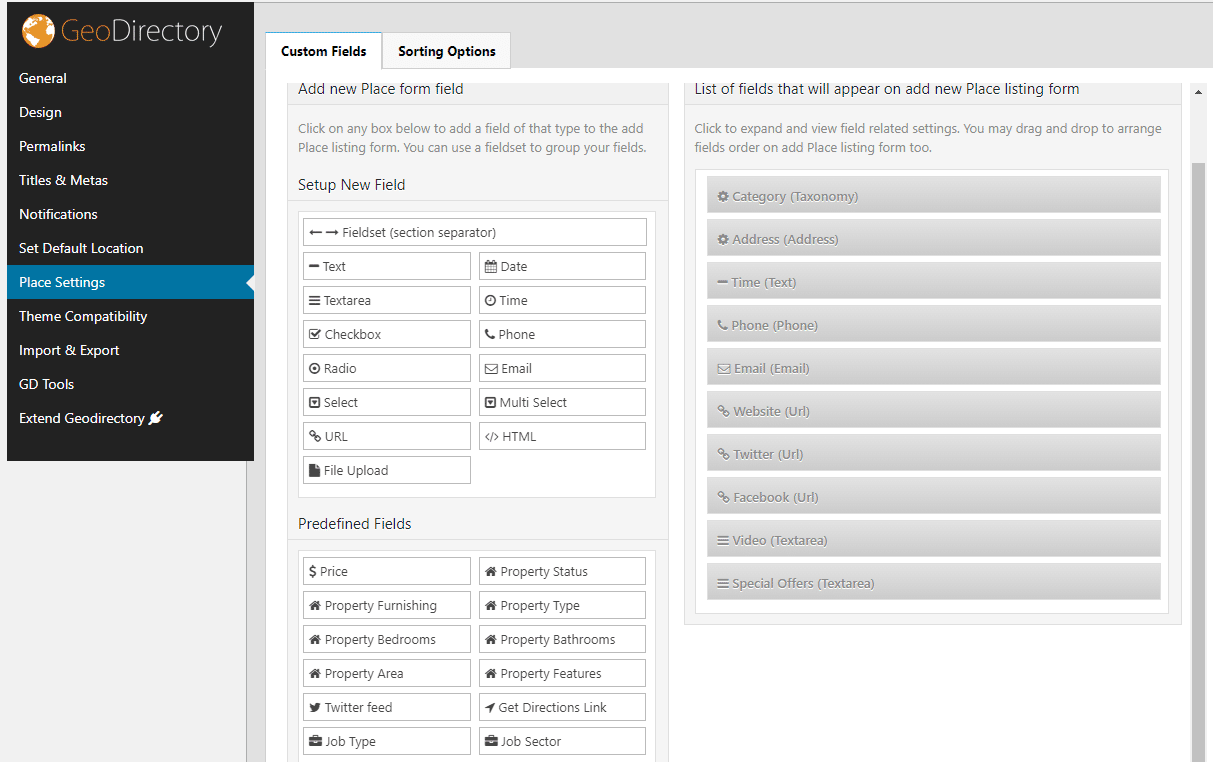
The custom fields are flexible and go deep, so you can set up exactly what you want premium users to mention as extra information regarding their business.
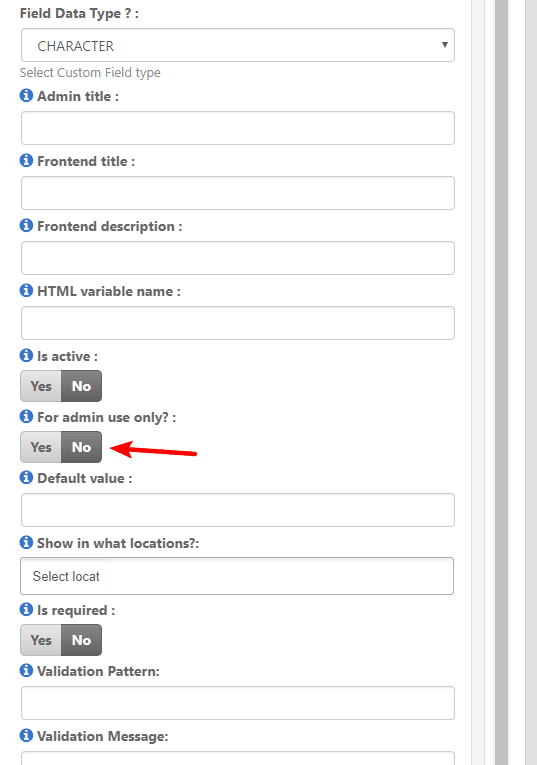
There’s even a feature that allows you to either keep things private for admins, or visible to the public.
The credibility & trustworthiness factor
As we mentioned earlier, a premium listing lets businesses add more information.
Stating your address, phone number, and hours of operation and adding photos and videos of an establishment and its people give potential customers a better understanding of what you do and what they can expect when they visit your business.
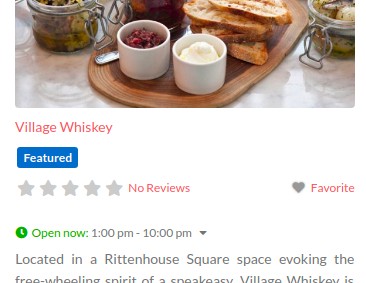
And when you display businesses more prominently on the directory website with a “Featured” or “Recommended” badge, customers can feel more comfortable about choosing that business for their needs, knowing they’re an established organization with a solid reputation.
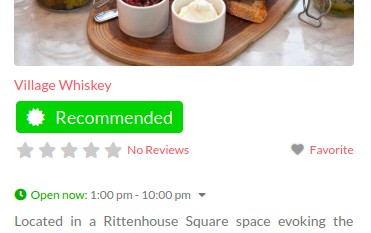
Speaking of reputation, a premium listing also helps customers see a company listing’s reviews and ratings at the forefront, which is important for persuading customers to choose one business over others, as many people rely on reviews and ratings to make their buying decisions.
In fact, 58% of consumers would pay more or travel further to support a company with good reviews.
Mention how they will get more exposure
A premium business listing can increase the visibility of local businesses on a directory website in several ways:
- Higher search ranking: Premium listings may be given higher priority in search results, meaning they appear higher up in the list of search results when someone is looking for businesses like yours, making it more likely that potential customers will see your business and click on your listing. (Advertisement add-on required for this)
- Prominent display: Paid listings are typically displayed more prominently on the directory home page and directory pages, such as being highlighted (e.g., shown as “Featured”) or given higher rankings on category pages or sidebars. This makes businesses stand out and draw more attention from potential customers.
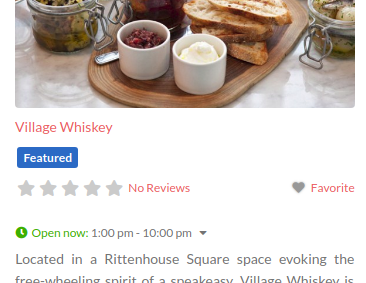
- Additional features: Again, premium listings also come with additional features that can help to increase visibility, such as the ability to add photos or videos, or highlight your listing. These features can help to make business listings more attractive and share-worthy to potential customers and increase the chances that they will choose a business over others.
Make it easy to see the potential for more business growth
A premium listing can attract more qualified traffic to a business to generate more leads and customers.
This means that your users may see an increase in revenue from the paid listings alone.
In addition, premium listings are often cheaper than other forms of online advertising, such as pay-per-click or Google Ads – making them a cost-effective solution for businesses looking to promote their products or services.
Additionally, when it comes to business growth, it can be smart to leverage data transparency and social proof to incentivize businesses to pay for a premium listing:
- Let businesses track analytics: You can set up front-end analytics for premium users to monitor incoming traffic from your online directory. The measurable results will make your directory business one that can be trusted and used long-term.
- Enable embeddable reviews & ratings: 95% of people say that reviews, positive or negative, influence their purchasing decisions. Needless to say, they’re very important. As mentioned earlier, by allowing reviews on your directory website, premium listings can show off their positive social proof both at the top of search results and on their own website with the embed add-on to boost revenue. Businesses can also show that they care by responding to customer reviews publicly – which can be set as a special privilege for premium listings only. (Both these options are coming soon to the pricing manager add-on.)
How to start offering premium listings to local businesses
Want to make some money from your online directory? The first step is to actually build one. Don’t worry, it’s easier than you think.
1. Build out your online directory
First things first, you’ll need to have a hosting plan set up and have WordPress installed on it. From there, you can easily install and activate the GeoDirectory plugin.
GeoDirectory allows businesses to showcase their products and services on an attractive listing page that features all of the important details about the company, like contact information, hours of operation, and photos and videos.
The plugin is easy to set up and manage, so you can quickly get your clients’ premium listings up and running in no time.
And best of all, businesses can track their success over time, making it easy to optimize their listing for maximum impact.
If you’re not sure where to start, check out our video guide: How to Create a Directory Website with WordPress.
2. Set up premium listings with the Pricing Manager
The Pricing Manager add-on for GeoDirectory allows you to sell premium listings that include more fields for users to fill out when creating listings, such as extra pictures, categories, tags, a longer description, and custom fields.
These premium listings can also be “featured” and displayed in prominent places on your site and can be contingent on subscriptions, where users can pay for recurring featured listings.
Your premium listing setup would look something like this:
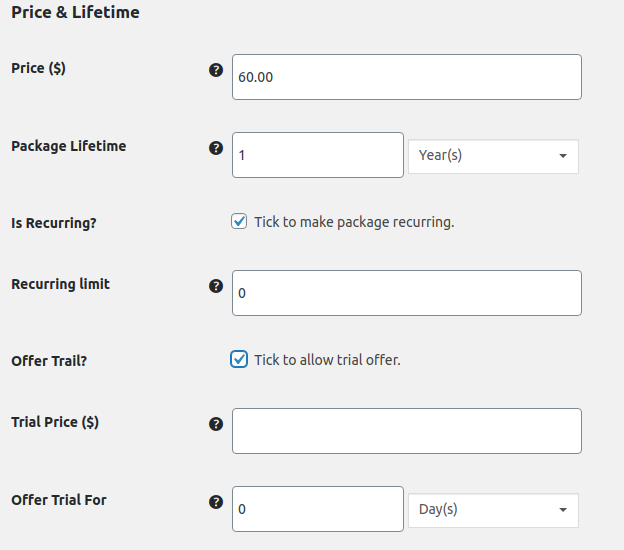
The plugin offers many possibilities and can be customized to create a unique directory that stands out and generates reliable sales.
3. Calibrate your paid listing offerings
As a directory website, you can arm business owners with a range of tools to manage premium listing much easier:
- Recurring payments allow for a steady income stream without the need to chase up businesses for renewals on their paid listings
- Alternatively, you can shoot payment reminders for single payments to ensure businesses renew their expired premium listings
- Offer free trials as a no-risk option for businesses to test out your premium listing service
- Create unlimited pricing packages to cater to different paid business listing needs. For example:
- Standard: includes basic listing information such as business name, contact information, and a small number of pictures.
- Premium: includes all the features of the standard package plus additional pictures, a longer business description, and the ability to include videos in their listing.
- Platinum: includes all the features of the premium package plus the ability to include a “featured” tag on their listing, and priority placement in search results.
- VIP: includes all the features of the platinum package plus the ability to include special promotions, a dedicated customer support representative, and a customized webpage for the business.
- “Pay to Claim” feature, when paired with the Claim Listings Manager, allows you to require an upgrade in order to claim a listing. This means that you can offer a free basic listing, but for businesses to fully claim and manage their listing, they would need to upgrade to a paid version.
Example of a directory website using premium listings
Many businesses already use premium listings to gain an edge over their competition. For example, winetasting.com is an online directory for American Wineries, where businesses can pay for premium listings to stand out from the crowd.
When someone searches for wineries in their area, those with a premium listing appear more prominently on the home page and the search results page:
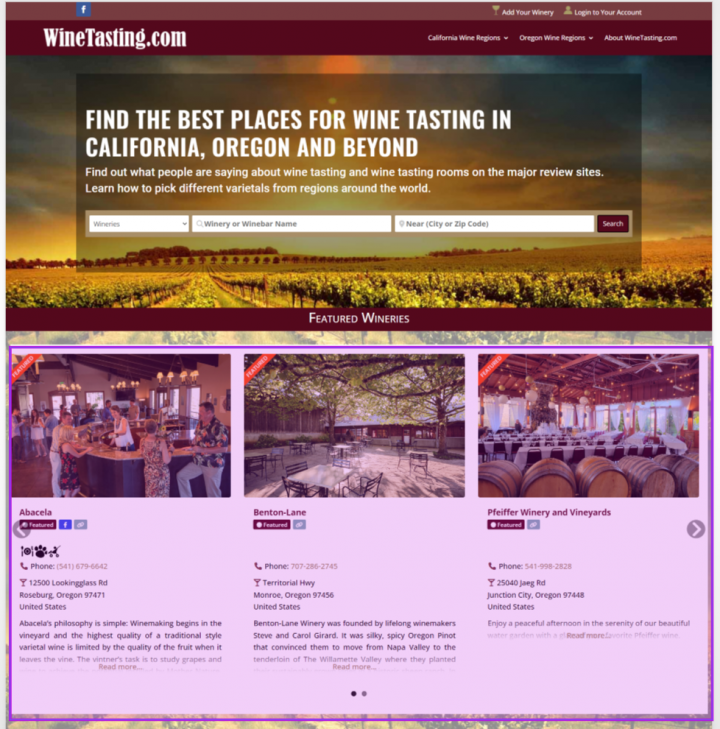
Notice how the premium listing has featured badges that indicate a ‘Featured’ status for more trust and credibility. These perks make featured listings stand out and catch a customer’s attention from the rest.
Parting Words
A premium listing on your directory website can be an effective way for businesses to promote themselves and generate more leads.
It provides customers with the assurance that they’re an established, reputable business while also allowing them to see customer reviews and ratings at the forefront.
Plus, it’s a cost-effective addition to other forms of online advertising.
To measure success and optimize for maximum benefit, track key metrics such as website traffic, sales, conversion rate, visitor engagement rates, and search result visibility and makes these data available in the advertising landing page.
So the next time you’re scratching your head on how to sell businesses on your paid listings, refer back to this article. 😉
You can get GeoDirectory here today:
Are you looking to build a classified ad directory faster than you can say “classified ad”? Then you’ve come to the right place.
The total market of classifieds ads is $21.72 billion in 2023 alone. It can be a profitable endeavor – and creating a revenue-generating classified website doesn’t have to be difficult.
Whether you’re new to web development or an experienced coder, this guide will walk you through every step of creating a powerful classified site using GeoDirectory.
So if you’re ready to get started on building your perfect classified ad website, read on!
What is a classified ad website?
A classified ad website is a site that allows people to buy, sell, and trade items online.
It’s like your very own Craigslist, Kijiji, or Gumtree.
It’s like an online marketplace, and it can be used to find almost any type of item you’re looking for.
With a classified ad website, the sky is the limit!
The aim is to bridge the gap between a seller offering a product/service and a potential buyer seeking it, or in the case of job boards or wanted ads, connecting a provider with a seeker.
How do I make money with my classified ads website?
Classified websites can be a goldmine for owners looking to earn some cash. Here’s the lowdown on how you can make bank:
- Listing sales: The classic way to make money – charge folks to post an ad on your site.
- Ad sales: Offer paid banner ads for placement on the site – it’s a great add-on for those purchasing a listing.
- Pay-per-click advertising: Use ad networks like Google Ads, Ezoic, or Mediavine to earn some dough from third-party banner ads shown to visitors. Tip: if you use a tool like GeoDirectory to create your classified ad site, then you can connect with networks like Google Adsense (using the advertising add-on) to earn ad revenue through text, image, and HTML ads.
- Membership fees: Give your members exclusive perks and make some recurring revenue with membership options. (coming soon to GeoDirectory)
Some examples:
- Priority listing: Allow members to have their listing appear at the top of search results or on a dedicated “featured” section.
- Analytics access: Offer members access to detailed analytics on their listing’s performance, such as the number of views and clicks.
- Unlimited listings: Offer members the ability to post unlimited listings, rather than limiting them to a certain number.
- Custom banners: Allow members to display a custom banner or logo on their listings for added visibility.
- Affiliate links: Include links to partner products and watch the money roll in from sales generated from these links.
In short, there are loads of ways to make money with a classified website. Get creative and start raking in the dough!
Setting up your classified ads site: DIY vs Classified Tools
Once you’ve decided to build a classified website, the first question you should ask yourself is: should you do it yourself or use a specialized tool?
Doing it yourself (DIY) means coding from scratch. This approach might be up your alley if:
- You’re a web developer with the coding skills
- You are willing to pay for a developer to do the job for you.
But it’s worth noting that if you go the DIY route, it can take a very long time to get your classified website up and running.
There’s also a lot of maintenance involved, as your custom code might need constant updating to make sure it’s secure.
Alternatively, you can take the path of least resistance and use a specialized tool like GeoDirectory to quickly create a powerful classified ads website.
With this method, you’re not bogged down with coding and too much of the tech stuff and enjoy a range of special features.
- With user-friendly tools like a drag-and-drop builder, even those without a tech background can easily build and manage their own classified site.
- Increased money-making opportunities through built-in revenue-generating features like pay-per-listing, advertising, and (coming soon) membership add-ons).
- Integrated blog modules for hassle-free content management.
- Professional appearance that helps establish a good reputation.
- Advanced search capabilities (e.g. customizable filters) make it easy for users to find what they’re looking for.
- Mapping system and GeoLocation search features.
- Users Profiles and community features.
If you start with a pre-built design and you don’t pretend to have a complete custom design before even validating your idea, with the help of the classified dummy data, you’ll have your classified ad website up and running in under an hour.
It’s safe to say that for most people, using a classified tool is a no-brainer.
How to Create a Classified Website
With the assumption that you’re probably not here for a coding tutorial, we strongly recommend using WordPress – the most popular website builder on the planet – and the GeoDirectory plugin (the most advanced of the WordPress classified plugins) to create a professional-looking classified website.
Follow along with this guide as we show you exactly how to do it.
Step 1: Pick your niche
When creating your classified website, the first step is to find your niche.
What type of industry or market do you want to target? If you already have a business idea, great!
If you see a gap in your industry or local area, seize the opportunity to create a thriving online classified community that connects people, businesses, and services while earning you classified ads revenues.
And if you’ve got nothing at the moment, don’t worry.
There’s still plenty of room for new and innovative classified sites as they continue to grow in popularity.
A good idea is worth nothing, execution is what makes the difference.
Here are some ideas for classified websites to start you off:
- Real estate listings
- Used car sales
- Services (e.g., lawn mowing, house cleaning)
- Local marketplaces for goods
- Industry-specific job boards
- Membership directories
However, if you are able to find a tiny niche and dominate it, that’s where the chances of success are a lot higher.
Craigslist can be a great source of inspiration and the bigger niches have already been exploited, but you could always come across an emerging gem.
Step 2: Purchase your domain
Next up, pick a memorable and easy-to-spell domain name. Your niche should influence your business name, which should be the foundation of your domain name.
You can then purchase the domain from any number of providers, like Google Domains, GoDaddy, or Namecheap.
Step 3: Get a hosting plan (server)
This will be the most expensive part.
But it doesn’t have to be hundreds of dollars per month.
An entry plan with Cloudways (we suggest the 1GB High-Frequency Vultr instance) costs less than $15 per month and it’s a great starting point for a fast classified website that can sustain heavy traffic (and make healthy profits).
Step 4: Download & install GeoDirectory

Now that you have your domain set up and your server ready, it’s time to download and install GeoDirectory.
No need to shell out big bucks for a web dev to build your WordPress site, or constantly fork over cash for updates.
Once you’ve got your hands on top-notch classified ads software like GeoDirectory, it’s time to get organized and categorize your site.
The great thing about using the plugin is that it works with any theme or page builder.
And if you’re an experienced developer, you’ll be happy to know that GeoDirectory is developer-friendly since all the code is built to be extended with many hooks and filters.
The directory starter theme can help you put a basic classified website online in minutes.
Step 5: Adding Dummy Data
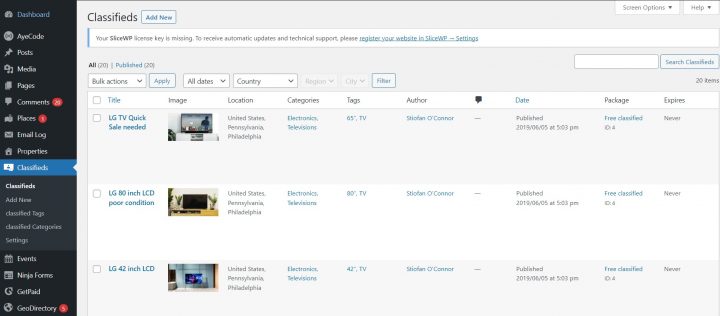
The last step in setting up your classified website is to add dummy data.
This will give you the best chance of making a good first impression with visitors and search engines alike.
Dummy data provides realistic content that shows off what your classified ad site has to offer. You can test the site’s features, see how it looks with actual data, and make any necessary changes before the website goes live.
Here’s how to add dummy data to GeoDirectory (alternatively, you can watch this instructional video):
Head over to Settings –> General (tab) –> Dummy Data (sub-tab).
- Pick your data type: Decide what data you want to import for each custom post type (CPT) and set the number of items. In this case, you would select “Classifieds.”
- Update templates: Opt to update the template pages if you want to show specific custom info, like prices. Just a heads up, if you’ve made custom changes to the archive or details page templates, this option will override them.
- One-click import: All you have to do is click “Insert Posts” and GeoDirectory will handle the rest. Pro-tip: installing the Advanced Search addon before importing will add extra search fields to non-default data types.
- Removing dummy data: When you’re done building your site, removing dummy data is as easy as clicking the “Remove Data” button.
And there you have it! Keep in mind, when using the CPT addon, each CPT will have its own settings for dummy data import.
The same goes for the Events addon and its Events CPT – it’ll have its own special dummy data types.
Step 5: Customize the functionality
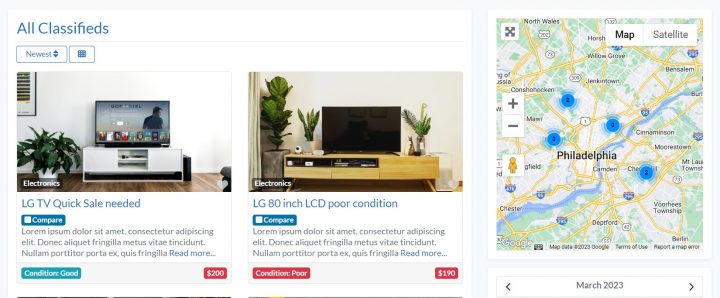
Now that you’ve got your dummy data in place, it’s time to customize the functionality of your classified ad website and make it a breeze to navigate for both visitors and search engines.
How?
- Add new categories and fields: Customize the existing fields or add new ones to get more detailed information from your visitors (here’s a guide on how to do that). Make sure to provide detailed information for each category, and don’t be afraid to add sub-categories for advanced filtering options.
- Bonus tip – offering to feature a listing in multiple categories is a smart way to upsell your premium membership levels.
- Configure search and filter options: Tweak settings and create custom search options to make it easy for people to find exactly what they’re looking for (check out this guide on adding filters to the main search bar).
- Set up user registration and submission forms: Enable users to register on your site and submit ads without any hassle (refer to this guide with instructions).
Step 6: Promoting your website
Your classified ad website is ready, now it’s time to get the word out and start driving traffic.
Here are a few tips:
- Optimize for SEO: Make sure your site is optimized for search engines by adding keyword-rich titles and descriptions, submitting your sitemap to Google Search Console, and creating high-quality content. Blogging is one of the best ways to drive traffic and sales to your website – Being a WordPress plugin, GeoDirectory is easily coupled with WordPress’s Blog Module where you can create, monitor, and optimize your content.
- Leverage platforms like Twitter, Facebook, Instagram Linkedin, and Pinterest, to spread the word about your classified ad website and drive traffic. Use catchy hashtags and visuals to catch people’s attention and link back to your site.
- Advertise online: You can also use online advertising to reach a wider audience. You can use Google Ads, Facebook Ads (including Instagram), or other platforms to target specific audiences. Include special offers like discounts or exclusive deals on premium membership levels to encourage more people to register.
- Reach out to local media outlets: If your classified ads website is focused on a specific region or area, reach out to local media outlets like newspapers, TV stations, and radio stations. They may be able to help you reach potential users in your target area.
- Use email marketing: Build an email list and send out regular newsletters or promotional emails to your subscribers. This can help keep your website top of mind and encourage repeat visits.
Parting words
Creating a classified ad website doesn’t have to be hard. With the help of GeoDirectory and its dummy data, you can get your site up and running in no time.
From setting up categories and fields, configuring search options, customizing user registration forms, optimizing for SEO, leveraging social media platforms, or advertising online – there are plenty of ways to promote your new classified ads website.
But don’t forget about email marketing too – building an email list is one of the best strategies for driving repeat visits.
Pro tip: Add-ons are the key to making your classifieds website truly functional and unstoppable. You can save a lot of money (90%) by grabbing a plan that includes all of them instead of paying for them individually ($30-$40 each).
A business owner is casually strolling through the internet, looking for a website that can help him promote his business.
He searched high and low, but they just couldn’t find one. Then he stumbles upon your directory!
Your directory stands out from the rest because you’ve added the GeoDirectory Claim Listing add-on. It allows business owners to claim their listings and take full control of them.
Not to mention, when combined with the GeoDirectory Price Manager add-on, you can now monetize your directory by requiring business owners to upgrade and pay for their listing in order to claim it.
So let’s learn how to install and set up this amazing feature!
What is the claim listing feature?
Claim Listing is a feature that allows users to verify ownership of a business listing you added to your directory in advance, with a basic description and a set of pictures.
Once they’ve claimed the listing, they have full control over it and can add to or update its information.
This helps keep the directory up to date with accurate customer data.
Why adding the claim feature to your directory site is a must
Adding a claim listings feature to a business directory website is a smart move for several reasons:
- Proving it’s yours: With this feature, business owners can claim their listing and ensure all details, such as contact info, hours, and description, are up to date and accurate.
- Getting noticed: Claimed listings often get more attention and appear higher in search results, which can lead to more customers and a stronger online presence.
- Building trust: Verified and claimed listings help build trust with customers, who can be confident that the information they see is accurate and up to date.
- Analyzing the scene: Business owners can take a closer look at how customers engage with their listings and use that insight to improve their online strategy.
In short, adding a claim-listing feature is a win-win: it improves the customer experience and gives business owners valuable insights.
Step 1: Install the GeoDirectory Claim Listing Add-on
You can purchase the claim listings add-on here.
Pro tip: GeoDirectory users can save 90% by grabbing a GeoDirectory membership that includes all the add-ons to make their directory website unstoppable, instead of purchasing add-ons one by one for a higher rate.
Now, you want to install the Claim Listings extension.
There are two ways to do this: the automatic way and the manual method.
The automatic installation only works on a live website – here’s how to go about it:
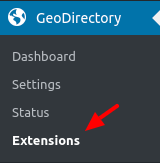
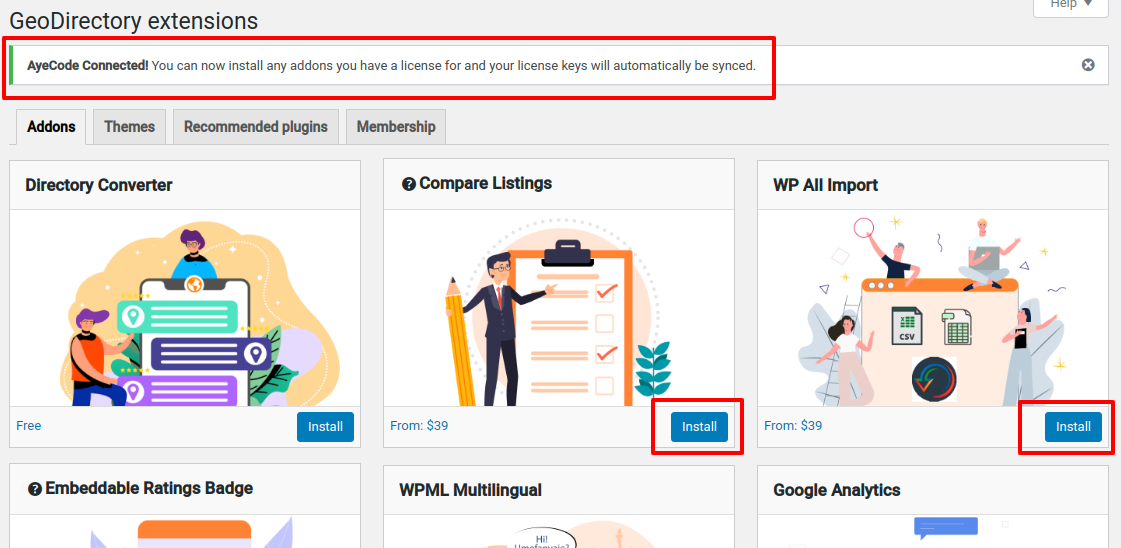
- First, head over to the WordPress backend and click on GeoDirectory > Extensions.
- You’ll then see a notification pop up with a big ol’ button that says “Connect Site.”

- Clicking that will take you to our parent company website, where you can log in using your login from any AyeCode product like GeoDirectory, UsersWP, or GetPaid.
- All you gotta do is click “Connect,” and voila! You’re now connected.
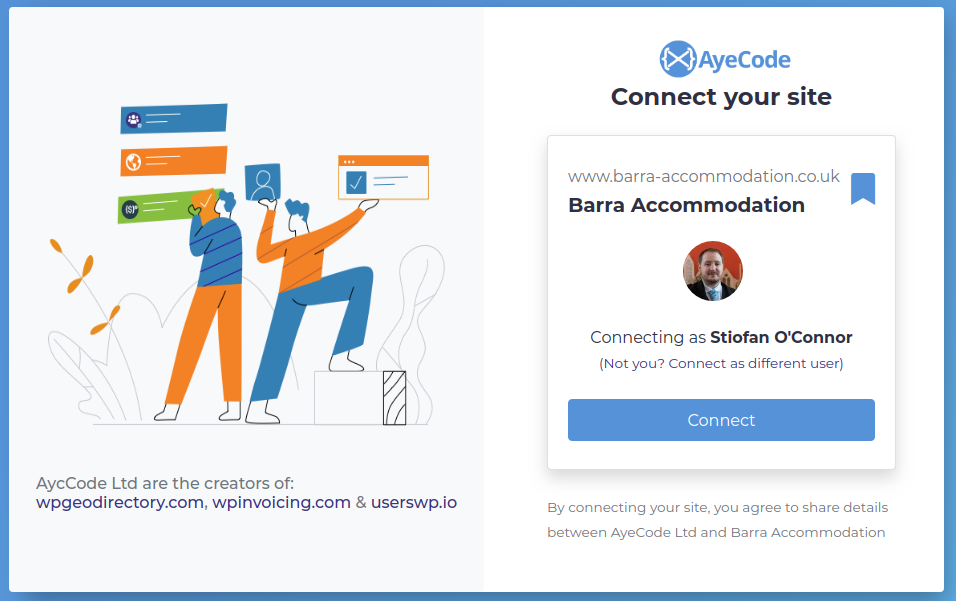
- You should be returned to your site at this point, from where you can install any extensions you have a valid license for with ease – including the “Claim Listing” feature.
A manual installation might be better for those with a local hosting environment. To do this, you’ll want to go this route:
- Download the extension zip file from your account area.
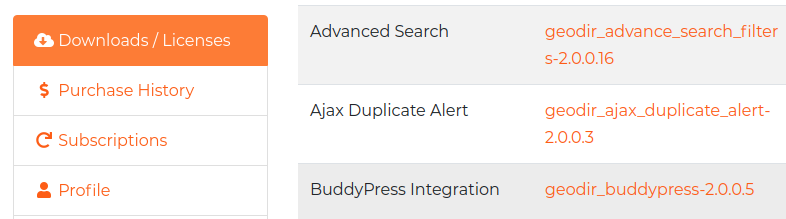
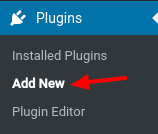
- Head to the WordPress backend and click on Plugins > Add New.
- Up at the top of the screen, hit the Upload Plugin button.
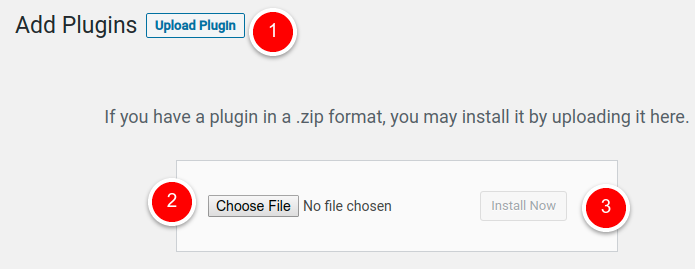
- Select the zip file you just downloaded and click “Install Now.”
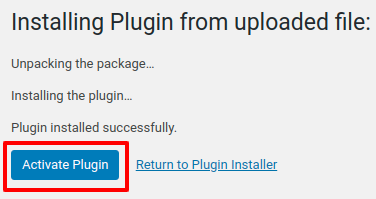
- And that’s it! Just hit the Activate Plugin button, and you’re good to go.
Step 2: Setting up your add-on
Once the add-on is active, head to your GeoDirectory > Settings page and scroll down to the Claim Listings section to configure important settings.
How will users claim listings? And how will you approve them?
These are the two main ways to manage claim listings:
- Manual approval: This requires you (the admin) to manually approve each listing before it is activated. To approve claims manually, go to GeoDirectory > Settings > Claim Listings (tab) > Listing Claims (sub-tab), and then you can choose to approve, reject, or delete the submitted claims.
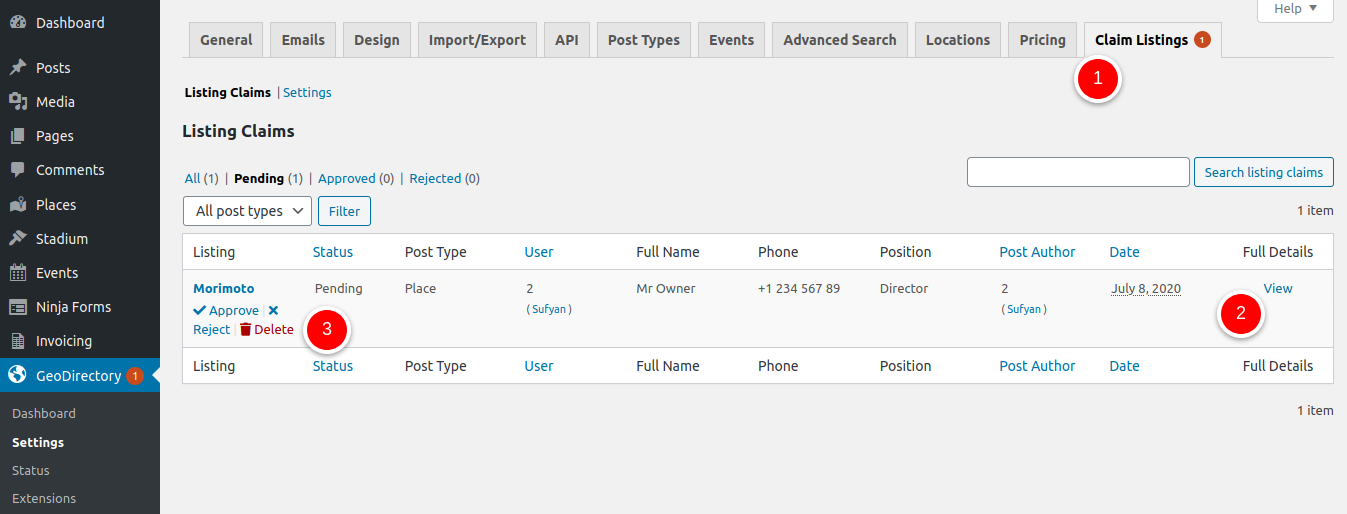
- Automatic approval: This is a more hands-off option where you can set conditions and stipulate that, once a claim is submitted, it will be approved automatically, and the listing will become active. For example:
- If you want people to fill out a form to claim a listing, the free Ninja Forms Integration lets you personalize your claim form and even make several versions to fit the unique needs of your directory. You can also show the claim forms directly on the details page in a tab.
- If you want to set up an email verification system, select the “Auto Approve via Email Verification” option so that business owners receive an email with a link to automatically verify their listing claim.
- If you have a pay-to-claim system and you turn on “Auto Approve on Payment Received,” claims will be automatically approved once payment is received (note: you’ll need the pricing manager add-on installed for this – more on this later).
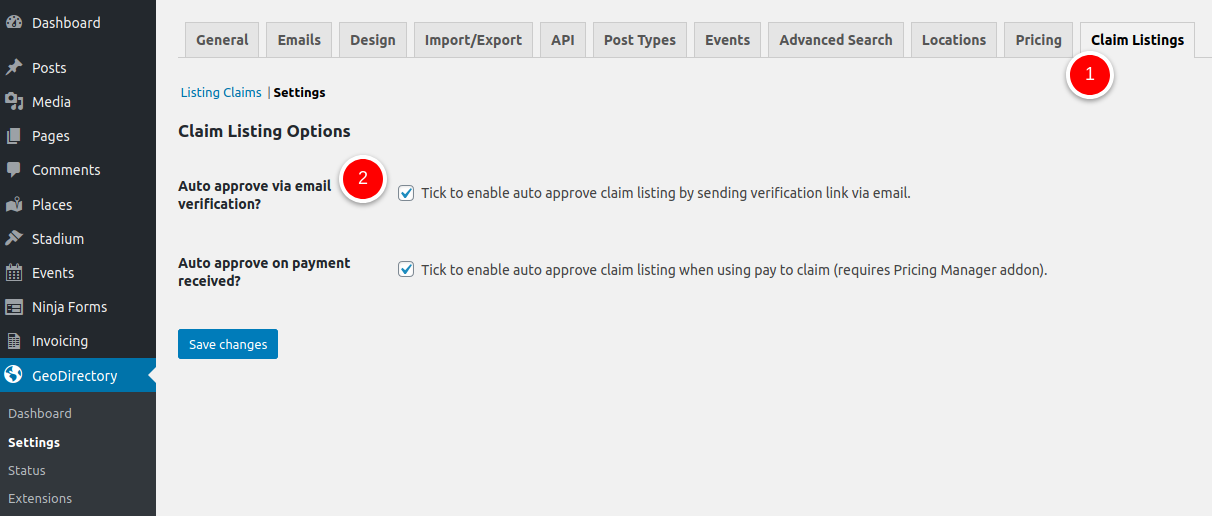
- And if you want to simply approve submitted listing claims immediately, just head to GeoDirectory > Settings > Claim Listings > Settings and tick the box.
Add the “Is Claimed?” Field
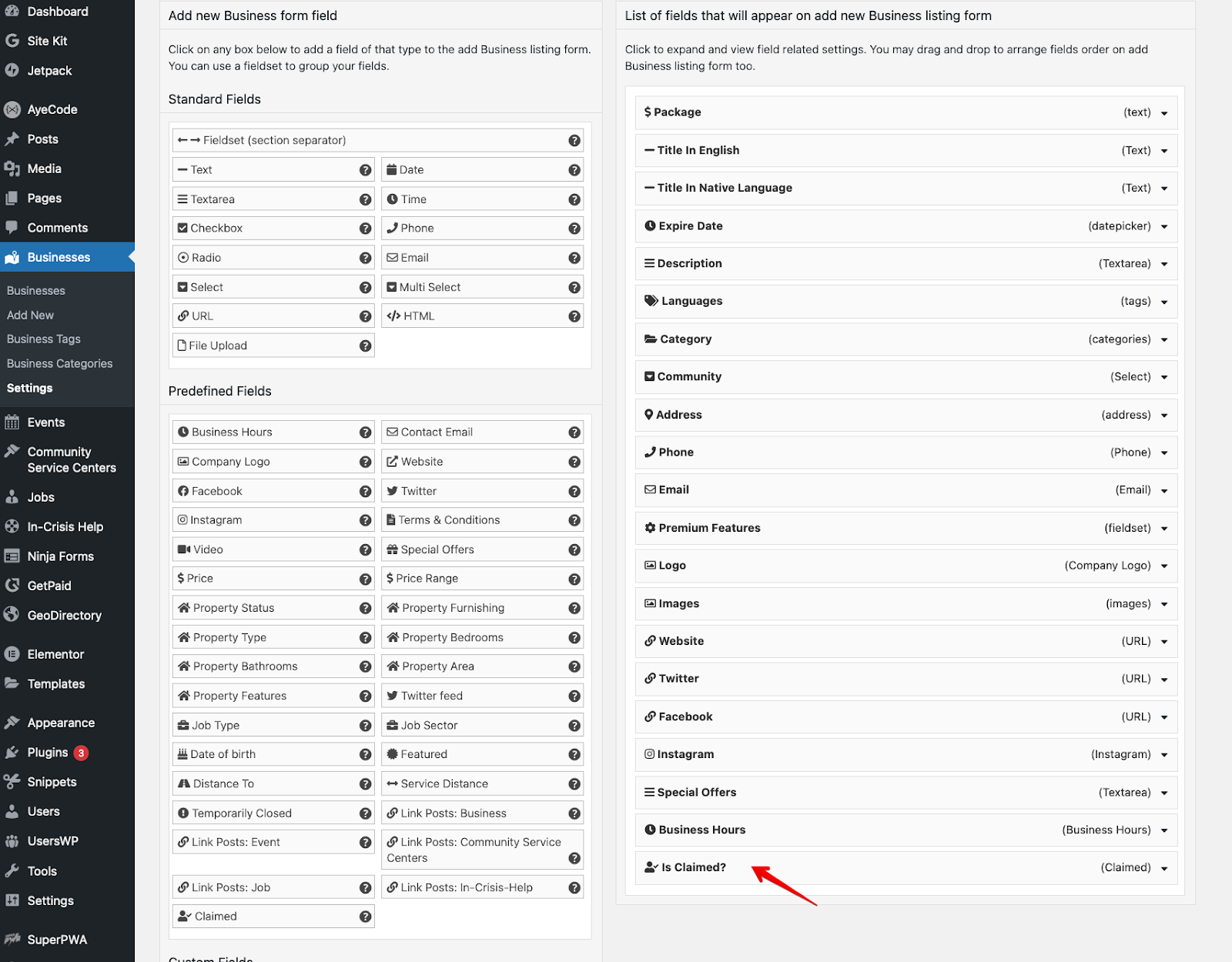
Next up, let’s make sure the “Is Claimed?” custom field is added to your available fields so users can claim listings when adding a new listing.
Here’s how:
Go to CPT > Settings > Form Builder and drag the “Is Claimed?” field over to the available fields section. Without this step, the “Is Claimed?” widget might not show up where you want it.
Add the “Claim Listing” button
You can’t have a “Claim Listing” function without the actual button, so make sure to add it in:
To get the claim button on the front end, use our GD > Post Claim widget. You can add it to any widget area or use it as a shortcode or block in your content.
Ideally, it should be added to the GD Detail page, which is the template used for each single listing page.
It can also be used in the GD Archive Item page, which is the template used for the listing cards.
Here are some things you can configure on it:
- Title – The title for the widget.
- Text – The button or link text.
- Output Type (A) – You can choose whether to output a button or a simple link.
- Show/Hide Options – Choose where the widget should be shown.
Based on the Output Type you select, the widget outputs a button (or a simple link). The button will look something like this:
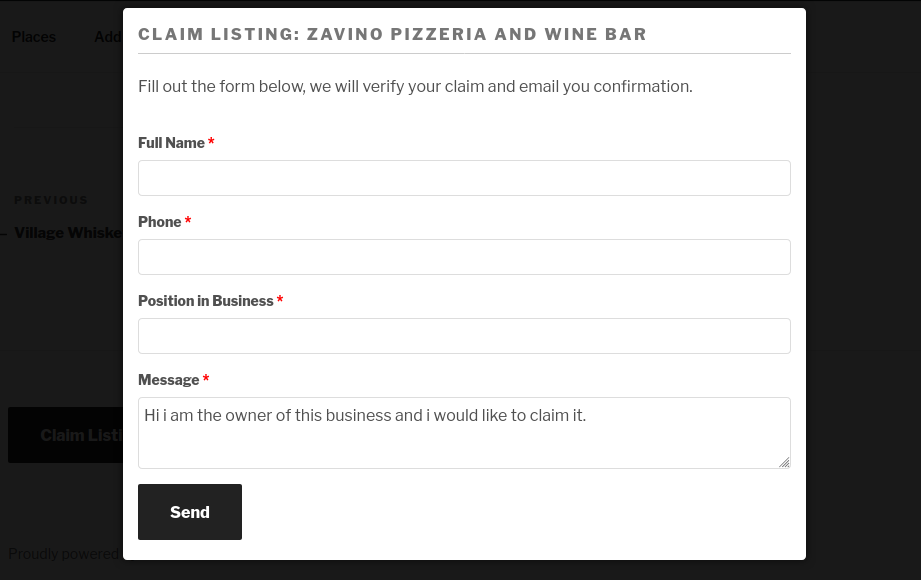
And once someone clicks on it, the form to submit a listing claim will look like this:
Step 3: Integrate with the Pricing and Payments Add-on to make money off the feature
Setting up pricing options for claimed listings is made easy with the GeoDirectory Price Manager add-on.
This add-on gives you full control over the prices for your membership packages and claimed listings, allowing you to create various plans.
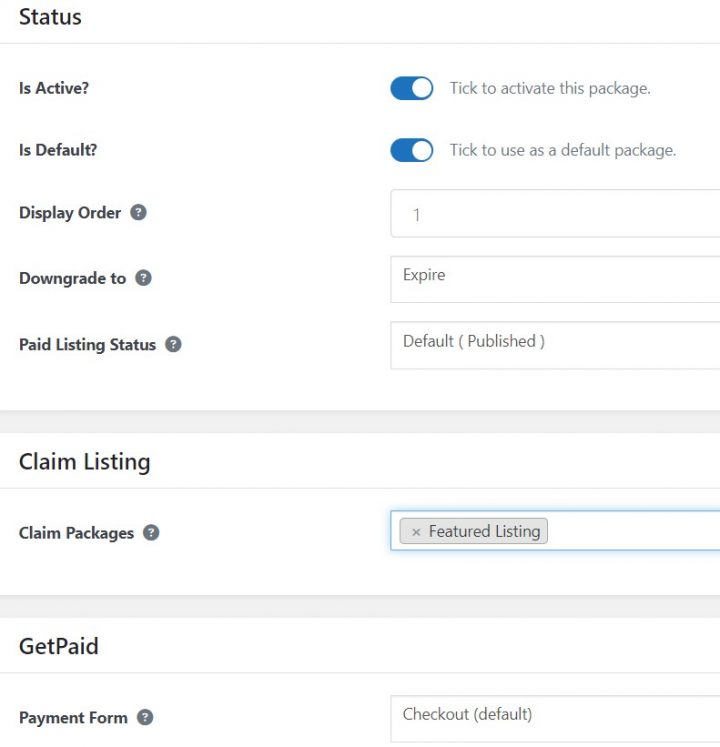
You can also integrate payment gateways such as Stripe or PayPal so users can pay for their listings right away.
This makes it easier and more efficient to manage payments, as you won’t have to handle them manually.
Once payment is received, the claim will be automatically approved, and the listing activated – no manual approval or processing is needed!
Step 4: Promote and encourage claiming listings
Once your GeoDirectory Claim Listing feature is up and running, it’s time to promote it and encourage users to claim their listings. Here are a few tips:
- Add a compelling call-to-action on the front end – Use a CTAs section on your homepage to encourage users to claim their listings. Create a section of the advertising landing page explaining everything a business owner needs to know before claiming their listings.
- Let your business owner know why they should claim their listing – Communicate the benefits of claiming a listing, like increased visibility and credibility in search results (like with a ‘verified listing’ badge), more accurate information display, and improved access for customers.
- Offer incentives for claiming – Alongside the obvious benefits, businesses might need an extra push to actually take action. Offer a discount, a special paid listing trial, or bonus points when they claim their listing, and make it easier for them to find the “Claim Listing” button on your front end.
Step 5: Monitor and Manage Claims
Once your claims feature is up and running, it’s important to keep an eye on it.
You may need to monitor and manage claims in various scenarios, including but not limited to:
- When you want to verify the legitimacy of a claimed listing to prevent fraudulent or incorrect information from being published in your directory.
- When you want to enforce your directory’s guidelines and policies for listing claims, such as reviewing and approving claims based on certain criteria.
- When you have a “Pay to Claim” system, ensure payment has been received before approving a listing claim.
- When you need to track and manage the status of listing claims, such as keeping a record of approved, rejected, or pending claims.
- When you need to respond to inquiries or disputes regarding listing claims, you need to access the relevant information and data to resolve the issue.
GeoDirectory provides a Claims Dashboard where you can monitor and manage everything. And if, for any reason, you want to unapprove a listing claim, you can do so by heading to the Listing Claims under Approved and clicking Undo for that particular claim.
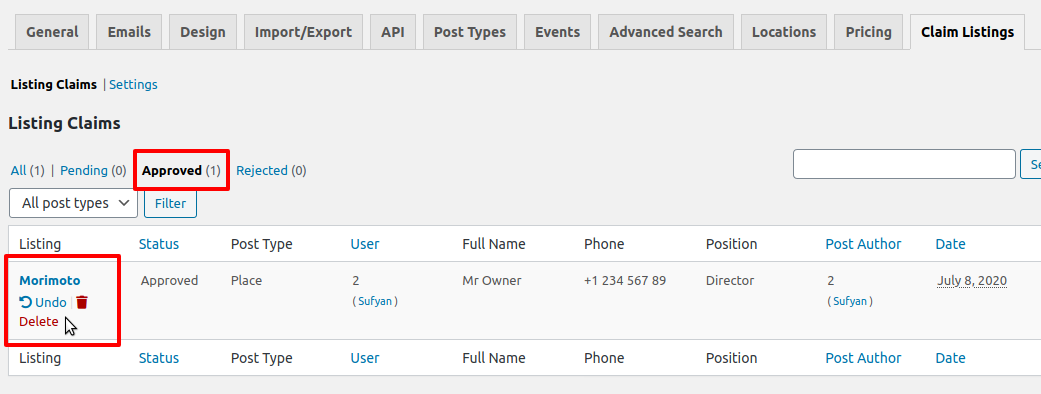
By monitoring and managing claims, you can ensure that all listings on your directory are legitimate, compliant with your guidelines and policies, and up to date.
This will help to keep your directory accurate, trustworthy, and profitable.
Parting words
That’s how easy it is to get started with the GeoDirectory Claim Listings add-on.
Being able to claim listings is an invaluable feature for any business directory.
With it, you can create a more interactive and engaging user experience and generate additional revenue by allowing users to pay to claim their listing.
We hope this guide has given you a better understanding of the GeoDirectory Claim Listing add-on and how to use it effectively.
To further customize and optimize the claiming feature on your directory, be sure to check out the GeoDirectory Price Manager add-on and consider integrating UsersWP with GD for better user account management.
So what are you waiting for? Get started today and make listing claiming easy and profitable!
Good luck with your directory venture, and happy claiming! 🙂
If you’re an Airbnb host, chances are you’re always looking for ways to increase your bookings and revenue.
But aside from a well-maintained property, extra amenities, and excellent customer service, you can add another layer of value to your guests.
A Directory Website with your local tips for travelers.
A directory website gives visitors everything they need for their vacation and will add a unique personalized touch to the experience of your short-term rental guests.
From finding a place to stay (cue your excellent property listings) to discovering unique local attractions or services, all in one convenient place.
With some creativity and effort, you can use your directory website to establish a brand, which can be a very profitable operation for your any Aribnb operator, as explained in this video.
Finally, you can turn this into a lucrative business venture to boost revenue for yourself and the community.
In this blog post, we’ll explain how you can create your directory website and get started on this journey.
First, here are some factors to consider when creating a tourist directory website:
- Location: Where will the directory be based, and what type of attractions/services will it feature? For example, if you’re a host in a ski resort area, the directory might include ski rental shops and activities like snowmobiling or dog sledding. If you have multiple properties in different regions, you can go global and offer a comprehensive directory of local attractions wherever your guests travel.
- Audience: Who is the directory for, and who will be featured on it? Are you focusing on visitors to your area, or do you want to attract local businesses too? Will the directory feature only travel-related services or a range of offerings from different industries?
- Branding and Design: Think about the design of your website and how it can help you drive more bookings. Your directory should be visually appealing, easy to navigate, and display information orderly. Also, ask how you’ll brand the directory and make it stand out. What colors, fonts, and images will you use? With a directory builder like GeoDirectory, you can style and customize attractive, on-brand pages from the ground up.
- Promotion: How will you get the word out to potential customers? Consider setting up a blog or social media account to spread awareness of your directory.
1. List your properties as a better deal than on Airbnb
Once your directory is ready, you’ll first want to list all your properties.
The great thing about having your website directory is that you can call the shots (entirely) on pricing.
That means you can offer exclusive discounts, bundle services together, and skip the service fees to create a better deal than what’s available through Airbnb or other hosting sites.
For instance, on Airbnb, hosts pay a 3% commission, and guests are charged a service fee of up to 15% on top of the accommodation price.
By raising the price by 7% on your directory website, guests will still pay, on average, 8% less compared to Airbnb.
This means you can make an extra 10% profit minus the credit card commission.
On top of the financial benefits, you have more control over the listing process to tailor the listing to your guests’ needs.
Some perks of this are:
- You could offer discounted rates for more extended stays, provide complimentary local tours/services with each booking, ‘curate’ unique experiences for each guest, or create custom packages for different types of travelers (families, couples, business travelers). By offering more than just a place to stay and extras like these, you will surely draw in more customers looking for an all-in-one solution.
- You build a direct relationship with guests instead of relying on a third-party platform. This way, you can keep in touch with guests after they’ve left (via email or social media). If the guest is happy with the experience, they may return for another stay or recommend your properties to others.
Once you’ve listed your properties, you can consider adding more businesses and activities to the directory.
This is where it gets fun.
By including other things to do in your area, you create a one-stop shop for travelers looking for the best of what your area offers.
If you send a link to the directory whenever you receive a new booking, you will allow your guest to better prepare for their stay and will ignite curiosity and excitement.
It will also allow you to set the expectations in advance, allowing you to provide information that otherwise your guest would discover only once they reach your property and find your welcome book.
It becomes a journey of experiences, far more than your Airbnb competitors could offer.
The following sections will show you how to show guests the best of what your area has to offer.
2. Show your guests where to grab a bite
Of course, your guests will need somewhere to eat, and you can be sure to take advantage of that.
By curating a list of local eateries, cafes, bars, and pubs, you’ll provide guests with an easy-to-navigate website to find out where locals eat in that area.
In the restaurant directory, you could even feature only those that offer discounts or freebies to your guests.
For example, you could post a featured cafe listing that offers 20% off for all guests on your directory website.
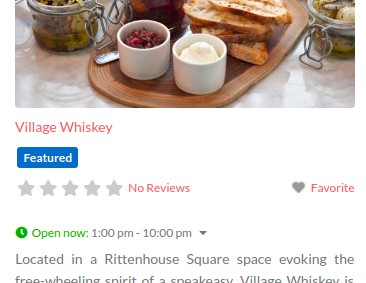
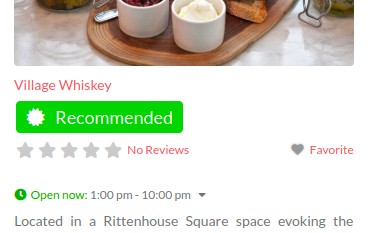
Or you may add some of the best places to eat in your opinion (starring them as “recommended”), and offer other local businesses the opportunity to feature their venues.
Either would look something like this:
The more options you give your guests, the more likely they’ll book with you over another Airbnb host.
3. Give your website visitors exclusive deals on all-inclusive hotels & resorts
Yes, you can make money even from those not looking to book your place.
Notably, not all travelers are inclined to utilize vacation rental units, and some still prefer the ambiance of hotels and resorts.
This trend is a profitable opportunity for those savvy enough to tap into it.
This kind of traveler might still stumble upon an article on your website with the only genuine description of your location’s best hotels and resorts.
In this regard, prominent booking portals such as booking.com and Expedia have implemented affiliate marketing programs, extending commission incentives to bloggers and webmasters who forge strategic partnerships with them.
By joining forces with these influential players in the hospitality industry, website owners can capitalize on the benefits of the collaboration, earning commissions for bookings completed through their referral links.
In addition to this monetary compensation, the partnership also facilitates the provision of unique deals and experiences to guests, enhancing the appeal of the directory website and generating additional revenue streams.
Re-Sell Day Passes
If your Airbnb is close to All Inclusive Resorts, you can generate additional revenue by reselling day passes at a markup.
Many resorts sell day passes in bulk at a discounted price.
So if you get a 20% discount on the day passes, you can resell them at a 10% discount and keep 10% as markup.
This can be a great way to provide additional value to guests who may prefer to stay at an Airbnb but still wants to take advantage of the facilities of a nearby resort. (while you make an extra profit.)
Be sure to check the terms and conditions of the hotel or resort to ensure that reselling day passes is allowed.
Timeshare resorts
A timeshare resort is a type of vacation ownership where individuals share ownership of a property, typically purchasing a week or a fraction of a week.
Owners can use or exchange them for an equal amount of time at other timeshare resorts.
They often offer additional amenities, activities, and on-site entertainment compared to regular resorts.
You could earn a percentage of the sale by referring a buyer through your directory website.
In addition to providing guests with unique experiences, partnering with timeshare resorts can significantly increase your revenue without additional costs.
Just make sure that you read all the terms and conditions before signing any agreements.
4. Suggest sports and recreational activities
Today, many travelers want active experiences that can vary depending on the location.
If you can suggest sports and recreational activities in your area, this could be an additional source of income for you.
For example, if your Airbnb is by the ocean and you know a local guide who offers fishing trips, you could commission them to take guests out and resell their service for a profit.
Or if there’s a rental shop nearby, you could partner with them to provide discounted rates on kayaks, paddleboards, and other equipment.
Golf is another popular activity for vacationers.
They may give you rounds at a 50% discount if you partner with a golf club.
You can use this opportunity to resell as packages for a profit: apartment plus golf or just the golf rounds.
And the great thing about golf courses is that they usually have many other activities to enjoy (e.g., tennis courts, swimming pools, and spas to restaurants and bars).
You can offer guests exclusive discounts on packages at golf courses in your area.
Skiing and snowboarding are two of the most popular winter activities, as they offer a thrilling adrenaline rush and beautiful scenery.
Ski resorts often provide lessons for those new to the sport, so getting started is easy.
Partner up with Ski and Snowboard teachers and resell their services.
5. Offer tickets to local attractions & extraordinary events
Regarding attractions and events, the possibilities are endless – from theme parks, museums, and nature-based activities to concerts and festivals.
Here are some more event partnership ideas to help you stand out from other Airbnb hosts:
- Boat tours: If you’re near the ocean, you could see if any local businesses offer Whale, Dolphin, or even Island watching tours.
- Wildlife exploration: If you’re near a nature reserve or wildlife park, contact them to see if they offer special packages for your guests.
- Food tours: Food tours are an excellent way for guests to know the local cuisine and culture. Contact local restaurants and tour operators to negotiate discounts and add experiences like cooking classes or wine tasting on your directory website.
- Sport & Wellness: You can partner with sports coaches and tour organizers (surf, golf, tennis, ski/snowboard, and many more) and sell their lessons for a %. You can also organize Tours (transportation and guide).
6. Let guests know about wellness experiences
Finally, consider partnering with local Yoga teachers, healing practitioners, and other wellness operators for exclusive rates for your guests.
You can add these services to your directory website and offer discounts on packages that include accommodation and treatment.
Look into:
- Massages
- Pilates
- Physiotherapy
- Breathing Sessions
- Ice Water Baths
- Yoga Classes
- Sound Therapy
Note: You will need the Custom Post Types add-on to offer and manage the different kinds of listings (like events, activities, and resorts) we mentioned in the sections above.
7. Remember these pro tips when creating your Airbnb directory website
Now that you know how to ramp up your Airbnb revenues with a directory website, here are some pro tips to help you make the most out of it.
- Make it easy for guests to browse lists of top-rated places (whether it’s properties, attractions, or events). You can use the listing manager to create your own fine selection of experiences (e.g., “Must try Italian Restaurants”, “Places to visit in Scotland,” or “Summer Events 2023”) to make choices even easier for buyers while promoting certain places.
- Add reviews and rating capabilities to your directory website. This is a necessity when listing websites, as people rely heavily on reviews and ratings for making travel-related decisions. With the MultiRatings and Reviews add-on, you can upload photos and customize everything from the icons and color to the rating categories and scale to give guests an idea of what experiences are the most popular and enjoyable.
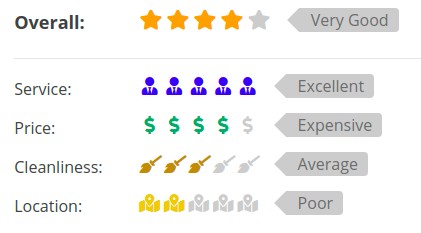
- Use the compare listing add-on to let your customers see listings side by side to assess essential details about each business. A comparison chart could be handy for your guests to understand the pros and cons of different listings so they can choose what’s best for them.
Ready to boost your Airbnb revenue?
No matter what type of travel experiences you want to offer, partnering with local businesses is an easy way for Airbnb hosts to increase and optimize their revenues.
With the right partnerships and a user-friendly GeoDirectory site, you can ensure your guests enjoy their stay and leave your destination with unforgettable memories, all while you’re making extra money!
If you’re feeling inspired, start building your Airbnb-like directory website today and see how to increase your Airbnb earnings.
Don’t forget to share it with the world to bring more guests to your destination.
You can get GeoDirectory here today:
Lost on how to get your online directory business out of the depths of page 13 in search results?
You’re not alone.
Without traffic, your Directory is meaningless, and SEO can be a tricky road to navigate, but it doesn’t have to be.
We’ve put together this complete guide on how to do SEO for your directory website.
Follow these tips and generate traffic, leads, and potential customers sooner than you think.
Ready? Let’s go.
What does SEO mean for directory businesses?
SEO, or Search Engine Optimization, is the practice of optimizing a website to improve its ranking in search engine results pages (SERPs).
This is important for directory businesses because it helps them to attract more qualified traffic to their website.
Here’s a quick overview of what goes into ‘optimizing a website for search engines (we’ll go deeper into these in later sections):
- Adding relevant keywords and phrases to important areas of your directory website (e.g., meta titles, descriptions, and URLs)
- On-page optimization (i.e., improving content quality with relevant images and videos, internal linking, reducing page load times, etc.)
- Making your site mobile-friendly
- Building links from other relevant websites
- Speed optimization
Why is a strong SEO strategy important for an online directory business?
- Increased visibility: A strong SEO strategy can help a directory business rank higher in the SERPs to get in front of more eyes when people search for related keywords and phrases.
- More sales & revenue for your directory: When a directory business ranks higher in search results, it’s more likely to attract qualified traffic (AKA people actively searching for the products or services that the directory advertise). These will make business owners more likely to convert to paid listings and ads and bring you greater sales and revenue.
- Users have an easier time on your site: A strong SEO strategy means faster loading times, easy navigation, and mobile-friendliness, all of which can help to increase the chances of converting visitors into customers.
- Increased brand awareness: By ranking higher in search results, a directory business can also increase its brand awareness among potential customers. Over time, you’ll establish yourself as a trusted and reliable source of information in its industry. Like Yelp is now.
- Gain a competitive advantage: Having a strong SEO strategy can also give an online directory a competitive advantage over its rivals. If the Website ranks higher in search results, it is more likely to attract advertisers who may have otherwise gone to a competitor.
Do your keyword research.
Keyword research is an important part of SEO for directory websites because it helps identify the phrases and terms people use to search for businesses and services in your industry.
Once you know what people are searching for, you can create the content to serve those queries on your online directory.
This is why you must narrow down on a niche and flesh out your target audience because that will help you identify keywords relevant to the directory business.
How to do keyword research for your directory website
Using keyword research tools such as Ahrefs, SEMrush, or Keywords Everywhere, you can get an idea of the types of main keywords and long-tail phrases that people use to search for businesses and services related to your directory.
Once you have your list of keywords, you can begin to optimize your website accordingly.
- Start with a list of seed keywords: An excellent way to get started with keyword research is to create a list of seed keywords related to your business or industry. These seed keywords can be broad or specific, depending on your goals and target audience.
- Focus on long-tail keywords: Long-tail keywords, which are more specific and longer phrases, tend to have less competition and may be more targeted to your audience. If you’re a newer site, aim for keywords with a low KD score (the lower, the better). These keywords are easier to rank for.
- Consider the user intent behind keywords: Are users looking for information, products, or services? By understanding user intent, you can optimize your content and website to meet your target audience’s needs better. Google a keyword and see what’s ranking (information, products, or service). That is how you check for search intent.
- Use related keywords and synonyms: In addition to the main keywords you are targeting, it can be helpful to include related keywords and synonyms in your content to help improve its relevancy and reach a wider audience.
- Monitor and update your keyword list: Keywords and user search behavior can change over time, so it’s important to regularly monitor and update your keyword list to ensure that it is still relevant and effective.
Where do I put these keywords in my directory?
Once you’ve identified relevant keywords and phrases, you’ll need to add them to key locations on your directory website.
Here are some of the important areas to consider:
- Meta titles and descriptions
- Page titles
- Content on page (e.g., the home page, blog posts, landing pages, etc.)
- Headings and subheadings
- Images and videos (e.g., ALT tags, titles, captions, etc.)
- URLs and navigation menus
- Backlinks from other websites
Once you’ve added these keywords, you’ll need to ensure they are used consistently and appropriately throughout your directory website.
Take care of your on-page SEO elements.
Every page on your website should be optimized for SEO. This way, business directories ensure that their pages are easily discoverable by users and search engines.
Here’s what you need to consider:
- Use descriptive and relevant titles and meta descriptions: Title tags and meta descriptions should accurately reflect the page’s content and include relevant keywords since they tell Google precisely what your page is about.
- Break down the content with headings and subheadings: Headings and subheadings help structure the content of your page and make it easier for users and search engines to understand the main topics covered. Make sure to respect the headings hierarchy.
- URLs should be concise, descriptive, and include relevant keywords.
- Include relevant images whenever possible and use descriptive alt text to improve the user experience, which can also be beneficial for SEO.
- Use internal linking wherever an opportunity arises: This is the practice of linking to other pages within the same website. Doing so helps search engines discover and crawl new pages on your site, understand its structure and hierarchy better, and distribute link equity (giving more authority to newer pages). All so individual pages can rank better in the SERP.
- Link to external sources: Linking to high-quality, authoritative sources can help improve the credibility and value of your content.
- Use schema markup: Schema markup is a type of microdata that you can add to your website’s HTML code to help search engines understand the content of your page. It can help your page stand out in the search results and provide additional information to users. (GeoDirectory does it automagically)
By paying attention to these on-page elements, you can help improve the visibility and credibility of your online directory website in search engine results.
This can lead to more relevant traffic and potentially more business for your directory.
Make sure your online directory is flawless on mobile
Aside from the obvious fact that mobile usage is on the rise, Google has stated mobile-friendliness as a legitimate ranking factor.
This means that if your website is not optimized for mobile devices, it will be less likely to appear in search engine results.
Did you know that 82 percent of smartphone users have ‘near me’ in their searches?
That shows the importance of optimizing your website for mobile devices, especially as an online directory pointing to local establishments.
To optimize your website for mobile devices, here are a few things you can do:
- Compress images: Large images can take longer to load on mobile devices. So resize them to the minimum size required for display on mobile devices. This can help your web pages load faster, which is important for providing users with a good experience. A free tool you can use is the free photoshop close: https://photopea.com
- Use responsive web design: Make sure your website is built with a responsive theme to adjust automatically to different screen sizes and devices (GeoDirectory is responsive out of the box). This will help ensure your directory website looks good and functions properly on all devices.
- Make sure the content is readable: Make sure your website’s content is readable on smaller devices. This can be done by using larger font sizes, increasing the line height, and ensuring the content does not overflow the mobile device’s screen.
- Optimize for faster load times: The probability of a user bouncing increases 32% as page load time goes from 1 second to 3 seconds. Ensure your website is optimized for faster page load times by using caching plugins, minifying CSS and JavaScript files, and reducing the number of HTTP requests.
Pro tip: Consider using mobile-friendly directory plugins like GeoDirectory if you’re using WordPress to build your directory business. It has built-in mobile optimization features like responsive design, mobile search, and a highly proficient database for quick search results.
Don’t sleep on local SEO
As a directory website owner, it’s essential to understand the value of local SEO and how it can benefit your customers.
By optimizing your website for local search terms, you can attract local businesses and demonstrate your expertise in this area.
Of course, you should optimize for keywords such as “online advertising,” “web marketing,” “SEO,” and “SEM,”
To optimize your directory website for local SEO, you should ensure that your website content is relevant and includes keywords that local businesses are searching for.
This includes optimizing titles, descriptions, and other on-page elements to make it easier for search engines to understand the content of your website.
In addition to optimizing your website, you should create a Google My Business profile for your directory website.
This will help you to show up in local search results and attract local businesses to your platform.
You can improve your online presence and attract more customers by fully optimizing your GMB profile with accurate information about your directory website.
As you attract local businesses to your directory website, you should emphasize the importance of local SEO and offer services that help businesses to improve their online presence.
Don’t limit yourself to selling Premium Listings.
This includes offering packages that include local SEO services such as GMB optimization and local directory submissions.
By demonstrating your expertise in local SEO and offering services that help businesses to improve their online presence, you can attract more customers to your directory website and establish yourself as a leader in the local SEO space.
Here are some pro tips for improving your local SEO:
- Create and optimize your Google My Business listing: Google My Business is a free tool that allows you to manage your business’s presence on Google Maps and in Google search results. By claiming and optimizing your listing, you can help improve your visibility in local search results and provide users with important information about your business, such as your location and contact information.
- Use relevant and local keywords: Incorporate relevant and local keywords into your website’s content and metadata, such as the title tags and meta descriptions. This can help improve the relevancy of your website for local searches. For example, you should have pages for keywords like: Local SEO in “Location,” SEM in “Location,” and Web Marketing in “Location” where location is the area you serve. If you serve more than one area, you should convert them all, 1 page for location.
- Obtain high-quality backlinks: Backlinks are links from other websites that point to your website – getting them from reputable and authoritative websites can help improve the credibility and authority of your website in the eyes of search engines.
- Encourage reviews: Encourage customers to leave reviews on your Google My Business listing or on social media. Positive reviews can help improve the credibility and trustworthiness of your business in the eyes of potential customers.
- Get local citations or NAP (Name, address, and Phone). These details should be visible in the footer of your website or in a dedicated page, and you should submit your directory URL on any website that will allow you to create such citations. More specifically, think of Facebook Pages and other online business directories.
Build backlinks to your directory website.
Link building is the process of getting other websites to link to yours.
It’s telling Google that other trustworthy sites deem you worthy of a link, which helps increase your website’s authority, trustworthiness, and visibility in search engine results.
Here are some tips for link building:
- Reach out to influencers and industry experts in your directory’s niche: Influencers and industry experts are people who have a large following or presence in your industry. Reach out to them and ask if they would be willing to link to your website. For example, if you’re building a directory of restaurants in Seattle, reach out to local food bloggers or chefs for potential links.
- Create useful and shareable content: People are more likely to link to useful, informative, or entertaining content. Try creating blog posts, videos, and infographics that can be easily shared across the web.
- For example, Yelp has a dedicated blog site divided into three categories: News, Businesses (tips for businesses), and Community. They have a fourth called “Life at Yelp” where they share their culture and what’s happening at the company. You could do something similar to set yourself apart from the competition.
- Dabble in guest posts: Guest posts are another proactive backlinking strategy. These are blog posts written by you and posted on another website. It’s a great way to get quality backlinks, as the website you’re posting on is likely authoritative and trustworthy in your directory’s niche.
- Participating in online forums and communities can help you get your website noticed by potential customers and other industry experts. It’s also a great way to share your knowledge, build relationships, and get backlinks from other websites. We’re talking about platforms like Reddit (subreddits in your niche), Quora, Facebook and LinkedIn groups, and other industry-related forums.
Track and study the numbers to tweak your SEO strategy
By analyzing website traffic, leads, and sales data, directory businesses can determine the ROI of their SEO efforts, identify areas of their website that need improvement, and stay up-to-date with industry trends.
You can use free analytics tools like Google Analytics or paid ones like SEMrush and Ahrefs if you want more robust capabilities like keyword position tracking, data on backlinks, and competitor analysis.
Here are a few metrics you’ll want to keep an eye on:
- Traffic (i.e., total visitors, unique visitors, and pageviews)
- Keyword rankings
- Time spent on page
- Bounce rates
- Organic search traffic
- Click-through rate (CTR)
- Conversion rate
By understanding the effectiveness of your SEO efforts, you can make adjustments and ensure that you’re taking full advantage of your directory business’s potential.
Start off on the right foot with GeoDirectory.
That was a lot, right? SEO for online directory businesses requires a robust strategy that touches on many different aspects, but if you can master them all – you’ll be well on your way to success.
Remember, consistency is key, so keep up with the latest trends and always be on the lookout for opportunities to enhance your directory business’s SEO.
If you’re looking for a great solution to help get your directory website off the ground, consider using GeoDirectory.
It’s a powerful WordPress plugin that helps you create robust, SEO-friendly directory sites.
It is mobile-friendly and comes with built-in features like mobile search, responsive design, and a highly proficient database for speedy search results.
Ready to give it a go?
You can get GeoDirectory here today:
Creating a high-conversion landing page is one of the most effective ways of marketing your online directory.
In this case, your landing page would be an Advertise Page because you are building an online directory, and your main goal is to find advertisers to buy premium listings or ad space.
I’ve seen far too many directory websites without a decent Advertise Page or neglecting the importance of this type of page.
On this page, you will provide business owners with the information needed to choose to buy premium listings or ad blocks.
Or if you offer the service (you should), to hire you to manage their online presence.
This entails creating one or more sales pages that are distraction-free and helps the visitor focus on the message well enough that they want to make a purchase.
A high-converting landing page means more people are turned into customers than those who exit the page or decide not to make a purchase.
The higher your conversion rate, the more sales you generate.
For that to happen, you must give maximum visibility to your landing page.
- It must be linked in the header of your main navigation menu.
- Calls to action buttons linking to that page should be available through your directory website’s content.
- It must be SEO optimized so that Google can show it to people in your niche looking to spend their marketing budget on online marketing.
- Your Social Media profile and posts should often link to it.
- You can buy ads on Google for specific keywords that are harder to rank for.
- Finally, you can create social media ad campaigns and link them to your sales page to increase sales.
While you can set up a sales page quickly and easily, however, there are key elements that need to be considered carefully:
- Enticing above-the-fold content
- A prominent, engaging headline and Call to Action (CTA)
- An informative and interesting subheading
- Strategically positioned images
- Balanced, uncluttered design and layout
- Color psychology
- Provide social proof
- Trust badges, logos, and guarantees
- Provide live chat and other user-friendly contact channels
- Funnel marketing
You can find more information on these in detail below.
1. Enticing Above-The-Fold Content
Above-the-fold content on a webpage means whatever text, images, and other elements a person sees when visiting the website without having to scroll down the page.
This area is crucial because if the content isn’t enticing and engaging, there’s no reason for the visitor to continue browsing the page.
Above-the-fold content can include a prominent, emotional, and thought-provoking image, video background, headline, subheading, Call to Action (CTA), and other relevant elements you choose.
Keep reading for more details on these types of content.
2. Prominent, Engaging Headline and Call to Action
A headline and CTA are typically one of the most critical elements of a landing page because it’s what visitors will likely see first.
This means they must be carefully crafted to ensure they provoke curiosity in your visitors.
The more curious they are, the more likely they’ll keep scrolling through the page.
A CTA (call-to-action) is designed to prompt the visitor to take action on something you want them to do.
For example, you could write a CTA asking visitors to create a listing, buy an advertising package, sign up for your email newsletter, or to buy something.
Good CTAs are short, sweet, and get to the point quickly.
If you don’t have a CTA, your visitors can’t be sure what you want them to do. That means they may not take action the way you want.
3. Informative and Interesting Subheading
After the CTA headline, it comes the subheading.
It should be just as engaging, but it should offer more information.
They’re typically between one to three sentences long, but be careful not to be too wordy.
Get straight to the heart of the matter and offer details that are relevant as well as compelling.
A subheading should detail how your online directory is highly rated, well-established, and popular or provide other relevant and enticing details to your target audience.
Your CTA is meant to spark interest, while the subheading offers enough detail to quench your visitor’s curiosity while creating even more curiosity.
That way, the reader continues scrolling through the page and engaging with your content.
You’ll have a greater chance of convincing them to take the action you want.
4. Strategically Positioned Images
When you add images to the page, it should be done thoughtfully. Don’t add images and photos just for the sake of it.
Sometimes they are not needed at all.
If used, images you add should be congruent with your ads.
This means that if you display an image in an ad, that same image should be in your above-the-fold content on your landing page.
Not only will this help your marketing look cohesive, but it will also help boost your sales.
The reason is that the person clicked on your ad in the first place, which means they found the image compelling.
So, if you use the same image on your landing page, it will continue to compel them enough to continue scrolling.
5. Balanced, Uncluttered Design and Layout
The design and layout of your landing page should be clean and uncluttered.
That way, your visitors can stay focused on your content and your CTAs.
This also means that you should remove any elements of the page that takes away their focus or makes them click on another page.
This includes removing any navigation links at the top of your page, for example.
6. Color Psychology
You can also use the psychology of color in your landing page’s design to make your page more eye-catching and enticing to your visitors.
For details on implementing color psychology, check out The Psychology of Color in Web Design.
7. Provide Social Proof
Social proof means evidence that people support and love your business.
This looks like testimonials, whether they’re written or in video form, for example. You could also use tweets and other social media posts.
Adding social proof to your landing page is crucial since it helps build trust with your audience.
If they see that other people like your online directory, it will help convince them to join in.
The more details you can provide, the more trustworthy your social proof appears.
This includes elements such as a photo, name, location, or website for the person giving the testimonial.
8. Trust Badges, Logos, and Guarantees
Like social proof, you can add trust badges, logos, and a guarantee to further build trust with your audience.
A trust badge can look like a five-star review from a prominent and popular customer review site like Capterra.
You could also include a guarantee for your online directory.
A common one is a 30-day money-back guarantee.
If your customers aren’t satisfied within 30 days of purchase, they can get a refund.
Often, you would include a clause in your terms of service that offers the appropriate details.
The more generous the refund policy, the better.
9. Live Chat and Other Contact Channels
Including at least one way visitors can contact you quickly and efficiently is a great way to resolve their issues before they give up and navigate away from your landing page.
You can help solve their problem and offer your online directory as a solution.
Options include live chat, an email address, a contact form, Facebook Messenger, other social media platforms, a support forum, or other avenues that make sense for your directory.
Whatever communication channels you offer, be sure they’re easy to access and user-friendly.
Offering more than one option is also ideal, especially if you have a live chat option that isn’t available 24/7.
10. Funnel Marketing
Funnel marketing is one of the key components of a landing page.
A funnel is a path you want your visitors to take when scrolling and navigating your landing page.
It starts at the top of the page, then gets more specific and targeted as you go.
For example, you could start with the visitor reading a sales copy or watching a sales video.
Then, you could display a CTA that prompts them to purchase a listing.
You could offer an additional item at a higher price to gain more revenue.
If the customer decides they don’t want the additional offer, you could then present them with a second product or service that’s at a much lower price.
If that doesn’t entice them, you could direct them to sign up for your free newsletter.
That way, you get more future opportunities to sell to your customers.
You can design your sales funnel in so many ways using the GetPaid add-on.
There’s no set, correct way to plan a funnel.
The best kind of funnel is the one that converts the most visitors into customers while generating the most revenue.
Now let’s break down a real-world example.
Landing Page Case Study Breakdown
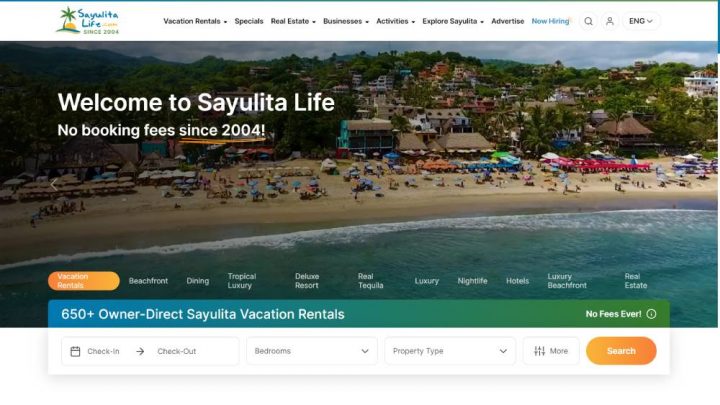
For this case study, I decided to review a directory that most (or all) of you probably never heard about: Sayulitalife.com
This directory covers a Surf Town close to where I live, and I’ve been keeping an eye on it since I moved here.
Sayulita Life is a website that showcases the beauty and lifestyle of the coastal town of Sayulita, Mexico.
The website provides visitors with a wealth of information about Sayulita, including its history, culture, and local attractions.
It also offers a wide range of services, such as travel planning and accommodation booking, to help visitors make the most of their time in Sayulita.
The website features stunning photography that showcases the town’s breathtaking scenery, as well as articles and blog posts about life in Sayulita, from its vibrant food scene to its thriving surf culture.
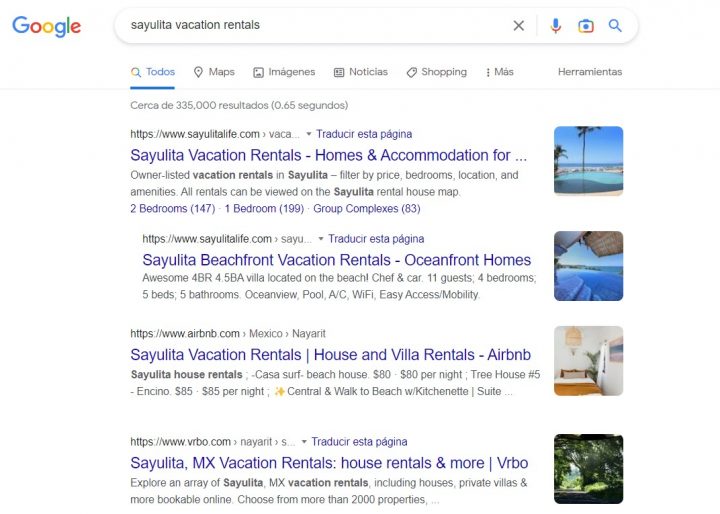
Even though Sayulita is a tiny surf town, this exceptionally well-positioned directory outranks sites like Airbnb, VRBO and TripAdvisor.
I estimate that it generates high-six figures per year.
Unfortunately, they are not using GeoDirectory, because they started their custom application in 2004, ten years before we even existed.
That said, a directory like this could be replicated almost identically with our plugin (especially with the upcoming FSE theme and booking engine).
Performance-wise, GeoDirectory would work even better.
Let’s examine their advertising landing page to ensure it includes all the previously discussed elements.
1. Above-the-Fold Content
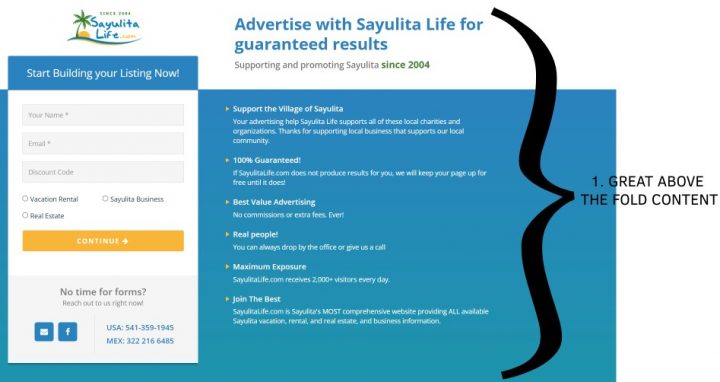
All information needed to make an informed decision are above the fold.
2. Heading & CTA
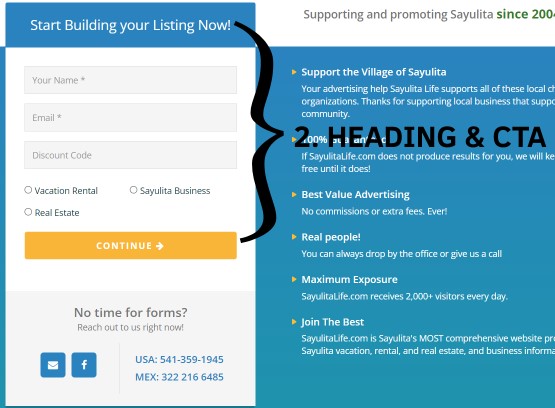
Main Heading and CTA are very prominent, and the form is as simple as possible to reduce the number of users not completing it.
3. Subheading
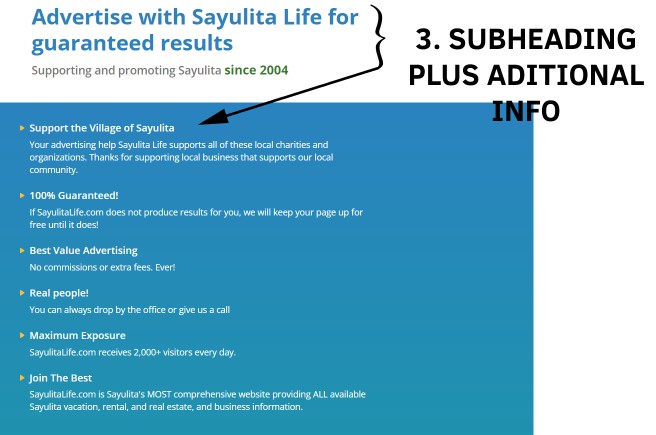
The subheading is present and comes with a bullet point of all info needed to detail how the directory is highly rated, well-established, and popular.
4. & 5. Images & Balanced Design/Layout
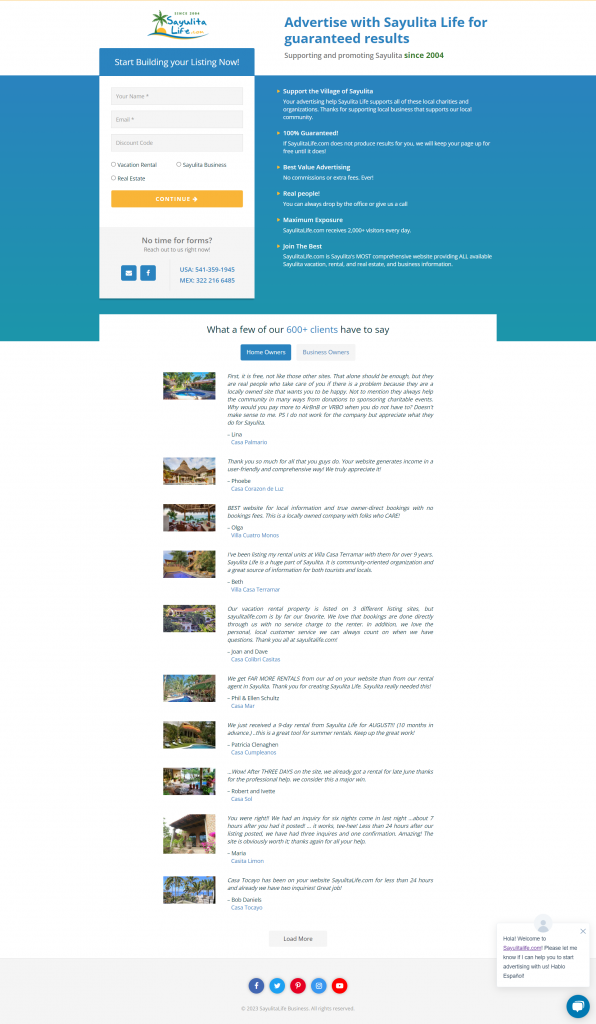
There are only small images on this landing page, but the layout and design are balanced and uncluttered.
6. Color Choice
The white and light blue color palette is often used because it’s non-invasive and associated with dependability.
7. Social proof
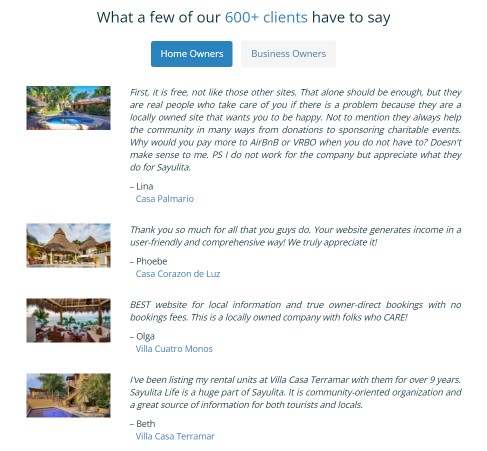
Sayulitalife.com advertising page provides abundant social proof
8. Trust badges and guarantees
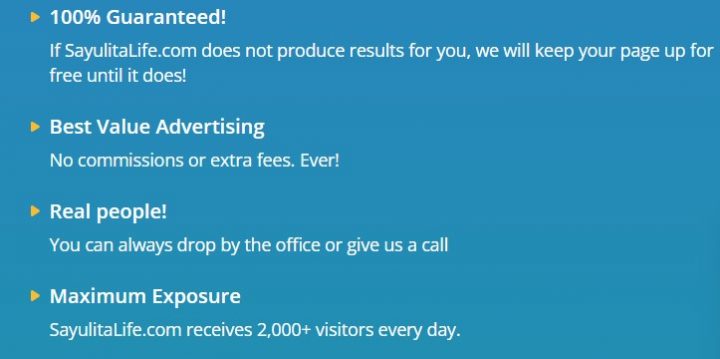
With this phrase alone, they go above and beyond:
“If SayulitaLife.com does not produce results for you, we will keep your page up for free until it does!“
They know they can keep their promise, so they offer a 100% satisfaction guarantee.
9. Live chat
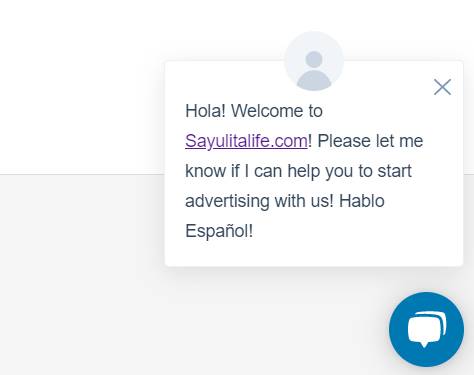
The Live Chat is there as expected.
10. Funnel marketing
I never purchased from them, so I don’t know if the checkout process includes Order Bumps, Upsells or Downsells.
However, given this directory’s incredibly well-managed operation, I wouldn’t be surprised.
Conclusion
If you neglected your advertising page, that’s possibly the reason why you don’t see exceptional results.
If you are building a Travel Directory (or any directory related to Geographical businesses), back-engineer as many websites as possible, like sayulitalife.com.
You will find the way to success.
Would you like me to roast your landing page? Send the link in a comment down below, and I’ll share my thoughts!
You can get GeoDirectory here today:
Creating an online directory is an excellent business, but it won’t generate revenue until you get the word out.
That’s why marketing is so crucial.
Building a solid marketing strategy paves the way to your site’s success.
With it, you’ll have a plan you can follow to help you reach your revenue goals as quickly and efficiently as possible.
If you’re creating an online directory and you’re wondering how to market a directory website, you’ll find all the details below using WordPress and the GeoDirectory plugin.
Feel free to skip down to the section that’s most relevant to you:
- Creating an Online Directory
- How to Create a Marketing Strategy for Your Online Directory
- How to Market a Directory Website
Creating an Online Directory
Before cracking into the details of marketing a directory website, you’ll need to build one.
If you haven’t done so already, you can create one now that’s scalable, secure, and performs well.
Combine WordPress and the GeoDirectory plugin, and you’ll make quick work of creating an online directory.
You won’t even need to touch any code.
Our GeoDirectory plugin extends the capabilities of the core WordPress software so you can turn your website into an online directory.
Our WordPress listing plugin adds features such as:
- A drag-and-drop listing submission form
- Unlimited Custom Fields and easily formatted page templates
- Ratings & Reviews and other customizable widgets
- Maps with the ability to get directions
- Contact forms
- Google Analytics widget
- A long list of other capabilities
Add-ons are also available to customize your online directory further:
- Pricing Manager – Monetize your directory.
- BuddyPress Integration – For a directory with social media capabilities.
- Claim Listings – Visitors can pay to take over and edit their business listing.
- Events – Create and list events with many capabilities.
- Events Tickets Marketplace – Customers can sell event tickets while the directory owner earns commissions.
- GeoMarketplace – Allows business owners to sell products directly on listings, while you collect commissions for each sale.
- A ton more features are available with our other add-ons.
For details on creating an online directory, check out these resources:
- Build a Restaurant Directory Website with WordPress.
- Create a Directory Website with Elementor and the GeoDirectory Plugin.
- Installing GeoDirectory.
- There are more articles in our extensive documentation.
You can also check out Online Directory Business Model Explained to gather ideas on which kind of Online Directory to start making money with.
How to Create a Marketing Strategy for Your Online Directory
To plan a reliable marketing strategy to get the word out about your online directory, you’ll need a goal and market research.
Then, you can build out your strategy, test it, and adjust what you need.
Every online business and directory will be different.
So, while it can be helpful to see what your competitors are doing, be sure to plan a marketing strategy that makes sense for your site.
1. Decide on a Clear Goal
You need to define a goal before you start. This helps you stay focused on what you need to accomplish as well as what your strategy should be aiming to fulfill.
Whatever goal you choose, it should be specific, actionable, and quantifiable.
You also need to decide on a timeline that is realistic.
Specific Goal-Setting
Your goal should be specific enough that it becomes a clear target.
For example, reaching 500 created listings in one to three months is a great goal.
Simply deciding on increasing sales is too broad.
Creating Actionable Goals
An actionable goal means that it’s as effortless as possible for you to take action on working toward reaching that goal.
There need to be clear steps that you can take to reach your goal.
If you take the example from earlier and you want to get 500 newly created listings in your online directory, actionable steps could include:
- Engaging in social media marketing (being helpful on sites like Reddit, Quora, Facebook group,s and local forums related to your niche is great marketing for your brand)
- Setting up a social media ad campaign.
- Writing guest posts for relevant blogs to spread the word about the directory.
- Starting an email list and a newsletter.
Or other possibilities.
All these actionable steps would increase the directory visibility and create higher chances of new listings being submitted.
Measurable Goals
A quantifiable goal is one where you can clearly measure its success.
There shouldn’t be any room for guesswork.
For example, you either get the 500 listings created or fall short.
Either way, it’s possible to see whether you reached your goal and how far along you are to achieving it.
Otherwise, you risk putting in a lot of arbitrary work that doesn’t land you the results you want.
Choosing a Timeframe
A realistic timeline looks different for every marketing strategy, site, and business.
But it’s essential to choose an achievable timeframe.
Depending on the methods you choose to market your online directory, each tactic takes a certain amount of time that you’ll need to consider.
If you want to write guest posts, for example, you can’t reasonably expect an article to be written, submitted, and published to start driving traffic to your site all in one day.
2. Conducting Market Research
Once you have defined your overall goals, you’ll need to research your market.
This is crucial because you need to find out what needs your online directory can solve for your visitors.
Searching for questions related to your directory’s niche and the shortcomings of your competitors gives you unique insights into what you should focus on.
Again, sites like Facebook groups, Local Forums, Reddit, Quora, and Twitter can help you understand what people in your target niche require and what they expect.
From there, you can ensure your directory checks all the boxes your audience is looking for while also gaining valuable insight into what kind of marketing they may be receptive to experiencing.
For example, if you notice people are generally professional in tone when reading their questions, then your marketing will need to align with that.
3. Building Your Online Directory’s Marketing Strategy
Once you have a better insight into your target audience’s needs, you can start planning your marketing strategy.
Some crucial areas to consider are:
- Branding and brand positioning
- Target audience
- Marketing and social media channels
- The available marketing tactics and methods
– Branding and Brand Positioning
Branding means how your business is publicly presented.
It has to do with the style and tone of voice in sales copy, the design of your logo, how your business is represented on social media, and other similar elements, such as brand positioning.
When it comes to a brand’s positioning, it’s all about how people perceive your business and what sets you apart from your competitors.
Building brand positioning takes time, but starting from the ground floor is crucial.
If you don’t think about how you want your customers to view your business, it’s more challenging to think of a marketing strategy that aligns with it.
It helps to consider these questions when thinking about your branding and positioning:
- What feeling do you want your customers to be left with after creating a listing?
- What do you want your audience to (virtually) take away when they leave your site?
- How is your online directory different from your competitors?
- How do you want your customers to perceive your directory when comparing your site with your competitors?
- What style and tone would your audience connect with the most?
A key aspect of brand positioning is repetition.
According to studies, it takes at least four to nine instances of repetition for a subject to be remembered reliably.
This means you need to mention key phrases, your directory’s name, and similar words at least four times. That doesn’t mean you need to repeat something that many times, all in one sitting.
Over time, you can disperse the repetition over several articles, ads, and other marketing materials.
– Target Audience
As touched upon earlier, your target audience consists of the people who you want to focus on reaching with your marketing.
It’s essential to consider the following when you’re building your marketing strategy:
- What do your potential customers need and want from an online directory?
- What does your ideal audience like and dislike?
- Your ideal customer’s schedule and lifestyle
- What are the values of your target audience?
- How do you want your customers to think and feel about your online directory?
When you understand your ideal customer deeply, you can create a well-fitted marketing plan.
Doing so makes it easier for them to connect and interact with your brand because they will want to do it naturally.
That’s where knowing as many details about your target audience as possible is beneficial.
When you understand their schedule, for example, you’ll better know when to publish social media posts and articles.
You can pick a time when you know your audience will be available and on social media.
Beyond that, understanding what your customers value the most is also critical.
A person’s values are an integral part of their identity.
If you align your business with their values, your potential customers will instantly connect to your site and will be more likely to purchase.
Everyone is different but shared values are family, time, peace, freedom, love, patience, privacy, safety, security, pets, money, energy, consistency, and anything else that’s important and that personally connects with your target audience.
If you know you value privacy, you’re not going to purchase from a business that doesn’t have basic security measures in place, for example.
When you deeply understand your target audience with concepts such as these, you can reach them much faster and easier.
– Marketing and Social Media Channels
When planning your marketing strategy, it’s essential to consider which social media channels to use.
You need to consider which platforms your target audience uses. Those are the ones you should focus on populating.
If you’re short on time or resources, you don’t need a huge social media presence on multiple platforms.
Choose the one or two most active for your audience and stick with them.
Publishing relevant, engaging content regularly and consistently is key.
The more of your business people see, the more likely they will be to remember your online directory and actually visit it.
Keep in mind that your content also needs to provide value.
You don’t need to give away the farm, but you need to offer something significant enough that your audience notices.
– Marketing Methods
Read on for examples of specific marketing tactics and methods you can use for your marketing strategy.
You can also check out 8+ Ways to Monetize a Directory Website.
4. Test, Analyze, and Adjust as Needed
Once you’re done creating an online directory and marketing strategy, it’s time to test it out.
Start implementing it, then track your progress.
Depending on your strategy, use tools that appropriately measure your goals.
For example, if you want to analyze your site’s traffic, use a tool like Google Analytics.
You can also let your listing owners track their traffic with the Google Analytics add-on.
Other tools, such as A/B testing software, including CrazyEgg or Hotjar can help you test changes to see if they’re more successful than what you currently use.
That way, you don’t waste your time with changes that don’t work.
Some visitors will see your original page, while others will see an alternative with your adjustments.
Once data starts rolling in, you can accurately measure your progress and adjust your plans accordingly and as needed.
Review your marketing strategy and see where you can improve if you notice that you’re off track with your goal.
Then, test out your changes, and analyze the data once again.
Adjust your strategy as often as necessary to reach your goal.
This is called the PDCA cycle (plan, do, check, act)
How to Market a Directory Website
Now that the basics of creating an online directory and a marketing strategy have been covered, here are the finer details of marketing a directory website.
There are so many different marketing methods you can try out, including, but not limited to:
- Provide free valuable information for your readers through your blog.
- Create a lead magnet or free offer.
- Populate listings and set up the Pricing Manager add-on and Claim listing plugin so visitors can pay to claim a listing as their own.
- Run a contest on social media or on your online directory.
- Use Adwords, or Ezoic, or Mediavine (depending on your traffic).
- Write guest posts to publish on relevant blogs.
- Create a high-converting landing page.
- Run a pop-up when a visitor tries to exit the site with an enticing offer.
- Publish articles regularly on your site’s blog.
- Create a badge with the Embeddable Ratings Badge add-on customers can use on their website that links to your directory.
- Use the MultiRatings and Reviews add-on to include highly-customizable, in-depth, and shareable reviews on your directory.
- Create a Facebook group based on your online directory’s niche.
- Partner with relevant influencers to share your directory.
- Collaborate with other businesses in your niche.
- Connect with several related businesses and create a group package with discounts, free offers, and similar items for visitors and customers.
- Use the Events Tickets Marketplace add-on to let customers sell event listings in your directory.
- Use BuddyPress and the BuddyPress Integration add-on to add a social media component to your directory.
There are so many marketing tactics you can use.
Whatever you decide on should fit your business and target audience well, so keep that in mind.
For more, check out The 6 Rules to Monetize a Directory Website, and 8+ Ways to Monetize a Directory Website.
Wrapping Up
By now, you know how you can go about creating an online directory and how to market a directory.
An online directory is a great business or an optimal way to create an extra income stream for your existing online blog or business.
Over to you: Do you have any questions about creating an online directory or how to market a directory? Ask away in the comments below.
You can get GeoDirectory here today:

Starting an online directory can be a very profitable endeavor.
There are many things to keep in mind when starting such a business, but if you make some common mistakes, you may find yourself struggling from the get-go.
In this blog post, we’ll explore nine of the most important mistakes to avoid when building a successful online directory.
With this information in hand, you can avoid these costly errors and put yourself on the path to profitability.
Let’s get started.
Don’t try to be everything to everyone.
As the old adage goes: when you try to be everything for everybody, you run the risk of being nothing for nobody.
Your online directory should have a specific focus, whether it is for a particular industry, region, or interest group.
Trying to cover too much ground with your site can quickly lead to an unfocused and messy product.
By honing in on a specific target audience, you can create content that resonates with that audience and builds up trust.
Here’s how you nail the niche for your directory website:
- Identify your target audience: Define the characteristics of your ideal user and consider their needs, preferences, and values.
- Be very specific with your directory: Consider specializing your directory to focus on a specific industry, location, or type of business. This can help you stand out from more general directories and attract users who are looking for specific types of businesses or services. For example, instead of a local restaurants directory which covers all types of cuisine, you could create a fine-dining “vegan restaurants” directory or “Halal-only” which focuses on specific food types.
- Develop a unique value proposition: Clearly communicate the unique benefits and value that your directory offers to your target audience (e.g., “the best directory in Florida for pet owners”). As another example, check out the simple, straightforward one-liner on this wine tasting directory website that used GeoDirectory to build their site:
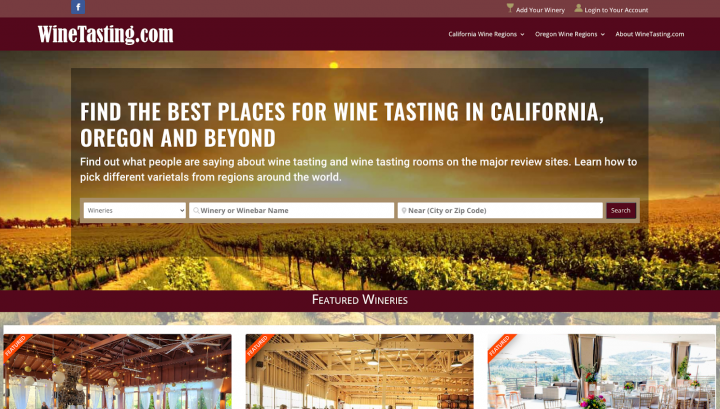
- Create an effective content strategy: Focus on creating compelling, high-quality content that resonates with your target audience and meets their needs.
- Be selective in your marketing efforts: Focus your marketing efforts on channels and strategies that are most likely to reach and resonate with your target audience.
Pro tip: You may not be something for everyone, but you can serve the same niche around the world with a multi-location capability that enables listings in multiple cities and countries.
Your directory isn’t mobile-friendly
With the rise of mobile device usage, it is essential that your online directory is optimized to be viewed on a variety of devices.
If your site isn’t fully optimized for mobile users, you risk alienating a large portion of potential customers. Here are a few ways to make an online directory more mobile-friendly:
- Use a mobile-friendly layout: A mobile-friendly layout means that your website is designed with a mobile user in mind. This means using larger buttons and fonts, as well as placing important information and features at the top of the page where they are easy to access on a small screen.
- Optimize images and media: Large images and videos can take longer to load on mobile devices, so it’s important to optimize these elements for a mobile audience. This could include compressing images and using responsive image tags to ensure that images are properly scaled for different screen sizes.
- Use mobile-specific features: There are a number of features that can be very useful for a mobile directory, such as click-to-call buttons and location mapping. So consider adding them if they are relevant to your website.
AyeCode’s GeoDirectory and UsersWP solutions have been designed with mobile-first in mind, and make it easy to create a beautiful online directory that looks great no matter what device it is being viewed on.
Your search function isn’t up to par
The bread and butter of a successful online directory is providing users with an easy way to find what they are looking for. If your site’s search function isn’t up to snuff, or is overly complex and slow, it can be a major turn-off for visitors.
So what does a powerful search function look like? Here are a few pointers:
- Make it easy to find: Place the search bar in a prominent location on your website, such as at the top of the page or in the header.
- Use clear and descriptive labels for the search bar, such as “Search for a business,” “Find a service provider,” or “Look for a product.” This quick little add helps users understand what they can search for and how to use the search function.
- Provide autocomplete suggestions: This will provide users with suggestions as they type, which can help them find what they are looking for faster and make it easier to use the search function.
- Offer filters and facets to make results more relevant: The ability to search by location, business type, or other relevant criteria makes it easier for users to narrow down their search results and find the specific businesses they are looking for. You can even get more granular and creative with it depending on your niche – for example, a travel directory might offer search filters such as the type of accommodation, price range, or amenities offered.
- Optimize the speed of search results: No one likes to wait. In fact, Google says the probability of a bounce increases by 32% as page load time goes from 1 second to 3 seconds.
- Start by fine-tuning your database like relevant fields, optimizing queries, and using caching techniques.
- Use a CDN (content delivery network) to help speed up the delivery of your website’s content by storing copies of it on servers located around the world (reducing the distance data has to travel).
- Minimize the use of JavaScript and other resource-intensive elements. Compress images and use responsive images whenever possible.
With the GeoDirectory plugin, you can quickly create a powerful search function with autocomplete suggestions, filters, and more.
For example, Djetelina is a directory that helps parents find activities for their kids – using our builder, they implemented search options like “Events,” “Category,” a date and time option, and the city to make it as easy as possible for parents to find children events.
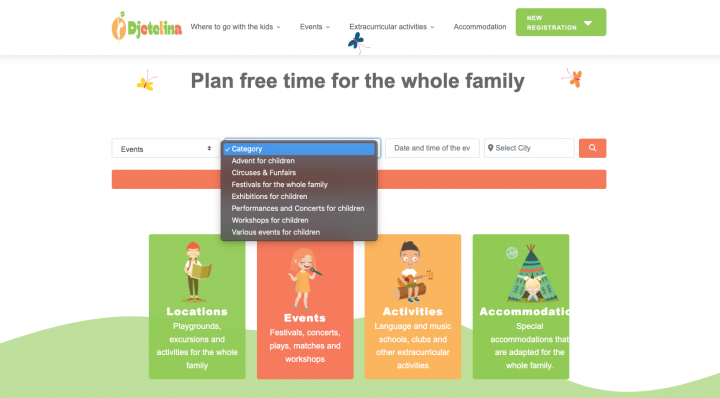
Using the plugin’s advanced settings, you can also control the speed of your search results so that you are never slow to deliver them.
It’s a great way to provide an effortless user experience for your online directory.
You’re not leveraging user reviews
User reviews are an important part of any online directory, as they provide potential customers with valuable insight into the quality of a business or service.
Just “finding a place” isn’t good enough. You need people to be confident in their choice, and reviews can help with that.
By incorporating user reviews into your directory website, you can help visitors make informed decisions and encourage them to choose your directory over others.
If you operate a WordPress directory with GeoDirectory, then you can give your users advanced features such as photo uploads, review ratings, and multiple rating options with a simple add-on.
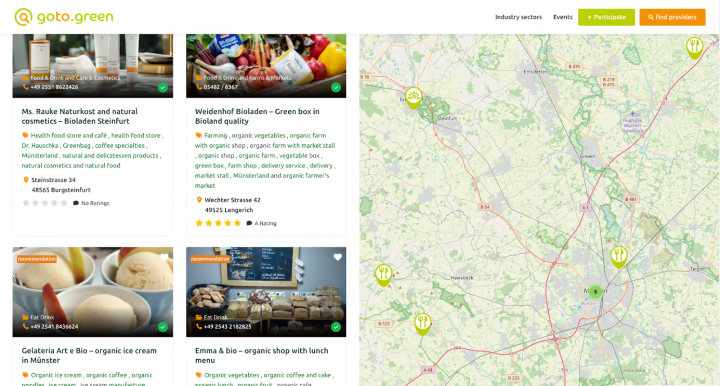
Goto.green is a directory that points people to all kinds of businesses that are vegan and eco-friendly.
They used our plugin to implement ratings for these business listings.
So when you’re browsing for, say, a vegan restaurant, you’re met with some reviews that give you an idea of what to expect from the place.
Not pricing your directory correctly
If you plan on monetizing your directory, then pricing it correctly is absolutely essential.
You may be tempted to set a low price point in order to attract more customers, but this can backfire as it won’t provide enough revenue for the upkeep and maintenance of your online directory over time.
On the other hand, if you set the price too high, then customers may be hesitant to pay for your services.
To maximize profits while still providing an attractive value proposition, it’s best to have a balanced pricing structure.
Here are the main points to consider when creating a pricing strategy for your directory website:
- Determine your costs and consider the value you’re offering to customers.
- Research the market and see what similar businesses are charging (this will tell you how much customers might be willing to pay).
- Decide on a pricing model that works best for your business (e.g., subscription-based, pay-per-use, advertising-based).
- Create different levels of membership for customers who need more features or have different budgets.
- Test different pricing options to see what works best.
- Communicate your pricing clearly to customers, including any terms and conditions.
With our pricing manager add-on (integrated with GetPaid for seamless payments), you can easily create different membership tiers, manage subscriptions and free trials, and offer enhanced listings, all with ease.
This allows you to tailor your pricing strategy based on the needs of your target audience and maximize profits for your directory business.
Related: Pricing Manager Setup Guide
Don’t sleep on community-building for your directory
The success of your directory will depend on the number of visitors and users that you can attract.
With a strong community comes more paid listings, greater engagement and participation in a forum, improved content (people going out of their way to add new entries, suggest listings, and keep things up-to-date), and more visibility.
The best way to build a community is by fostering a sense of community within your directory website and ensuring that customers are engaged.
- Engage with and encourage interaction among users (responding to comments and questions on your website or social media accounts, or hosting online events or webinars where users can learn and connect with each other)
- Foster a sense of belonging and inclusivity (consider creating a FB group or forum where people can connect with others who share similar interests or goals)
- Encourage user-generated content (e.g., reviews, tips, recommendations) to build a sense of ownership. For example, Yelp has a Talk tab that provides users with an opportunity to discuss and share their experience of the listed businesses or ask a question.
- Provide resources and support like tutorials, guides, or best practices to help your users get the most out of your directory. Not only does this arm your users with knowledge, but it’s great from an SEO perspective as well because you attract more relevant traffic through keywords.
- Consider recognizing and rewarding your most active and helpful users through things like badges, discounts, or special perks. This can go a long way in building a strong and engaged community.
Member management tools like UsersWP come in handy when building a community around your online directory. With this plugin, you can create user profiles, add social media integration, create private messaging systems, and build a thriving online community.
You can also use the plugin to reward loyal customers with special offers or discounts.
Ignoring customer support
Providing excellent customer support is one of the most important elements of running a successful online directory business.
Customers need to know that their questions are answered promptly and that their concerns are taken seriously.
To build trust with customers, you should provide timely and helpful responses to any customer inquiries or complaints.
Make it easy for customers to contact you by setting up a dedicated customer service email or creating an online chat feature.
No measurement of analytics
You should always have an idea of how your business is performing and the impact of your efforts.
This knowledge can help you make better-informed decisions, identify growth opportunities, and measure success over time.
This applies to both you and your customers.
With our Google Analytics add-on, you can add frontend analytics for your users viewing the directory page, events tracking, and more.
And with your own integration to your directory website, you can monitor user activity, engagement, and trends to understand how people are using your website and which features are popular.
Lastly: Using the wrong software solution for your directory website
Choosing the right software solution for your online directory is one of the most important decisions you will have to make.
You need a platform that offers all the features and functionality you need while being cost-effective, user-friendly, and reliable.
If you’re considering building an online directory business on WordPress, then you can skip a lot of the heavy work with the world’s most advanced and scalable plugin that will set you up for success.
Yes, we’re talking about GeoDirectory.
If you want to make the most out of your directory, then you may want to consider grabbing the add-ons we mentioned throughout this guide.
You can download our plugin for free here or browse the membership plans that include everything you need to gain an edge in the directory space.

When you learn how to make a directory website with your chosen directory listing software and you get set up, it can be frustrating to realize that’s only about half the battle.
You also need to know how to make money with your WordPress website.
What can make matters worse is creating a plan to monetize your website only to learn that the directory listing software you’re using doesn’t support the features you need.
Building and monetizing your online directory can seem like an uphill battle, but it doesn’t have to be with the proven strategies outlined below.
How to Make a Directory Website with WordPress
Before you can start monetizing your online directory, you need to build one.
One of the best ways to create an online directory website is to build it on top of a self-hosted WordPress site.
WordPress is well-maintained and frequently updated with security patches. It’s also infinitely scalable if your hosting plan includes enough resources.
Regular (automatic) maintenance on your site with plugins such as for database and image optimization, caching, and Domain Name System (DNS) also help further boost the performance of your website.
It’s also essential that your website’s theme and any plugins you install are cleanly coded and built for efficiency. Otherwise, your site can become bloated and slow to load.
After installing WordPress, you can add a plugin for creating an online directory.
The Best WordPress Directory Plugin to Use
When looking for directory listing software for your WordPress site, you must pick an option with all the features you need.
Not only that, but the directory plugin you choose also needs to be secure, fast, highly customizable, and straightforward.
Our GeoDirectory plugin covers all these areas. It also includes:
- Automation
- Supports millions of listings
- Great search functionality
- Importing from CSV
- No coding required
- Each listing can have its page
- Unlimited custom fields
- Add-ons to extend the core plugin,
- And the list goes on
GeoDirectory covers the features that other options don’t support. We also have a premium version with extensive features.
If you need to convert your existing directory listing software to GeoDirectory, such as switching from phpMyDirectory, use the Directory Converter add-on.
Online Directories: How to Make Money with Your Website
Now that you know how to make a directory site, it’s time to learn how to make money with your directory website. There are so many ways to do this, and you’re only limited by your level of creativity.
Check out 8+ Ways to Monetize a Directory Website for several proven strategies.
Little-Known and Unique Ways to Monetize Your Online Directory
Below are even more strategies to monetize your online directory.
These suggestions are often overlooked but are quick to implement with minimal effort for the maximum possible Return on Investment (ROI) and revenue.
1. Create Related Product Add-Ons
Depending on the type of online directory you have set up, you can sell complimentary products or services.
An excellent place to add these related products and services is as upsells during the checkout process.
By that point, your visitors are sure they’re purchasing to become customers, so it’s a great time to show them more items they may be interested in.
You can also add a sidebar to your site and place related products and services there.
Print-on-demand merchandise services like RedBubble, Spring (formerly TeeSpring), and VistaPrint can help you create these products that are made to order.
Then, you can sell them with WooCommerce, or if you don’t want to develop an entire e-commerce storefront, you can use our Payments Plugin GetPaid. Both are fully compatible with GeoDirectory.
Below are examples of products and services you could offer your customers for different directories.
Feel free to use them as suggestions and for inspiration.
Some suggestions offer businesses space in a listing, to sell their products for a commission.
For such use cases and similar ones, use the GeoMarketplace add-on.
Hotel Directory
Consider what travelers need up to and including during their stay at a hotel they selected through your directory.
This also includes what they would need to sightsee or conduct business.
You could sell travel-sized personal care products, souvenirs, travel mugs, travel insurance, and anything else you think will be relevant.
On the other hand, as a directory developer, your actual client here is the Hotels, not the traveler.
So think about what you can upsell to the hotel too.
Social media management, reputation management, professional photography (not a photographer? You can always outsource and take a commission), and website development.
Those are just a few options you can consider as upsells for many businesses.
Every business that added itself to your directory is actively investing in Marketing.
Be creative and sell them something else.
Travel Directory
Similarly, you can consider your customers’ travel requirements and tailor some products or services based on those needs.
You could offer the same options as the above, as well as luggage and luggage accessories, passport holders, eye masks, neck pillows, travel agent services, and the like.
You can partner with Tour Organizers in all destinations covered by your directory, sell their tours, and get paid a commission for every guest referred.
Restaurant Directory
Customers of a restaurant directory can often use gift cards, but you can also get creative with your extra services.
For example, you could use the same concept as Uber Eats and offer premium priority pick-up and delivery for a fee.
This could be a good business plan for a directory serving small cities where this kind of service is not offered by the more prominent apps.
Nevertheless, your clients are the Restaurants in your directory, not just the website visitors.
What could you sell to the restaurants?
Any service mentioned above for Hotels is valid here, too.
However, with a bit of creativity, you can find plenty more.
Restaurants today need Digital Menus with QR codes, but many restauranteurs still don’t know how to operate a computer, so they might need someone to edit it.
You can charge an annual fee to take care of that and more.
Business Directory
There are other options beyond letting business owners claim their pre-populated listing with the Pricing Manager, and Claim Listings GeoDirectory add-ons.
Businesses willing to pay to be listed on your directory could be willing to pay for someone to manage their AdWords account or to help them create sponsored posts on Facebook and Instagram.
Owners of small businesses don’t have time to become online marketers.
They might not even know they need to do online marketing. You can sell them a service and create win-win opportunities and long-lasting business relationships.
Real Estate Directory
If your target audience consists of real estate agents, you could offer templates for presentations and open-house marketing material.
On the same note, offering branding design or marketing services is another option.
If your target audience is focused more on home sellers, you could sell ad space for cleaning companies to promote their products and services.
That way, your customers can prepare their homes for showings at open house events.
The Advertising add-on can enable this functionality in your online directory.
Offering home staging services is another option.
If your target audience revolves around home buyers, you could similarly offer space on your site to contractors.
They can sell their services as products on a listing.
Last, you can refer leads to RE agents and claim a portion of the commission for each home transaction facilitated by your directory.
Marketplace Directory
If you own an online marketplace directory, you could create your line of signature products and sell them similar to Costco with their Kirkland brand.
Amazon does the same thing.
Beyond that, you could sell ad space and let companies advertise items they want to promote or newly launched products.
Job Board
For job boards, you could offer professional résumé templates and coaching.
If you want to target businesses, they could sell related products in your directory on job listings.
For example, if you build a job board for restaurant personnel, you can be sure a good portion of your visitors will be Chefs.
Selling professional knives could be an idea.
No need to create an inventory. You can use the dropshipping method to avoid that and only get paid every time a sale is closed.
Other products could include business casual wear, printing services for business cards, steel-toed boots for construction workers, and other similar items that prospective candidates may need if they get the job.
Events Directory
Apart from selling tickets with the Event Ticket Marketplace add-on, and depending on the type of event, you could let companies sell their products on a listing for a commission, such as quality headphones for silent discos.
You can have businesses sell the products they would have at the events directly on the listing.
For example, suppose your Events Directory promotes wine tastings. In that case, you could invite the wine-tasting organizer to sell the wine online so visitors who could not participate in the tasting can still buy the wine.
Similarly, event-goers could pre-pay for any merchandising, like a t-shirt for a concert and other similar items.
2. Sponsored Blog Posts
Another option is to write content for your blog that’s informative and helpful.
Then, once you have established a following, you could invite brands to sponsor single blog posts.
You could display the business’ logo with a caption or label that reads, “This article is sponsored by” or something similar.
When visitors see that such valuable content was provided (in part) by a specific company, it helps build a sense of trust and loyalty to the brand because of their perceived generosity.
This strategy helps combat “advertising blindness,” a phrase used in marketing to describe visitors who are so used to seeing ads that they ignore them completely.
You can use the Advertising add-on to set this up for your online directory.
3. Sponsors for Your Newsletter
Similarly, you could also have businesses sponsor your newsletters.
Instead of just placing the company’s logo in the email, you could also arrange to offer a coupon code that’s entered in during checkout on the business’ website.
Offering deals that can only be accessed through the newsletter is a great way to entice readers to sign up as well as accept the offer.
This type of lead generation requires users to double opt-in, which means they must agree to sign up for your newsletter, then decide to pass on their information again to the third party when they checkout.
This means that it’s a strategy that’s potentially GDPR-compliant as long as the rest of the site requirements are met.
4. Offer Exclusive Listings or Memberships
Offering exclusive listings or membership to your directory can increase its value, which means you can charge more.
Not only that, but you can use our Embeddable Ratings Badge add-on to let members display their status in your directory on their website as social proof that they’re an ideal business to patronize.
This strategy works well for SuperLawyers.com where only the top 5% of lawyers can be listed in the directory. They’re given an embeddable badge to easily add to their site to show that they’re an exclusive, trusted member.
With the Embeddable Ratings Badge add-on, you can choose who gets access to the badge and if you want to let users customize the design of their badge. That way, it’s styled in a way that’s best suited for their site.
Not only does that help with brand awareness for your directory, but it’s also a strategy that gets your site backlinks to drive more visitors to your directory and improve your domain score for better Search Engine Optimization (SEO).
5. Publish Paid and Honest Blog Reviews
Another option is to publish honest reviews on the blog of your directory.
These can be paid reviews regardless of the star rating.
You could also include a coupon or offer from the business to add value for the reader and to the company advertising on your directory.
Reviews can be public but also private only for the business owner.
These are called mystery shopper reviews and are very useful for business owners (especially for those with a standardized service), to evaluate the quality of work provided by their teams.
You can use GetPaid to handle the payment for the review.
6. Premium Listing Upgrades for Added features
Letting your visitors sign up to publish a premium listing is a great way to monetize your site.
You can increase the overall value by letting your customers access many more custom fields that offer greater details.
Using the Pricing Manager add-on, you can accomplish this and offer custom fields and options like adding more images, categories, tags, a longer descriptions, telephone numbers, and more.
You can create whatever custom field you want, then offer it as a premium listing upgrade.
For example, if you have a business directory, users can publish free listings with basic details such as the company’s name and a brief description. Still, they can get more value if they upgrade since they can also include contact details for lead generation.
7. Create Services Based On Customer Feedback
One of the most overlooked ways to monetize your online directory is to find the best methods by listening to customer feedback.
You can also search social media to do some market research.
You can search for what customers want in the online directory you created.
Reddit and Quora are great places to find what questions people are asking and what objections they may have that keep them from upgrading.
Once you have these details, you can tailor your monetization strategy to your target audience’s specific needs to increase sales.
You can also use what you find to point out gaps in your niche and fill them with a product, service, or automation.
It’s also a great idea to research statistics that may be available and relevant to your directory.
So much data is available online, so it’s worth the effort.
For more data, you can use Google Analytics or a similar tool to see details about your current audience to help you better understand your users and what they may need.
Using a heatmap tool such as CrazyEgg or Hotjar can help you collect data on how your audience is interacting with your directory website.
You’ll find out where users hover their mouse, what they’re selecting, where they spend most of their time browsing on each page, and more.
Heatmaps help you see where customers expect to go on your site but where they may have run into issues along the way, such as when people hesitate, then abandon the page, for example.
Adjusting your current services to make them easier for users, based on the data you collect and find, can help increase user retention and satisfaction.
When users see the improvements they’ve been wanting without having to put in any effort to offer feedback or complain. It sends a message that you understand them so well that you can anticipate their needs.
This can help build trust and loyalty between your customers, visitors, and your online directory website.
When this happens, they’re more likely to make future purchases and remain customers.
Wrapping Up
You now know how to make a directory online and make money with your website.
You also understand what directory listing software is best to use.
Setting up an online directory and monetizing it doesn’t have to be complicated.
GeoDirectory is a no-code option that’s robust, secure, user-friendly, fast, and reliable, and it also scales well.
Over to you: Were you able to set up your online directory? Do you have any questions or features you’re looking for but aren’t sure how to create? Feel free to share your thoughts in the comments below.
You can get GeoDirectory here today:
Are you looking for the best event calendar plugin for WordPress to keep your customers informed about upcoming events?
Whether it’s a music concert, an art exhibition, or any other type of event, having the right tools can make all the difference.
In this blog post, we will compare eight of the most popular WordPress event calendar plugins on the market today and help you choose one that suits your needs.
We’ll take a look at each plugin in detail – from its features, pricing plans, and drawbacks – so that you can decide which one is right for your business.
Ready? Let’s go.
What’s a WordPress event calendar plugin?
A WordPress event calendar plugin is a tool for creating and managing events on your website.
With the right plugin, you can easily list upcoming events, give visitors important details about those events, set ticket prices, and even take payments.
By events, we mean any type of event, such as webinars, workshops, conferences, online courses, and more.
Having a WordPress event calendar plugin can give your website visitors an easy way to learn about upcoming events without having to search all over the web or social media for information.
What to look for in a good WordPress event calendar plugin
The best WordPress event calendar plugin will make it easy for you to manage your events, add key details about the event, and publish them on your website.
Look for a plugin that has features like:
- Include important event details (date, time, attendees, equipment, staff, logistics)
- Display availability for client bookings or events
- Allow clients to self-book at available times
- Request and store customer data in a database
- Record events in the calendar
- The ability to customize the looks of your events page
- Send confirmation notifications for event creation
- Send updates for event changes
1. GeoDirectory Event Calendar Plugin
Plugin insights
- Rating: 5/5
- Downloads: 1M+
- Price:
First up is GeoDirectory and its powerful Event Calendar add-on.
Founded in 2011 by AyeCode, GeoDirectory has become one of the leading WordPress directory solutions, with more than 1 million downloads worldwide.
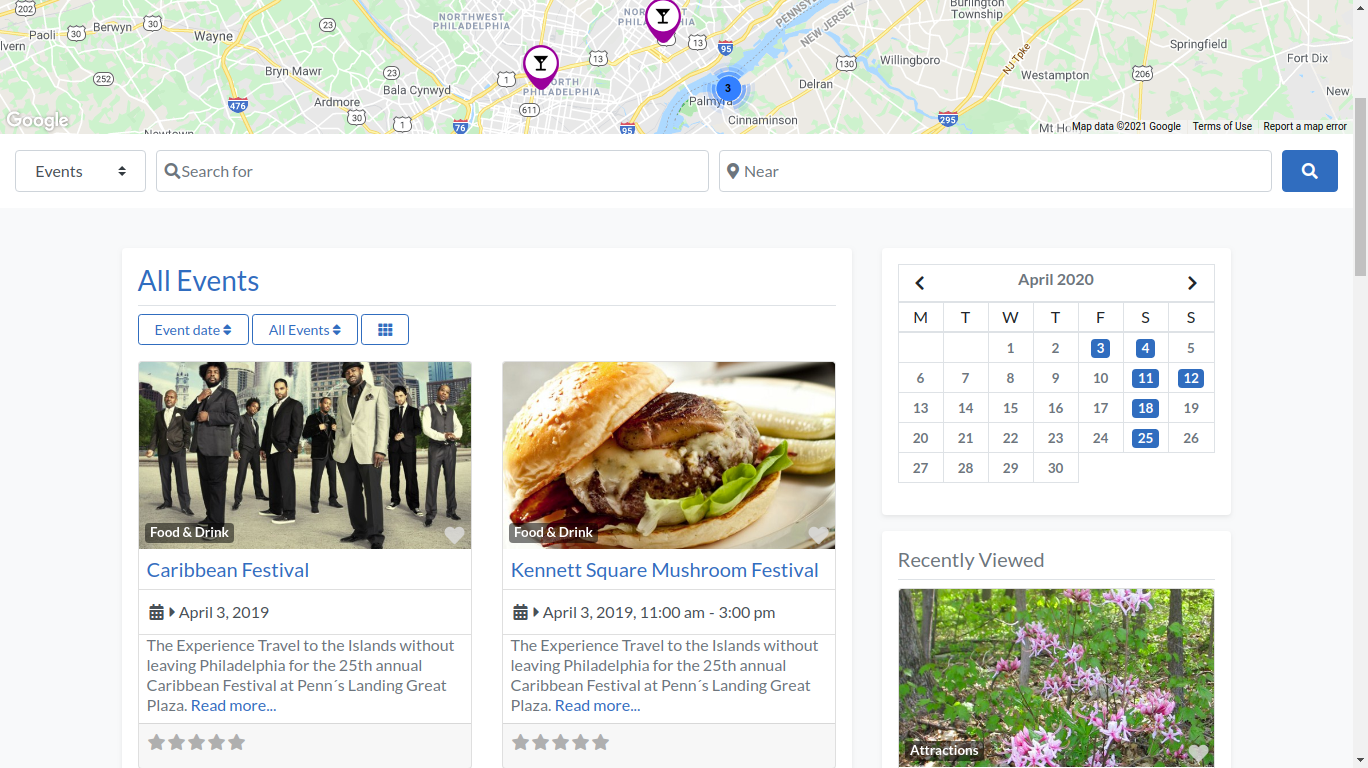
The GeoDirectory Event Calendar plugin is designed to work seamlessly with the GeoDirectory plugin, allowing you to easily add events to your directory listings via Custom Post Types (CPTs).
You can add unlimited custom fields to your events out of the box with the easy form builder.
GeoDirectory Events is the best option, especially for user-generated content Event Directories, where users submit their events and sell tickets for them.
Key features:
- Recurring events made easy – create events and set custom dates for them that repeat on any day, week, month, year, or even custom dates, so you don’t have to manually enter them every time.
- Events locator – Events are conveniently displayed on an interactive map (that shows distance and driving directions), so visitors can easily search for events by location. Great for people organizing real-life events in multiple locations.
- Filterable calendar display – Visitors can easily search for events in the calendar display (using widgets) and sort them by selecting “upcoming,” “today,” “past,” or “all.”
- Set prices for events – the pricing manager add-on allows you to set prices for your events and enable/disable features per price.
- Events ticket marketplace. Allow event organizers to sell tickets for their events while you collect a commission for each ticket sold.
Cons
- Some features require paid add-ons – such as the pricing manager and CPTs.
Best for: businesses offering paid, repeat, location-dependent, or remote events that want to enable search and filtering on the calendar display.
2. Timely All-In-One Events Calendar
Plugin insights
- Rating: 4.7/5
- Downloads: 90,000+
- Price: Free (premium add-ons start from $98/year)
Next up is Timely All-In-One Events Calendar, a popular event calendar plugin that’s been around since 2012.
The plugin is designed to make event creation and management easy and efficient.
It offers multiple display themes that can be easily customized using the inline calendar theme editor – so you can change the calendar’s appearance without code or an API.
Key features:
- Translatable dashboard in multiple languages – makes it easy for non-English speaking users to manage their events.
- Handy filtering solution (paid) – allows visitors to filter their events by location, category, or venue/ organizer.
- Convenient media library – allows you to quickly upload and attach photos and videos to your events.
Cons
- Filtering options are paid
- Limited support and knowledge base for users
Best for: businesses that want a lot of control over the look and feel of their events calendar and need advanced filtration options.
3. MotoPress Events Calendar

MotoPress Events Calendar is an intuitive WordPress plugin designed to simplify event management. With a visual interface inspired by Google Calendar, you can create, organize, and display unlimited events without coding.
Whether you run a fitness studio, educational center, or event space, this calendar builder gives you complete control over your schedules and appearance.
MotoPress Events Calendar helps you stay organized and lets your visitors easily browse and interact with your events.
Key Features:
- Visual calendar builder: Create and manage events in a drag-and-drop interface that looks and feels like Google Calendar.
- Recurring events: Save time by setting up automatically repeating events.
- Unlimited calendars and events: Manage multiple schedules from a single dashboard.
- Easy front-end navigation: Visitors can browse events for a seamless user experience.
Cons:
- Lacks built-in payment integration for paid events.
- Limited integrations with third-party booking or ticketing plugins.
Best for: Wellness studios, tutors, community centers, and event venues that need a flexible, visually organized way to showcase their schedules online.
4. Event Espresso
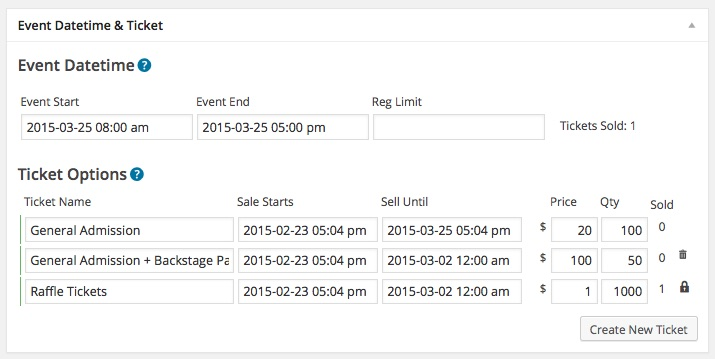
Plugin insights
- Rating: 4.3/5
- Downloads: 1,000+
- Pricing: $79.95/year + Personal support license, $299.95/year + Developer support license, $299.95/year + Everything support license
The authors of Event Espresso claim their plugin lets you submit and register events on any website.
Using this premium WordPress event calendar, website administrators can easily manage their events and set different ticket prices and options.
It also lets you create groups when signing up, set different times and dates for events, and set up several types of tickets for users.
The plugin is known for its sophisticated payment processing capabilities, which collect all revenue from every port and integrate it into one single system.
Participants can even pay their invoices offline – this plugin also controls all payments.
Key features:
- Drag–and–drop ticket ordering makes it easier for customers to select the tickets they need.
- Create promo and discount codes to incentivize customers to book their tickets.
- Allow comments on events – let customers share their thoughts and reviews; promotes engagement.
- Printable tickets – customers can print them as proof of purchase and identification.
Cons
- Too many features are sold as add-ons
- Not fully compatible with Elementor
Best for: larger businesses that need a wide range of payment, promotion, and ticketing options.
5. Sugar Calendar
Plugin insights
- Rating: 4.3/5
- Downloads: 2,000+
- Pricing: $49–$199/year or $449 for a one-time payment
Sugar Calendar is a WordPress event calendar plugin with great customization options and flexibility.
It has a simple admin interface and filtering functionality within the WordPress dashboard.
With the calendar widgets, clients and site admins can view a list of upcoming and past events across various event categories.
When you enable Visitor Conversion mode, your event appears instantly in your visitors’ time zones. To make it even more friendly for a global audience, it’s also translation-ready, making it perfect for international websites.
Key features:
- Event ticketing functionality through Stripe – allows customers to purchase tickets directly.
- Single- and multi-day events – allow you to create and manage them easily.
- Event timezones – adjust event times based on the local timezone.
Cons
- Ticketing and recurring events are premium add-ons available only for Professional and Ultimate plans.
- You can’t buy premium add-ons separately.
- A free version is not available.
Best for: membership sites, WooCommerce stores, community websites, and other businesses looking for a powerful event calendar plugin with ticketing capabilities.
6. Booknetic
Plugin insights
- Rating: 4.95/5
- Downloads: 6,000
- Price: $79 (regular license), $489 (extended license)
While this WordPress plugin offers many features, working with it is still easy and quick, as it doesn’t require coding or design skills.
Booknetic syncs with 3rd-party software, such as Zoom, Google Calendar, and more, saving you time.
On top of that, you can create the perfect form for your clients with the intuitive drag-and-drop editor.
There’s also the neat waiting list, which increases the hype for everyone on an upcoming event.
You can also add third-party tools like Zapier, Automate, and HubSpot to expand its functionality.
Key features:
- Email and SMS notifications – keep your customers up to date on their bookings.
- Insightful reporting – provides detailed information on the performance of your events.
- Custom(izable) forms – let you create forms with the drag-and-drop editor.
Cons
- No free trial for the premium version
- More expensive compared to other plugins
Best for: businesses that want more flexibility and control over the appointment scheduling and booking process with tons of features.
7. EventON
Plugin insights
- Rating: 4.5/5
- Downloads: 58,000+
- Price: freemium ($25/license)
You’ll love EventON if you prioritize customizability and aesthetics.
With this plugin, you can create unlimited events with or without end dates or times, and the list is minimal and clutter-free.
With Zoom and Jitsi integrations, an event attendance mode, and Live Now animations, the event calendar plugin supports virtual and in-person events.
Customizing your calendar is easy with the shortcode generator.
The calendar can be set to auto-delete past events to keep it clean and up-to-date.
The software also includes support for right-to-left (RTL) languages, health protocol guidelines, and multi-day events.
Key features:
- Featured image for events – helps customers picture what to expect and makes it easy to recognize events.
- RTL language support – helps reach broader international audiences and deliver a better experience.
- Gutenberg compatible – allows you to create a beautiful event calendar with the popular Gutenberg block editor.
Cons
- No free trial (but you can see the live demo)
Best for: blogs, eCommerce sites, and event sites that prioritize aesthetically pleasing visuals over advanced features.
8. Calendarize it!
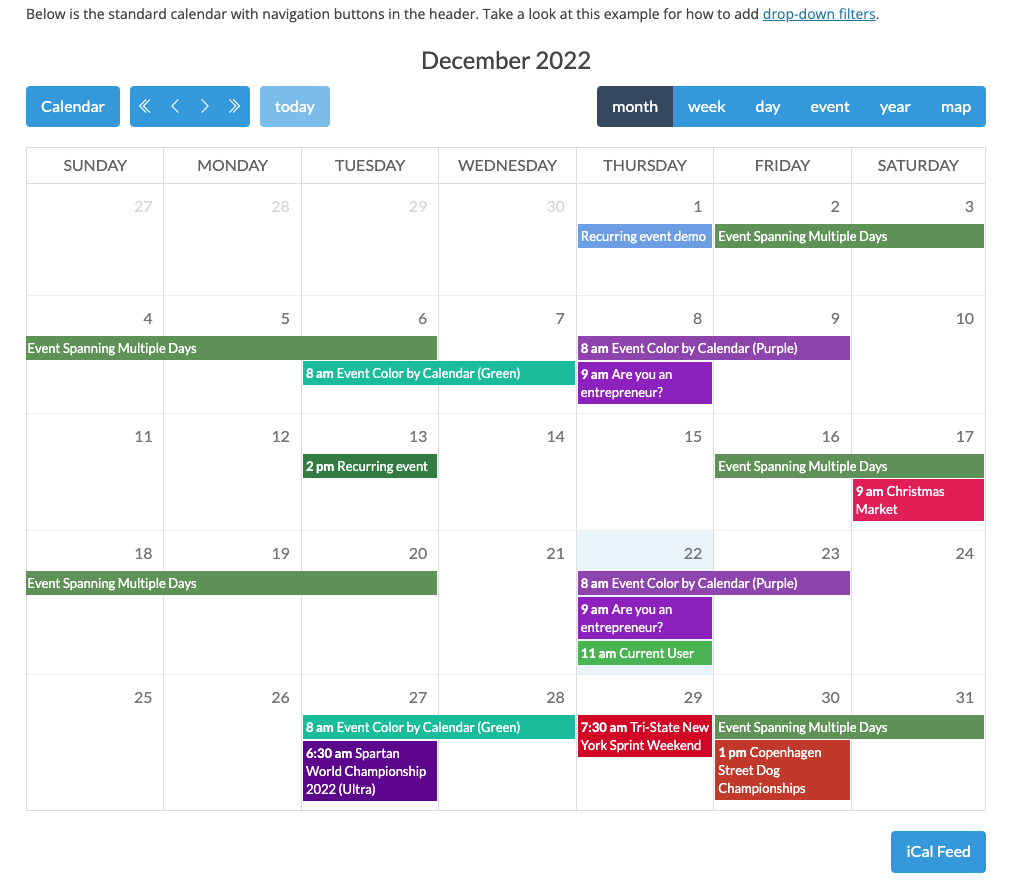
Plugin insights
- Rating: 4.5/5
- Downloads: 12,000+
- Price: $29/license
Calendarize it! It is a flexible, feature-packed WordPress event calendar plugin.
You can create multilingual calendars with translation plugins like Weglot, and template building is made easy with the plugin’s integration with page builders like WPBakery.
Upon purchasing the license, you’ll have access to free add-ons.
Among the most interesting features are the accordion upcoming events widget, advent calendar, author filtering, and event countdown.
The premium add-ons are for WordPress websites that want to sell tickets online.
These add-ons let you manage ticket sales, accept payments, and advertise upcoming events more efficiently.
Key features:
- Social sharing panel – lets customers share events on different platforms, including Twitter and Facebook.
- Event countdown – encourages customers to buy tickets before the event date.
- RSVP events – allows customers to easily confirm their attendance at events
- Custom taxonomy labels – help you rename and organize your event categories.
Cons
- Premium add-ons are sold separately between $10 and $89 each
Best for: blogs, online magazines, or any other community-driven website that needs to display events in a visually appealing way and wants more customization options.
Parting words
No matter the type of website you run, there are plenty of WordPress event calendar plugins that can fit your needs.
The plugins on our list range from free to premium and from robust to easy to use. Be sure to pick the one that best fits your budget, website type, and audience size.
And if you’re looking for a more customizable option with robust search and ticketing capabilities, GeoDirectory and its Event Calendar add-on is your best bet to take your website to the next level.
Good luck! We hope that you find a plugin that works best for you.