
These are the sections you will find when you install the GeoDirectory Core (free) plugin only:
Overview – General – Google Analytics – Design – Permalinks – Titles & Metas – Notifications – Set Default Location – Place Settings – Theme Compatibility – Import & Export – GD Tools
On this page:
Introduction – Available variables – Using title & meta variables in widget titles
Introduction
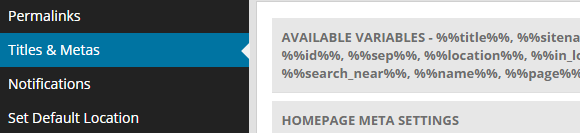
- This image shows where to find the Titles & Metas settings:
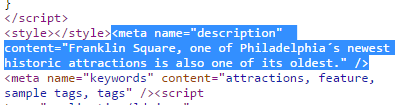
- These settings allow you to change the meta title

and the meta description (Meta descriptions are commonly used on search engine result pages (SERPs) to display preview snippets for a webpage):
- If you use the Yoast SEO plugin, the settings added to GD > Titles & Metas will not work, you will need to use the settings of the Yoast SEO plugin.
Available variables
All meta titles and meta descriptions can use the following variables:
| %%title%% | Title of a listing. Do not use for listings pages. |
| %%sitename%% | Your site name as entered at WP Settings > General Settings > Site Title. |
| %%sitedesc%% | Your site description as entered at WP Settings > General Settings > Tagline. |
| %%excerpt%% | This refers to the WP excerpt you can add to listings, posts and pages. |
| %%pt_single%% | The singular form of a Custom Post Type, for example Place or Event. |
| %%pt_plural%% | The plural form of a Custom Post Type, for example Places or Events. |
| %%category%% | Indeed, the category. |
| %%id%% | The ID of the page or listing. |
| %%sep%% | Separator between parts. |
| %%location%% | Location in this format: city, region, country. |
| %%in_location%% | Location with a prefix of your choice in this format: in city, region, country. You can translate in in the core language file. |
| %%location_single%% | Location referring to the location of the page itself, for example Madrid, or Japan. |
| %%in_location_single%% | Location referring to the location of the page itself, with a prefix of your choice, for example in Los Angeles, or in Argentina. You can translate in in the core language file. |
| %%search_term%% | Whatever was entered as a search term (for search pages only). |
| %%search_near%% | Location entered in the Near field of the GD Search (for search pages only). |
| %%name%% | Name of the user (for author pages only). |
| %%page%% | Title of a WP page. |
| %%pagenumber%% | |
| %%pagetotal%% |
Using title & meta variables in widget titles
- To enable the use the above variables in the titles of GD widgets, add this code to your child theme’s functions.php file, or use the Code Snippets plugin:
[php]// Use title and meta variables in widget titles.
function gd_widget_title( $title ) {
if ( !empty( $title ) ) {
$title = geodir_filter_title_variables( $title, ‘location’, ” );
}return $title;
}
add_filter( ‘widget_title’, ‘gd_widget_title’, 10, 1 );
add_filter( ‘bestof_widget_title’, ‘gd_widget_title’, 10, 1 );
add_filter( ‘gd_features_widget_title’, ‘gd_widget_title’, 10, 1 );
add_filter( ‘geodir_cpt_categories_widget_title’, ‘gd_widget_title’, 10, 1 );
add_filter( ‘geodir_popular_location_widget_title’, ‘gd_widget_title’, 10, 1 );
add_filter( ‘geodir_location_description_widget_title’, ‘gd_widget_title’, 10, 1 );
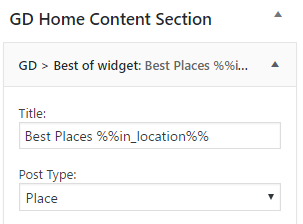
add_filter( ‘geodir_location_neighbourhood_widget_title’, ‘gd_widget_title’, 10, 1 );[/php] - You can now add as a title to one of the above widgets, for example:
- And this would be the result for one of the location pages: